







Question: java programming 1. The second is the TestBoxes class that should be saved in a file called TextBoxes.java that contains a main() method. This main()
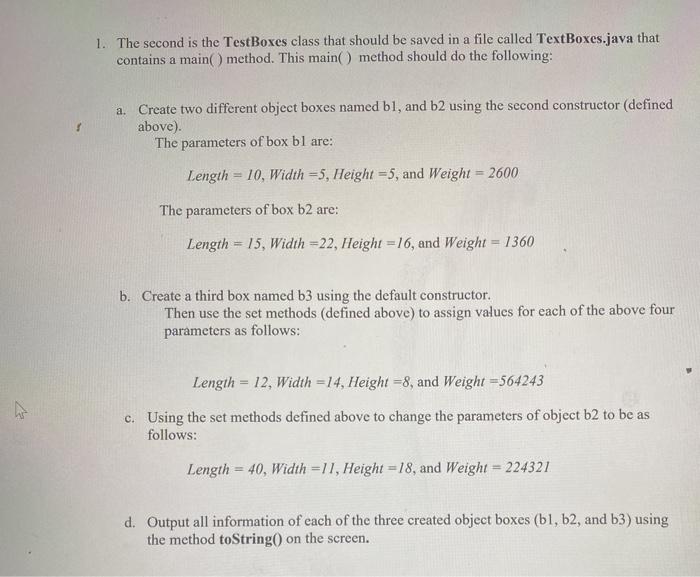
1. The second is the TestBoxes class that should be saved in a file called TextBoxes.java that contains a main() method. This main() method should do the following: a. Create two different object boxes named bl, and b2 using the second constructor (defined above). The parameters of box bl are: Length = 10, Width =5, Height =5, and Weight = 2600 The parameters of box b2 are: Length - 15, Width =22, Height =16, and Weight = 1360 b. Create a third box named b3 using the default constructor. Then use the set methods (defined above) to assign values for each of the above four parameters as follows: Length = 12, Width =14, Height =8, and Weight=564243 ho c. Using the set methods defined above to change the parameters of object b2 to be as follows: Length = 40, Width=11, Height =18, and Weight = 224321 d. Output all information of each of the three created object boxes (b1,b2, and b3) using the method toString() on the screen. 1. The second is the TestBoxes class that should be saved in a file called TextBoxes.java that contains a main() method. This main() method should do the following: a. Create two different object boxes named bl, and b2 using the second constructor (defined above). The parameters of box bl are: Length = 10, Width =5, Height =5, and Weight = 2600 The parameters of box b2 are: Length - 15, Width =22, Height =16, and Weight = 1360 b. Create a third box named b3 using the default constructor. Then use the set methods (defined above) to assign values for each of the above four parameters as follows: Length = 12, Width =14, Height =8, and Weight=564243 ho c. Using the set methods defined above to change the parameters of object b2 to be as follows: Length = 40, Width=11, Height =18, and Weight = 224321 d. Output all information of each of the three created object boxes (b1,b2, and b3) using the method toString() on the screen
Step by Step Solution
There are 3 Steps involved in it

Get step-by-step solutions from verified subject matter experts
 Study Help