







Question: JAVA programming assignment : 1 ) Look at the matrix below for i) 8x8 gray level image. 2) Look at file from link posted below
JAVA programming assignment :
1 ) Look at the matrix below for i) 8x8 gray level image.
2) Look at file from link posted below image
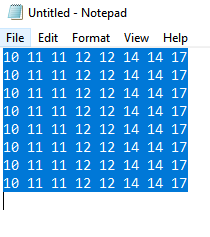
The matrix above reprsents image with 5 bits per pixel. The possible range of gray scale levels is 0-31. There are no pixels with value of 0 to 9 and from 18 to 31.
2nd file link: http://s000.tinyupload.com/index.php?file_id=54103282583873725333
(note: this file can be opened as a pgm file with gimp or any other image reader by adding the following headers on the first three lines of any text editor:
P5
255 255
255
Write a program in JAVA for the following operations for both files, and please share screenshots of results.
1. Display histogram of image.
2. Give a negative image of the gray scale image( reverse the gray scale image)
3.display negative image
4. plot histogram of negative image
5. Implement equalizaiton alogrithm fo rimage
6. Plot histogram of equalized image.
7. Plot gray level transformation function
8. display new equalized image
a) display histogram of image
Untitled - Notepad File Edit Format View Help Untitled - Notepad File Edit Format View Help
Step by Step Solution
There are 3 Steps involved in it

Get step-by-step solutions from verified subject matter experts
 Study Help