







Question: Java Programming Implement part of a loan management system as follows: a) Develop an account class (super class), a loan class (sub-class) and a saving
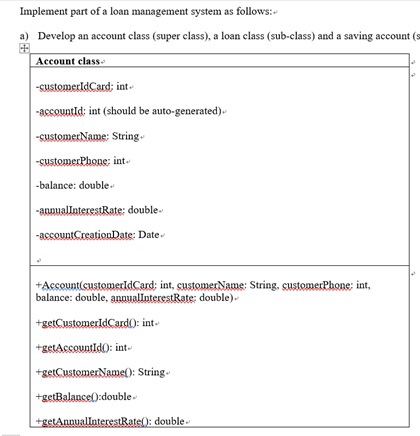
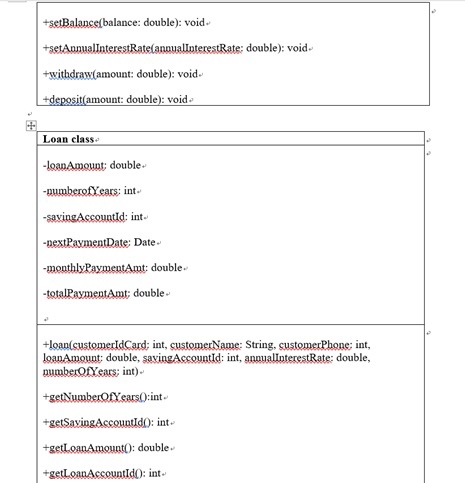
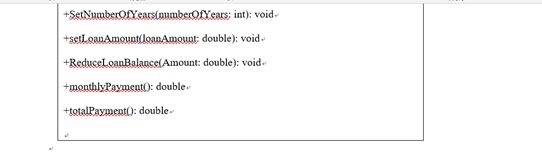

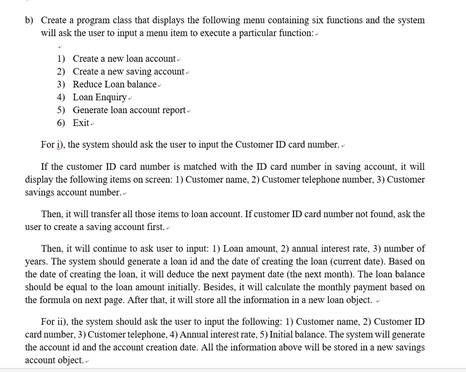

Implement part of a loan management system as follows: a) Develop an account class (super class), a loan class (sub-class) and a saving account (s Account class -customerldCard: int -accountld: int (should be auto-generated) -customerName: String -balance: double anouallnterestRate: double accountCreationDate: Date balance: double, anaualinterestRate: double int +getAccountld0: int setCustomerName): String- +getBalanse0:double +getAnnuallnterestRate: double +setBalace balance: double): void. +withdra(amount: double): void. amount: double): void Loan class double int +SetNumberOfearslnumberofYears; int): void +setLeanAmount loanAmgunt: double): void +ReduceLoanBalaelAmount: double: void +monthlyPaymeat0: double +totalPayment: double SavingAccount class nt, int, balance: double, annualInterestRate: double) +salculateInterest(numberOfYears): void b) Create a program class that displays the following menu containing six functions and the system will ask the user to input a menu tenn to execute a particular function 1) Create a new loan account 2) Create a new saving account 3) Reduce Loan balance 4) Loan Enquiry ) Generate loan account report 6) Exit For i), the system should ask the user to input the Customer ID card number. If the customer ID card number is matched with the ID card number in saving account, it will display the following items on screen:1 Customer name, 2) Customer telephone number, 3) Customer savings account number Then, it will transfer all those items to loan account. If customer ID card number not found, ask the user to create a saving account first. Then, it will continue to ask user to inp Loan amount, 2) annual interest rate, 3) number of years. The system should generate a loan id and the date of creating the loan (current date). Based on the date of creating the loan, it will deduce the next payment date (the next month). The loan balance should be equal to the loan amount initially. Besides, it will calculate the monthly payment based on the formula on next page. After that, it will store all the information in a new loan object. For ii), the system should ask the user to input the following: 1) Customer name, 2) Customer ID card number, 3) Customer telephone, 4) Annual interest rate. 5) Initial balance. The system will generate the account id and the account creation date. All the information above will be stored in a new savings account object. For iii), the system will ask the user to input the loan id number and it will display corresponding loan information on screen. Then, it will ask user to input the total amount for loan payment. Based on the amount, it will check the corresponding savings account to see if the reduced amount is sufficient there. If sufficient, it will reduce the loan balance from his/her loan account. In addition, it will calculate the new monthly payment and the total amount together with displaying them on screen. Furthermore, the system will save the new values in the coresponding loan account. However, it will send error message to user if reduced amount is not sufficient in savings account For iv), it will ask user to input the loan account number and all the information about the corresponding loan will be displayed on screen. For v), it will generate a text file summarizing the information of all loan accounts. It will display customer ID card number, loan id number, customer name, customer telephone number, loan balance, loan account creation date, next payment date, monthly payment and total payment For vi), the execution of system will be terminated. Please don't forget that after each function is performed, the system should display the main menu again and then ask the user to input a main item number. Finally, do the validations properly. monthly interest rate monthly payment loan balance monthly tnterest rate)"umer of years total payment monthly paymentnumber of yars 12 Implement part of a loan management system as follows: a) Develop an account class (super class), a loan class (sub-class) and a saving account (s Account class -customerldCard: int -accountld: int (should be auto-generated) -customerName: String -balance: double anouallnterestRate: double accountCreationDate: Date balance: double, anaualinterestRate: double int +getAccountld0: int setCustomerName): String- +getBalanse0:double +getAnnuallnterestRate: double +setBalace balance: double): void. +withdra(amount: double): void. amount: double): void Loan class double int +SetNumberOfearslnumberofYears; int): void +setLeanAmount loanAmgunt: double): void +ReduceLoanBalaelAmount: double: void +monthlyPaymeat0: double +totalPayment: double SavingAccount class nt, int, balance: double, annualInterestRate: double) +salculateInterest(numberOfYears): void b) Create a program class that displays the following menu containing six functions and the system will ask the user to input a menu tenn to execute a particular function 1) Create a new loan account 2) Create a new saving account 3) Reduce Loan balance 4) Loan Enquiry ) Generate loan account report 6) Exit For i), the system should ask the user to input the Customer ID card number. If the customer ID card number is matched with the ID card number in saving account, it will display the following items on screen:1 Customer name, 2) Customer telephone number, 3) Customer savings account number Then, it will transfer all those items to loan account. If customer ID card number not found, ask the user to create a saving account first. Then, it will continue to ask user to inp Loan amount, 2) annual interest rate, 3) number of years. The system should generate a loan id and the date of creating the loan (current date). Based on the date of creating the loan, it will deduce the next payment date (the next month). The loan balance should be equal to the loan amount initially. Besides, it will calculate the monthly payment based on the formula on next page. After that, it will store all the information in a new loan object. For ii), the system should ask the user to input the following: 1) Customer name, 2) Customer ID card number, 3) Customer telephone, 4) Annual interest rate. 5) Initial balance. The system will generate the account id and the account creation date. All the information above will be stored in a new savings account object. For iii), the system will ask the user to input the loan id number and it will display corresponding loan information on screen. Then, it will ask user to input the total amount for loan payment. Based on the amount, it will check the corresponding savings account to see if the reduced amount is sufficient there. If sufficient, it will reduce the loan balance from his/her loan account. In addition, it will calculate the new monthly payment and the total amount together with displaying them on screen. Furthermore, the system will save the new values in the coresponding loan account. However, it will send error message to user if reduced amount is not sufficient in savings account For iv), it will ask user to input the loan account number and all the information about the corresponding loan will be displayed on screen. For v), it will generate a text file summarizing the information of all loan accounts. It will display customer ID card number, loan id number, customer name, customer telephone number, loan balance, loan account creation date, next payment date, monthly payment and total payment For vi), the execution of system will be terminated. Please don't forget that after each function is performed, the system should display the main menu again and then ask the user to input a main item number. Finally, do the validations properly. monthly interest rate monthly payment loan balance monthly tnterest rate)"umer of years total payment monthly paymentnumber of yars 12
Step by Step Solution
There are 3 Steps involved in it

Get step-by-step solutions from verified subject matter experts
 Study Help