







Question: Java Programming: Link to video: https://www.youtube.com/watch?v=w0LwGqffUkg Please implement a program using Java, to simulate the Bankers algorithm for Deadlock detection. The program should detect whether
Java Programming:
 Link to video: https://www.youtube.com/watch?v=w0LwGqffUkg
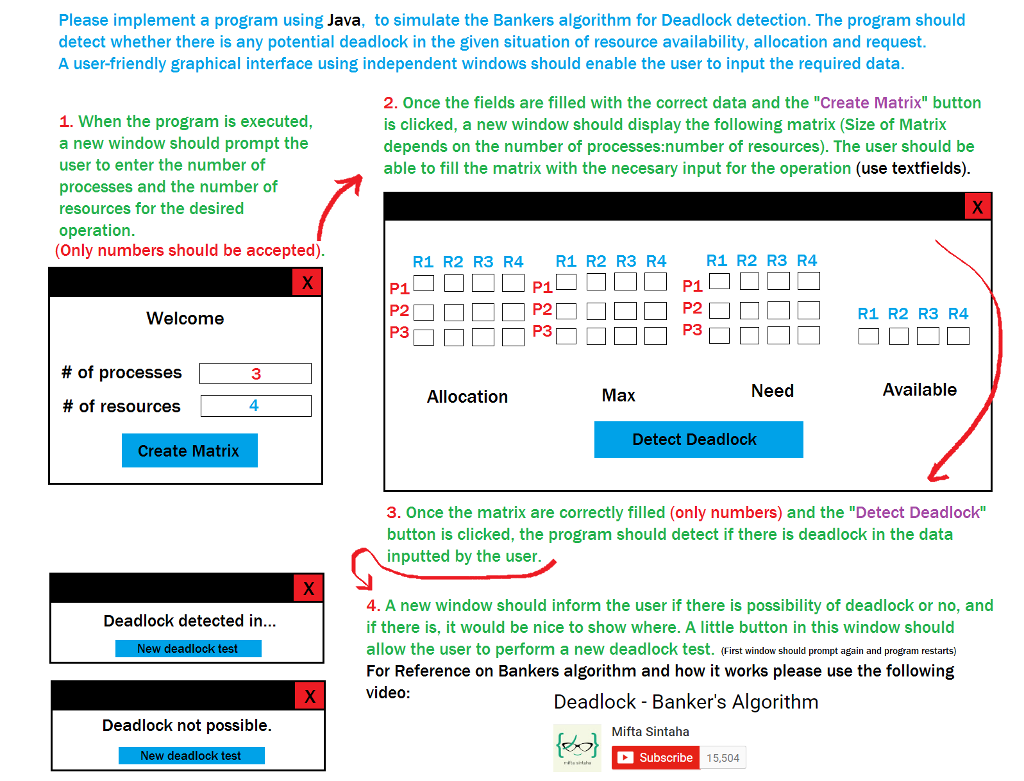
Please implement a program using Java, to simulate the Bankers algorithm for Deadlock detection. The program should detect whether there is any potential deadlock in the given situation of resource availability, allocation and request. A user-friendly graphical interface using independent windows should enable the user to input the required data. When the program is executed, a new window should prompt the user to enter the number of processes and the number of resources for the desired operation. (Only numbers should be accepted). Once the fields are filled with the correct data and the "Create Matrix" button is clicked, a new window should display the following matrix (Size of Matrix depends on the number of processes: number of resources). The user should be able to fill the matrix with the necessary input for the operation (use text fields). Once the matrix are correctly filled (only numbers) and the "Detect Deadlock" button is clicked, the program should detect if there is deadlock in the data inputted by the user. A new window should inform the user if there is possibility of deadlock or no, and if there is, it would be nice to show where. A little button in this window should allow the user to perform a new deadlock test. (First window should prompt again and program restarts) For Reference on Bankers algorithm and how it works please use the following video: Deadlock Banker's Algorithm
Step by Step Solution
There are 3 Steps involved in it

Get step-by-step solutions from verified subject matter experts
 Study Help