







Question: JAVA Programming Question: Create a package named cs520.hw3.part1. Using this package, create the class StringTest and implement the specified functionality in its main method. a.
JAVA Programming Question:
Create a package named cs520.hw3.part1. Using this package, create the class StringTest and implement the specified functionality in its main method.
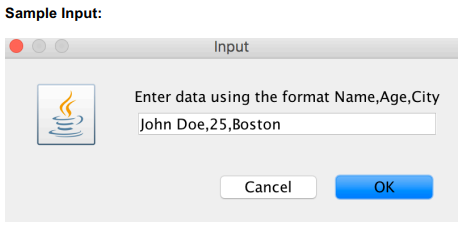
a. Ask the user, through a single input dialog, for the name, age, and their city in the format Name,Age,City
b. Trim the users input, in case spaces were entered at the beginning or at the end.
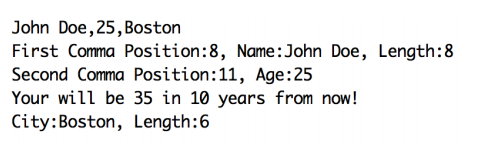
c. Display the trimmed data to the console. Do the following operations using this trimmed string.
d. Find the index of the first comma in the input using the indexOf method. Using this value, extract name part of the input using the substring method.
e. Display the position of the first comma, the name, and the length of the name to the console.
f. Find the index of the second comma in the input using the indexOf method. Using this value, extract the age part of the input using the substring method.
g. Display the position of the second comma, and the age to the console. Convert the value to an integer. Display to the console their age in 10 years.
h. Extract the city using the substring method. Display to the console the city and the length of the city to the console.
i. Now, examine the code for all possible exceptions that could occur. Handle all the different exceptions explicitly and print out the appropriate exception message to the console.
SAMPLE OUTPUT:
Also, test the following inputs where exceptions will occur and your program handles them gracefully -- when Cancel is clicked, when only the name is entered, when only the name and the age are entered, and when all the three values are specified but the age is not an integer.
Thanks for your help!
Sample Input: Input Enter data using the format Name,Age,City John Doe,25,Bostorn Cancel OK
Step by Step Solution
There are 3 Steps involved in it

Get step-by-step solutions from verified subject matter experts
 Study Help