







Question: JAVA PROGRAMMING Use the Java code given below to make a window that evaluates an expression(picture of window is shown below) You will need to
JAVA PROGRAMMING
Use the Java code given below to make a window that evaluates an expression(picture of window is shown below)
You will need to add more Java code to look like the picture or window shown below. You may also use: JFrame, JTextfield, Jpanel, JLabel, JButton, JtextArea, BorderLayout, FlowLayout, GridLayout, Color, Front, event.ActionListener, event.ActionEvent.
//BELOW CODE YOU CAN MODIFY AND USE TO MAKE THE WINDOW
import java.util.Stack; import java.util.Scanner; public class Stringcalculator{ public static int eval(String expression){ char[] tokens = expression.toCharArray(); //Create Stack for integers Stack A = new Stack(); // Create Stack for Operators (Characters) Stack B = new Stack(); //Tokenizing the string for (int i = 0; i = '0' && tokens[i] = '0' && tokens[i]
PICTURE OF WINDOW:
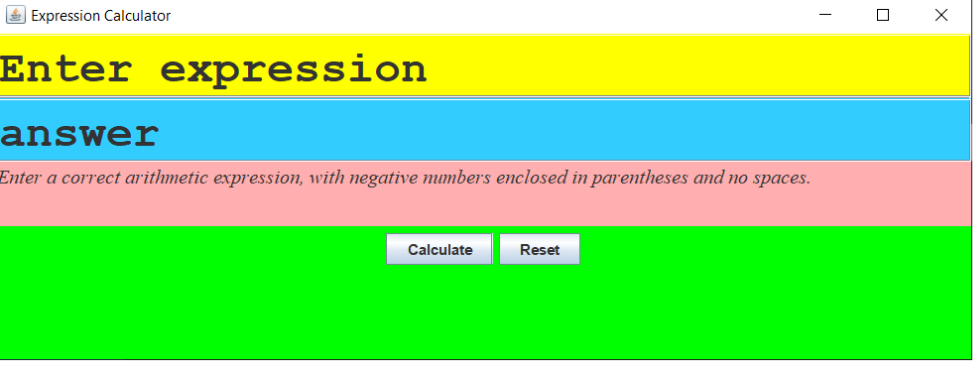
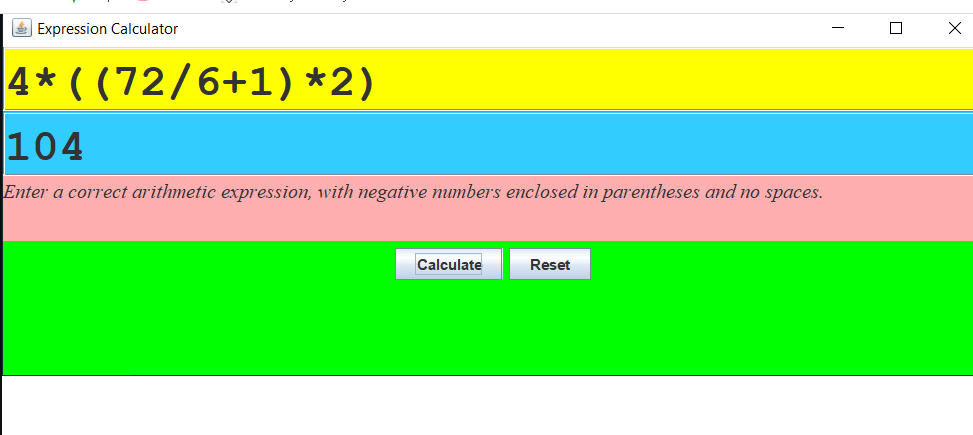
Expression Calculator - Enter expression answer Enter a correct arithmetic expression, with negative mmbers enclosed in parentheses and no spaces. Calculate Reset Expression Calculator 4* ( (72/ 6+1) *2) 104 Enter a correct arithmetic expression, with negative mumbers enclosed in parentheses and no spaces. Calculate Reset Expression Calculator - Enter expression answer Enter a correct arithmetic expression, with negative mmbers enclosed in parentheses and no spaces. Calculate Reset Expression Calculator 4* ( (72/ 6+1) *2) 104 Enter a correct arithmetic expression, with negative mumbers enclosed in parentheses and no spaces. Calculate Reset Step by Step Solution
There are 3 Steps involved in it
1 Expert Approved Answer
Step: 1 Unlock

Question Has Been Solved by an Expert!
Get step-by-step solutions from verified subject matter experts
Step: 2 Unlock
Step: 3 Unlock
 Study Help