







Question: Java Project. We just learned about inheritance and polymorphism, not interface yet(please don't give answer with interface). I need help with UML diagram to get
Java Project. We just learned about inheritance and polymorphism, not interface yet(please don't give answer with interface). I need help with UML diagram to get started.
Please HELP.
If you can help code some would be so helpful, but I understand it's a big project
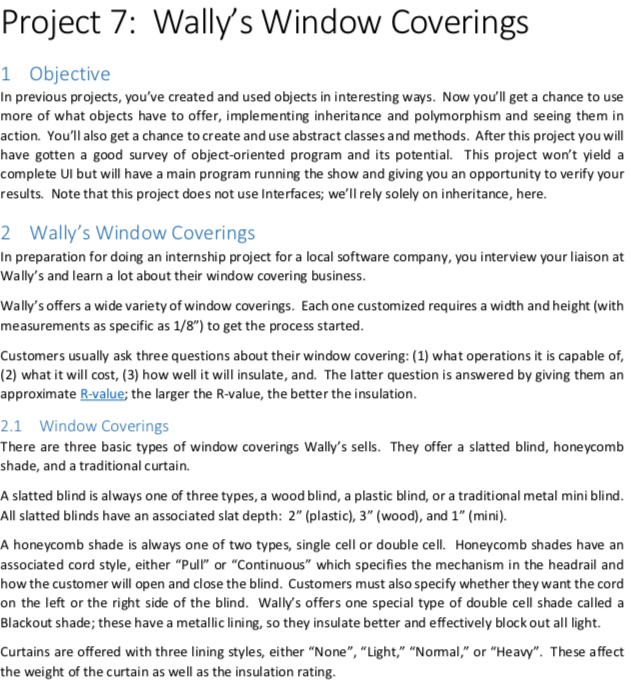
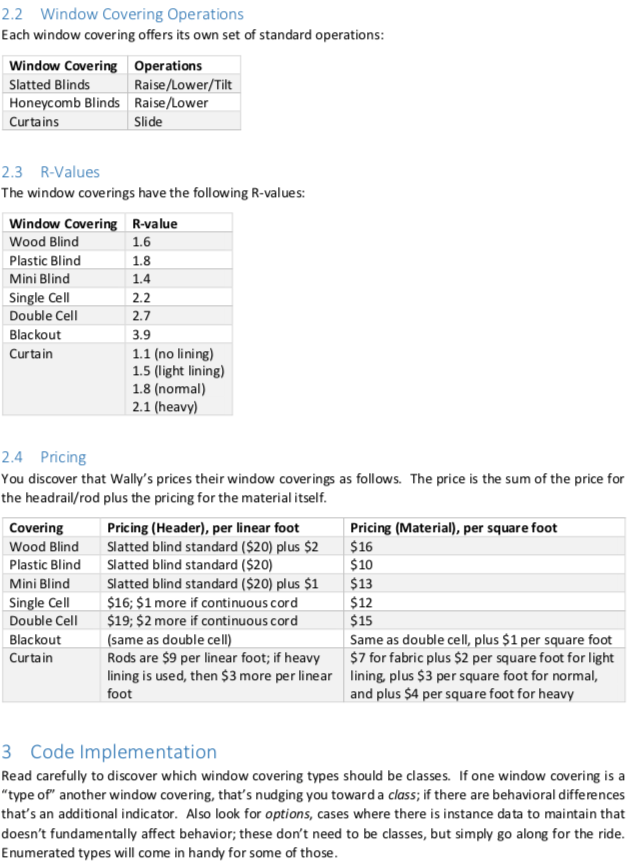
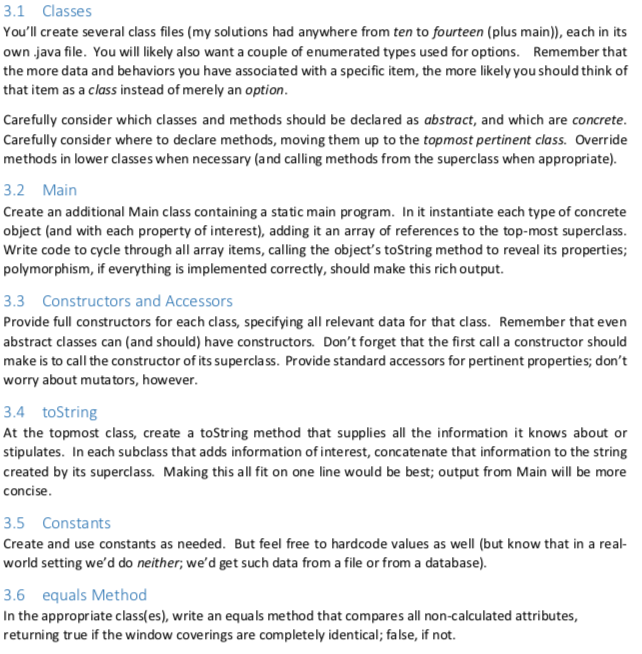
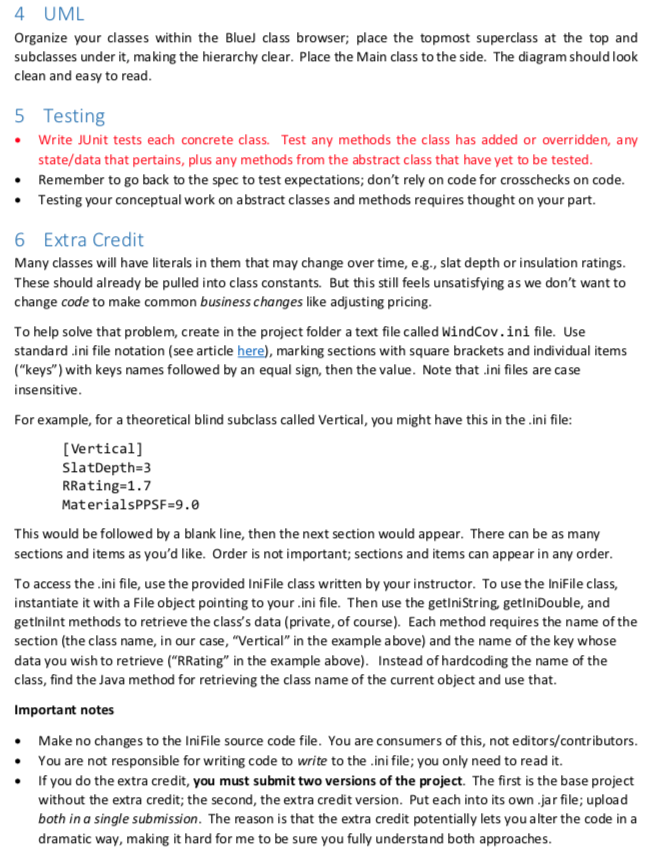
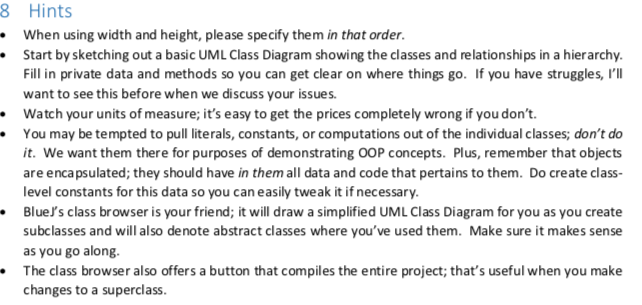
Project 7: Wally's Window Coverings Objective In previous projects, you've created and used objects in interesting ways. Now you'll get a chance to use more of what objects have to offer, implementing inheritance and polymorphism and seeing them in action. You'll also get a chance to create and use abstract classes and methods. After this project you will have gotten a good survey of object-oriented program and its potential. This project won't yield a complete Ul but will have a main program running the show and giving you an opportunity to verify your results. Note that this project does not use Interfaces; we'll rely solely on inheritance, here 2 Wally's Window Coverings In preparation for doing an internship project for a local software company, you interview your liaison at Wally's and learn a lot about their window covering business Wally's offers a wide variety of window coverings. Each one customized requires a width and height (with measurements as specific as 1/8") to get the process started Customers usually ask three questions about their window covering: (1) what operations it is capable of, (2) what it will cost, (3) how well it will insulate, and. The latter question is answered by giving them an approximate R-value; the larger the R-value, the better the insulation 2.1 Window Coverings There are three basic types of window coverings Wally's sells. They offer a slatted blind, honeycomb shade, and a traditional curtain. A slatted blind is always one of three types, a wood blind, a plastic blind, or a traditional metal mini blind All slatted blinds have an associated slat depth: 2" (plastic), 3" (wood), and 1" (mini) A honeycomb shade is always one of two types, single cell or double cell. Honeycomb shades have an associated cord style, either "Pull or "Continuous" which specifies the mechanism in the headrail and how the customer will open and close the blind. Customers must also specify whether they want the cord on the left or the right side of the blind. Wally's offers one special type of double cell shade called a Blackout shade; these have a metallic lining, so they insulate better and effectively block out all light. Curtains are offered with three lining styles, either "None", "Light," "Nomal," or "Heavy". These affect the weight of the curtain as well as the insulation rating .2 Window Covering Operations Each window covering offers its own set of standard operations Window Covering Operations Slatted Blinds Raise/Lower/Tilt Honeycomb Blinds Raise/Lower Curtains Slide 2.3 R-Values The window coverings have the following R-values: Window Covering Wood Blind Plastic Blind Mini Blind Single Cell Double Cell Blackout Curta in R-value 1.6 1.8 1.4 2.2 2.7 3.9 1.1 (no lining) 1.5 (light lining) 1.8 (nomal) 2.1 (heavy) 2.4 Pricing You discover that Wally's prices their window coverings as follows. The price is the sum of the price for the headrail/rod plus the pricing for the material itself Covering Wood Blind Plastic Blind Mini Blind Single Cell Double Cell Blackout Curtain Pricing (Header), per linear foot Slatted blind standard ($20) plus $2 Slatted blind standard ($20) Slatted blind standard ($20) plus $1 $16; $1 more if continuous cord $19; $2 more if continuous cord same as double cell) Rods are $9 per linear foot; if heavy lining is used, then $3 more per linear foot Pricing (Material), per square foot $16 $10 $13 $12 $15 Same as double cell, plus $1 per square foot $7 for fabric plus $2 per square foot for light ining, plus $3 per square foot for normal, and plus $4 per square foot for heavy 3 Code Implementation Read carefully to discover which window covering types should be classes. If one window covering is a "type of" another window covering, that's nudging you toward a class; if there are behavioral differences that's an additional indicator. Also look for options, cases where there is instance data to maintain that doesn't fundamentally affect behavior; these don't need to be classes, but simply go along for the ride Enumerated types will come in handy for some of those 3.1 Classes You'll create several class files (my solutions had anywhere from ten to fourteen (plus main)), each in its own .java file. You will likely also want a couple of enumerated types used for options. Remember that the more data and behaviors you have associa ted with a specific item, the more likely you should think of that item as a class instead of merely an option Carefully consider which classes and methods should be declared as abstract, and which are concrete Carefully consider where to declare methods, moving them up to the topmost pertinent class. Override methods in lower classes when necessary (and calling methods from the superclass when appropriate). 3.2 Main Create an additional Main class containing a static main program. In it instantiate each type of concrete object (and with each property of interest), adding it an array of references to the top-most superclass Write code to cycle through all array items, calling the object's toString method to reveal its properties; polymorphism, if everything is implemented correctly, should make this rich output. 3.3 Constructors and Accessors Provide full constructors for each class, specifying all relevant data for that class. Remember that even abstract classes can (and should) have constructors. Don't forget that the first call a constructor should make is to call the constructor of its superclass. Provide standard accessors for pertinent properties; don't worry about mutators, however .4 toString At the topmost class, create a toString method that supplies all the information it knows about or stipulates. In each subclass that adds information of interest, concatenate that information to the string created by its superclass. Making this all fit on one line would be best; output from Main will be more concise 3.5 Constants Create and use constants as needed. But feel free to hardcode values as well (but know that in a real- world setting we'd do neither, we'd get such data from a file or from a database). 3.6 equals Method In the appropriate class(es), write an equals method that compares all non-calculated attributes, returning true if the window coverings are completely identical; false, if not. 4 UM Organize your classes within the Bluel class browser; place the topmost superclass at the top and subclasses under it, making the hierarchy clear. Place the Main class to the side. The diagram should look clean and easy to read 5 Testing Write JUnit tests each concrete class. Test any methods the class has added or overridden, any state/data that pertains, plus any methods from the abstract class that have yet to be tested .Remember to go back to the spec to test expectations; don't rely on code for crosschecks on code Testing your conceptual work on abstract classes and methods requires thought on your part. 6 Extra Credit Many classes will have literals in them that may change over time, e.g., slat depth or insulation ratings These should already be pulled into class constants. But this still feels unsatisfying as we don't want to change code to make common business changes like adjusting pricing To help solve that problem, create in the project folder a text file called WindCov.ini file. Use standard ini file notation (see article here), marking sections with square brackets and individual items ("keys") with keys names followed by an equal sign, then the value. Note that ini files are case insensitive For example, for a theoretical blind subclass called Vertical, you might have this in the .ini file: [Vertical] SlatDepth-3 RRating-1.7 MaterialsPPSF-9.0 This would be followed by a blank line, then the next section would appear. There can be as many sections and items as you'd like. Order is not important; sections and items can appear in any order To access the ini file, use the provided IniFile class written by your instructor. To use the IniFile class, instantiate it with a File object pointing to your.ini file. Then use the getiniString, getlniDouble, and getinilnt methods to retrieve the class's data (private, of course). Each method requires the name of the section (the class name, in our case, "Vertical" in the example above) and the name of the key whose data you wish to retrieve ("RRating" in the example above). Instead of hardcoding the name of the class, find the Java method for retrieving the class name of the current object and use that. Important notes Make no changes to the IniFile source code file. You are consumers of this, not editors/contributors You are not responsible for writing code to write to the .ini file; you only need to read it. If you do the extra credit, you must submit two versions of the project. The first is the base project without the extra credit; the second, the extra credit version. Put each into its own jar file, upload both in a single submission. The reason is that the extra credit potentially lets you alter the code in a dramatic way, making it hard for me to be sure you fully understand both approaches 8 Hints When using width and height, please specify them in that order Start by sketching out a basic UML Class Diagram showing the classes and relationships in a hierarchy Fill in private data and methods so you can get clear on where things go. If you have struggles, I'I want to see this before when we discuss your issues. Watch your units of measure; it's easy to get the prices completely wrong if you don't. You may be tempted to pull literals, constants, or computations out of the individual classes; don't do it. We want them there for purposes of demonstrating OOP concepts. Plus, remember that objects are encapsulated; they should have in them all data and code that pertains to them. Do create class- level constants for this data so you can easily tweak it if necessary BlueJ's class browser is your friend; it will draw a simplified UML Class Diagram for you as you create subclasses and will also denote abstract classes where you've used them. Make sure it makes sense as you go along The class browser also offers a button that compiles the entire project; that's useful when you make changes to a superclass Project 7: Wally's Window Coverings Objective In previous projects, you've created and used objects in interesting ways. Now you'll get a chance to use more of what objects have to offer, implementing inheritance and polymorphism and seeing them in action. You'll also get a chance to create and use abstract classes and methods. After this project you will have gotten a good survey of object-oriented program and its potential. This project won't yield a complete Ul but will have a main program running the show and giving you an opportunity to verify your results. Note that this project does not use Interfaces; we'll rely solely on inheritance, here 2 Wally's Window Coverings In preparation for doing an internship project for a local software company, you interview your liaison at Wally's and learn a lot about their window covering business Wally's offers a wide variety of window coverings. Each one customized requires a width and height (with measurements as specific as 1/8") to get the process started Customers usually ask three questions about their window covering: (1) what operations it is capable of, (2) what it will cost, (3) how well it will insulate, and. The latter question is answered by giving them an approximate R-value; the larger the R-value, the better the insulation 2.1 Window Coverings There are three basic types of window coverings Wally's sells. They offer a slatted blind, honeycomb shade, and a traditional curtain. A slatted blind is always one of three types, a wood blind, a plastic blind, or a traditional metal mini blind All slatted blinds have an associated slat depth: 2" (plastic), 3" (wood), and 1" (mini) A honeycomb shade is always one of two types, single cell or double cell. Honeycomb shades have an associated cord style, either "Pull or "Continuous" which specifies the mechanism in the headrail and how the customer will open and close the blind. Customers must also specify whether they want the cord on the left or the right side of the blind. Wally's offers one special type of double cell shade called a Blackout shade; these have a metallic lining, so they insulate better and effectively block out all light. Curtains are offered with three lining styles, either "None", "Light," "Nomal," or "Heavy". These affect the weight of the curtain as well as the insulation rating .2 Window Covering Operations Each window covering offers its own set of standard operations Window Covering Operations Slatted Blinds Raise/Lower/Tilt Honeycomb Blinds Raise/Lower Curtains Slide 2.3 R-Values The window coverings have the following R-values: Window Covering Wood Blind Plastic Blind Mini Blind Single Cell Double Cell Blackout Curta in R-value 1.6 1.8 1.4 2.2 2.7 3.9 1.1 (no lining) 1.5 (light lining) 1.8 (nomal) 2.1 (heavy) 2.4 Pricing You discover that Wally's prices their window coverings as follows. The price is the sum of the price for the headrail/rod plus the pricing for the material itself Covering Wood Blind Plastic Blind Mini Blind Single Cell Double Cell Blackout Curtain Pricing (Header), per linear foot Slatted blind standard ($20) plus $2 Slatted blind standard ($20) Slatted blind standard ($20) plus $1 $16; $1 more if continuous cord $19; $2 more if continuous cord same as double cell) Rods are $9 per linear foot; if heavy lining is used, then $3 more per linear foot Pricing (Material), per square foot $16 $10 $13 $12 $15 Same as double cell, plus $1 per square foot $7 for fabric plus $2 per square foot for light ining, plus $3 per square foot for normal, and plus $4 per square foot for heavy 3 Code Implementation Read carefully to discover which window covering types should be classes. If one window covering is a "type of" another window covering, that's nudging you toward a class; if there are behavioral differences that's an additional indicator. Also look for options, cases where there is instance data to maintain that doesn't fundamentally affect behavior; these don't need to be classes, but simply go along for the ride Enumerated types will come in handy for some of those 3.1 Classes You'll create several class files (my solutions had anywhere from ten to fourteen (plus main)), each in its own .java file. You will likely also want a couple of enumerated types used for options. Remember that the more data and behaviors you have associa ted with a specific item, the more likely you should think of that item as a class instead of merely an option Carefully consider which classes and methods should be declared as abstract, and which are concrete Carefully consider where to declare methods, moving them up to the topmost pertinent class. Override methods in lower classes when necessary (and calling methods from the superclass when appropriate). 3.2 Main Create an additional Main class containing a static main program. In it instantiate each type of concrete object (and with each property of interest), adding it an array of references to the top-most superclass Write code to cycle through all array items, calling the object's toString method to reveal its properties; polymorphism, if everything is implemented correctly, should make this rich output. 3.3 Constructors and Accessors Provide full constructors for each class, specifying all relevant data for that class. Remember that even abstract classes can (and should) have constructors. Don't forget that the first call a constructor should make is to call the constructor of its superclass. Provide standard accessors for pertinent properties; don't worry about mutators, however .4 toString At the topmost class, create a toString method that supplies all the information it knows about or stipulates. In each subclass that adds information of interest, concatenate that information to the string created by its superclass. Making this all fit on one line would be best; output from Main will be more concise 3.5 Constants Create and use constants as needed. But feel free to hardcode values as well (but know that in a real- world setting we'd do neither, we'd get such data from a file or from a database). 3.6 equals Method In the appropriate class(es), write an equals method that compares all non-calculated attributes, returning true if the window coverings are completely identical; false, if not. 4 UM Organize your classes within the Bluel class browser; place the topmost superclass at the top and subclasses under it, making the hierarchy clear. Place the Main class to the side. The diagram should look clean and easy to read 5 Testing Write JUnit tests each concrete class. Test any methods the class has added or overridden, any state/data that pertains, plus any methods from the abstract class that have yet to be tested .Remember to go back to the spec to test expectations; don't rely on code for crosschecks on code Testing your conceptual work on abstract classes and methods requires thought on your part. 6 Extra Credit Many classes will have literals in them that may change over time, e.g., slat depth or insulation ratings These should already be pulled into class constants. But this still feels unsatisfying as we don't want to change code to make common business changes like adjusting pricing To help solve that problem, create in the project folder a text file called WindCov.ini file. Use standard ini file notation (see article here), marking sections with square brackets and individual items ("keys") with keys names followed by an equal sign, then the value. Note that ini files are case insensitive For example, for a theoretical blind subclass called Vertical, you might have this in the .ini file: [Vertical] SlatDepth-3 RRating-1.7 MaterialsPPSF-9.0 This would be followed by a blank line, then the next section would appear. There can be as many sections and items as you'd like. Order is not important; sections and items can appear in any order To access the ini file, use the provided IniFile class written by your instructor. To use the IniFile class, instantiate it with a File object pointing to your.ini file. Then use the getiniString, getlniDouble, and getinilnt methods to retrieve the class's data (private, of course). Each method requires the name of the section (the class name, in our case, "Vertical" in the example above) and the name of the key whose data you wish to retrieve ("RRating" in the example above). Instead of hardcoding the name of the class, find the Java method for retrieving the class name of the current object and use that. Important notes Make no changes to the IniFile source code file. You are consumers of this, not editors/contributors You are not responsible for writing code to write to the .ini file; you only need to read it. If you do the extra credit, you must submit two versions of the project. The first is the base project without the extra credit; the second, the extra credit version. Put each into its own jar file, upload both in a single submission. The reason is that the extra credit potentially lets you alter the code in a dramatic way, making it hard for me to be sure you fully understand both approaches 8 Hints When using width and height, please specify them in that order Start by sketching out a basic UML Class Diagram showing the classes and relationships in a hierarchy Fill in private data and methods so you can get clear on where things go. If you have struggles, I'I want to see this before when we discuss your issues. Watch your units of measure; it's easy to get the prices completely wrong if you don't. You may be tempted to pull literals, constants, or computations out of the individual classes; don't do it. We want them there for purposes of demonstrating OOP concepts. Plus, remember that objects are encapsulated; they should have in them all data and code that pertains to them. Do create class- level constants for this data so you can easily tweak it if necessary BlueJ's class browser is your friend; it will draw a simplified UML Class Diagram for you as you create subclasses and will also denote abstract classes where you've used them. Make sure it makes sense as you go along The class browser also offers a button that compiles the entire project; that's useful when you make changes to a superclass
Step by Step Solution
There are 3 Steps involved in it

Get step-by-step solutions from verified subject matter experts
 Study Help