







Question: JAVA Tetris is a game where players need to match falling tetrominos in a 10x20 grid.1. A player can navigate the falling tetromino with four
JAVA
Tetris is a game where players need to match falling tetrominos in a 10x20 grid.1. A player can navigate the falling tetromino with four keys. Arrows left and right, to move a tetromino left or right, arrow up to rotate a tetromino, and arrow down (this is optional) to let the teromino fall in its current orientation and column.
Implement a tetris game based on Java graphics and event handling. You can either choose to implement a complete game, or a short version.
Design Suggestions
Similar to the Tetromino assignment, the playing field can be implemented by deriving a class TetrisComponent from JComponent that contains the game items (grid and tetromino).
The tetromino is controlled by user input with the four arrow keys. To this end you can install a KeyListener in a JComponent, then set the component's focusability to true and request the focus.
comp.addKeyListener(. . . );
comp.setFocusable(true);
comp.requestFocus();
The KeyListener will record which buttons were pressed. A KeyListener provides three methods keyPressed, keyReleased, keyTyped. keyReleased is the recommended method to use. A KeyListener object can be created with an anonymous class.
comp.addKeyListener(new KeyListener() {
public void keyPressed(KeyEvent e) {}
public void keyReleased(KeyEvent e) { /* record key press */}
public void keyTyped(KeyEvent e) {}
});
When a key was pressed, record which key was pressed. To this end you can query the parameter e and the constants VK UP, VK DOWN, VK LEFT, and VK RIGHT. The constants are associated with the non-numeric keypad arrow keys.
if (e.getKeyCode() == KeyEvent.VK UP) . . .
When the state of the tetromino changes, repaint the component.
The falling of the tetromino can be controlled by timers. Start with 500ms and choose a suitable timer speed. When the timer expires:
calculate the new position of the tetromino. If the new position is valid within the grid, then the tetromino should fall by one row; otherwise the tetromino is embedded into the grid, and a new tetromino is introduced.
When the new position is set, repaint the component.
Tetromino rotation: When the arrow up key is pressed, the tetromino should rotate. However, the rotation can only be performed, if the resulting tetromino fits within the grid.
The grid can use a two dimensional array as internal representation. e.g., Block[10][20].
-Consider to use a grid that is larger than what is displayed on the screen (e.g., Block[16][25]. This will help to test whether a rotated or falling tetromino fits within the grid. For example, three pseudo columns on each side, and three pseudo rows at the bottom could be filled with pseudo blocks. This way you can avoid testing whether a point in the tetromino is within the grid bounds.)
-Consider to use two empty pseudo rows on top for the same reason.
The short version ends, after the first tetromino has hit the floor. The complete game ends when no more tetromino can be placed into the grid.
Sketch of the grid representation
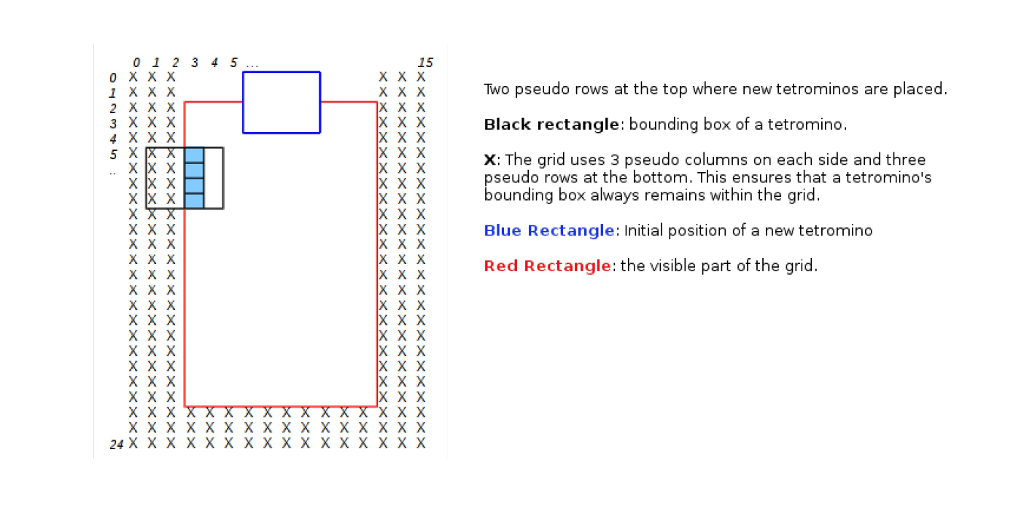
15 Two pseudo rows at the top where new tetrominos are placed Black rectangle: bounding box of a tetromino x: The grid uses 3 pseudo columns on each side and three 2 X X X 3 X X X x X 5 X x X seudo rows at the bottom. This ensures that a tetromino's bounding box always remains within the grid Blue Rectangle: Initial position of a new tetromino Red Rectangle: the visible part of the grid x X x X X x X X x X x X 24 X X X X X X XX XX X XX X X X 15 Two pseudo rows at the top where new tetrominos are placed Black rectangle: bounding box of a tetromino x: The grid uses 3 pseudo columns on each side and three 2 X X X 3 X X X x X 5 X x X seudo rows at the bottom. This ensures that a tetromino's bounding box always remains within the grid Blue Rectangle: Initial position of a new tetromino Red Rectangle: the visible part of the grid x X x X X x X X x X x X 24 X X X X X X XX XX X XX X X X
Step by Step Solution
There are 3 Steps involved in it

Get step-by-step solutions from verified subject matter experts
 Study Help