







Question: java thank you! 3 files seprate! 1.TrafficLight.java 2.TrafficLightComponent.java (provided) 3.TrafficLightViewer.java(provided) Use the following files: TrafficLightComponent.java import java.awt.Graphics; import java.awt.Graphics2D; import javax.swing.JComponent; public class TrafficLightComponent extends
java thank you!
3 files seprate!
1.TrafficLight.java
2.TrafficLightComponent.java (provided)
3.TrafficLightViewer.java(provided)

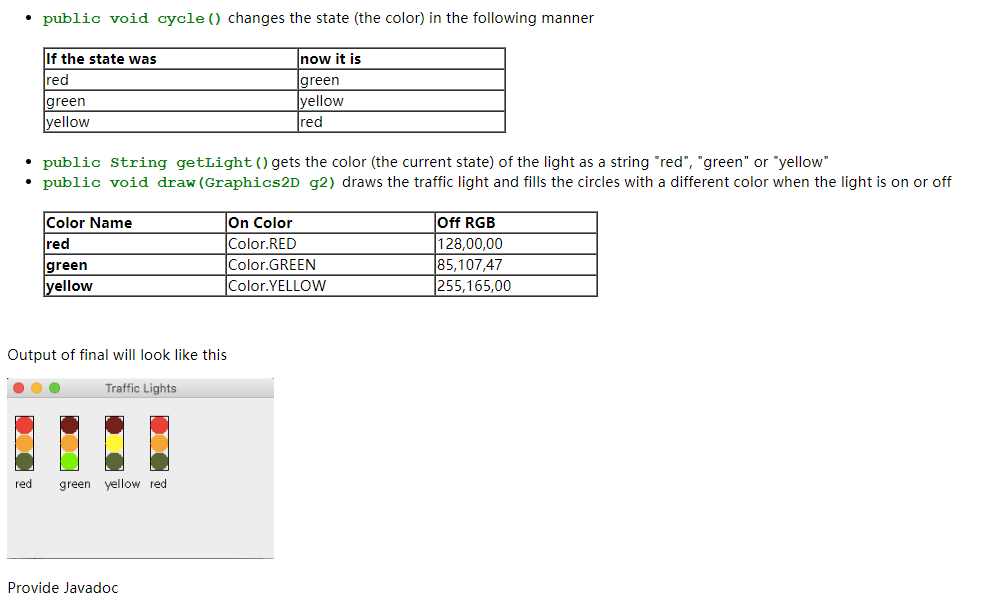
Use the following files:
TrafficLightComponent.java
import java.awt.Graphics; import java.awt.Graphics2D; import javax.swing.JComponent; public class TrafficLightComponent extends JComponent { private static final long serialVersionUID = 1L; public void paintComponent(Graphics g) { // Recover Graphics2D Graphics2D g2 = (Graphics2D) g; TrafficLight signal = new TrafficLight( 10, 20); signal.draw(g2); String colorWord = (signal.getLight()); g2.drawString(colorWord, 10, 100); TrafficLight signal2 = new TrafficLight( 60, 20); signal2.cycle(); signal2.draw(g2); colorWord = signal2.getLight(); g2.drawString(colorWord, 60, 100); TrafficLight signal3 = new TrafficLight( 110, 20); signal3.cycle(); signal3.cycle(); signal3.draw(g2); colorWord = signal3.getLight(); g2.drawString(colorWord, 110, 100); TrafficLight signal4 = new TrafficLight( 160, 20); signal4.cycle(); signal4.cycle(); signal4.cycle(); signal4.draw(g2); colorWord = signal4.getLight(); g2.drawString(colorWord, 160, 100); } } TrafficLightViewer.java
import javax.swing.*; public class TrafficLightViewer { public static void main(String[] args) { JFrame frame = new JFrame(); frame.setSize(300, 400); frame.setTitle("Traffic Lights"); frame.setDefaultCloseOperation(JFrame.EXIT_ON_CLOSE); TrafficLightComponent component = new TrafficLightComponent(); frame.add(component); frame.setVisible(true); } }In this problem you are going wte a class to mocdel a trattic light that can cycle through colors, red, green, yellow. To do this, you will have to maintain the state ot the trafik light. Maintaining state is one ot the design pattem discussed in tnis weeks lesson. The state or the TrafficLight indicates which light is lit It changes every time the Traffiotight cycles Trafficlight will have a constructor that takes the x and y ccordinates of the upper left hand corner of the roctangular part of the troffic light as parameters.The TrafficLight ls black rectangle at the xy ccordinates with a wicth of 20 and a helght of 60. There are rod, green of 60. Thore are red, grcen and yellow cireles inside the rectangle to look like a tracight. The upper lett hand corner ot the red circle will be at same xy coordinates as the box. The circles wwill touch the sides or the boxand each other Dcfinc an instance varlable to hold the state (which light is lit), Make it an int. And definc public constants for rod,green, and yow, namod RED, GREEN, YELLONW (These will ba ints also) The canstructor takes the x.y ccardinates of the upper lef hend crer of the TrafficLight as patameters and also sets the state of the light to red fusing the canstant). Provide mcthods
Step by Step Solution
There are 3 Steps involved in it

Get step-by-step solutions from verified subject matter experts
 Study Help