







Question: Java This is what it should look like Instructions Write a Java console application that prompts the user to enter the radius of a circle,
Java
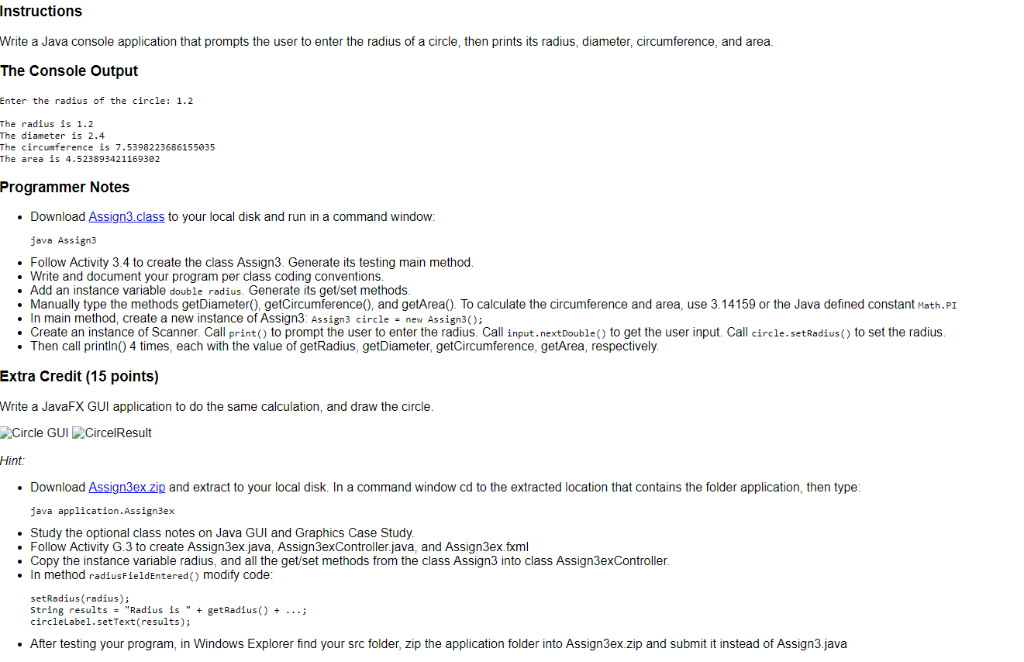
This is what it should look like
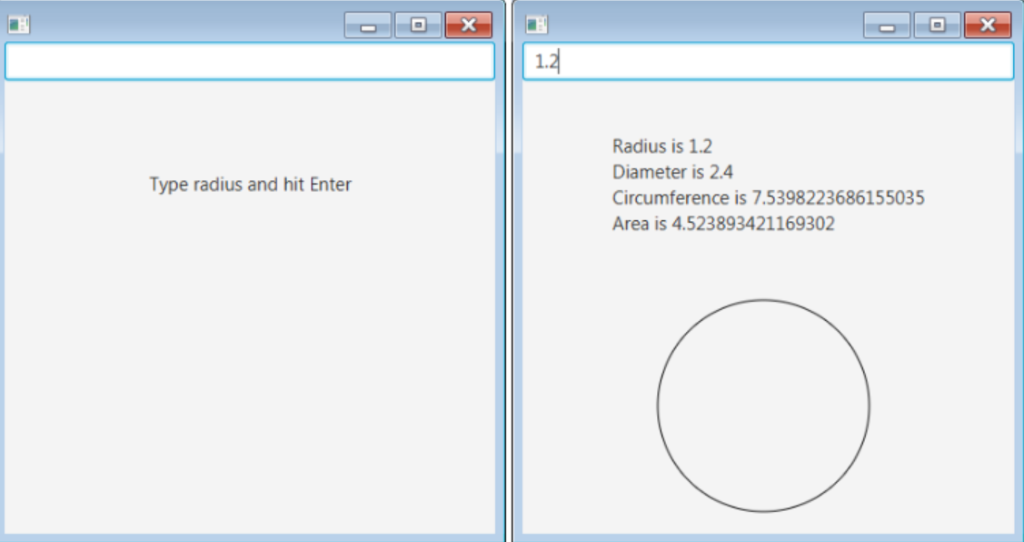
Instructions Write a Java console application that prompts the user to enter the radius of a circle, then prints its radius, diameter, circumference, and area. The Console Output Enter the radius of the circle: 1.2 The radius is 1.2 The diameter is 2.4 The circumference is 7.5398223686155035 The area is 4.523893421169382 Programmer Notes Download Assign3.class to your local disk and run in a command window: java Assign3 Follow Activity 3.4 to create the class Assign3. Generate its testing main method Write and document your program per class coding conventions .Add an instance variable double radius. Generate its get/set methods Manually type the methods getDiameter), getCircumference0, and getArea). To calculate the circumference and area, use 3.14159 or the Java defined constant Math.PI . In main method, create a new instance of Assign3: Assign3 circle - new Assign3); Create an instance of Scanner. Call print) to prompt the user to enter the radius. Call input.nextDoubleto get the user input. Call circle.setRadius() to set the radius Then call println) 4 times, each with the value of getRadius, getDiameter, getCircumference, getArea, respectively Extra Credit (15 points) Write a JavaFX GUI application to do the same calculation, and draw the circle Circle GUICircelResult Hint Download Assign3ex zip and extract to your local disk. In a command window cd to the extracted location that contains the folder application, then type java application.Assign3ex Study the optional class notes on Java GUI and Graphics Case Study .Follow Activity G.3 to create Assign3ex.java, Assign3exController.java, and Assign3ex.fxml .Copy the instance variable radius, and all the get/set methods from the class Assign3 into class Assign3exController. . In method radiusFieldEntered) modify code setRadius (radius); String results"Radius is " + getRadius)+ circleLabel.setText (results); After testing your program, in Windows Explorer find your src folder, zip the application folder into Assign3ex.zip and submit it instead of Assign3.java 1.2 Radius is 1.2 Diameter is 2.4 Circumference is 7.5398223686155035 Area is 4.523893421169302 Type radius and hit Enter Instructions Write a Java console application that prompts the user to enter the radius of a circle, then prints its radius, diameter, circumference, and area. The Console Output Enter the radius of the circle: 1.2 The radius is 1.2 The diameter is 2.4 The circumference is 7.5398223686155035 The area is 4.523893421169382 Programmer Notes Download Assign3.class to your local disk and run in a command window: java Assign3 Follow Activity 3.4 to create the class Assign3. Generate its testing main method Write and document your program per class coding conventions .Add an instance variable double radius. Generate its get/set methods Manually type the methods getDiameter), getCircumference0, and getArea). To calculate the circumference and area, use 3.14159 or the Java defined constant Math.PI . In main method, create a new instance of Assign3: Assign3 circle - new Assign3); Create an instance of Scanner. Call print) to prompt the user to enter the radius. Call input.nextDoubleto get the user input. Call circle.setRadius() to set the radius Then call println) 4 times, each with the value of getRadius, getDiameter, getCircumference, getArea, respectively Extra Credit (15 points) Write a JavaFX GUI application to do the same calculation, and draw the circle Circle GUICircelResult Hint Download Assign3ex zip and extract to your local disk. In a command window cd to the extracted location that contains the folder application, then type java application.Assign3ex Study the optional class notes on Java GUI and Graphics Case Study .Follow Activity G.3 to create Assign3ex.java, Assign3exController.java, and Assign3ex.fxml .Copy the instance variable radius, and all the get/set methods from the class Assign3 into class Assign3exController. . In method radiusFieldEntered) modify code setRadius (radius); String results"Radius is " + getRadius)+ circleLabel.setText (results); After testing your program, in Windows Explorer find your src folder, zip the application folder into Assign3ex.zip and submit it instead of Assign3.java 1.2 Radius is 1.2 Diameter is 2.4 Circumference is 7.5398223686155035 Area is 4.523893421169302 Type radius and hit Enter
Step by Step Solution
There are 3 Steps involved in it

Get step-by-step solutions from verified subject matter experts
 Study Help