







Question: Java This program puts into practice the material from your One-Dimensional 1. Use the main ) method to create and populate the array with the
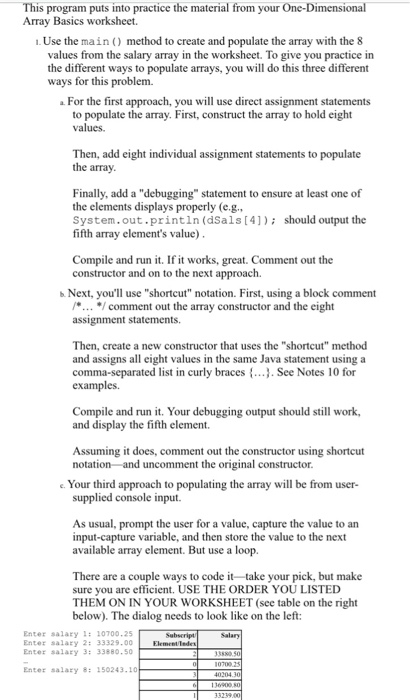
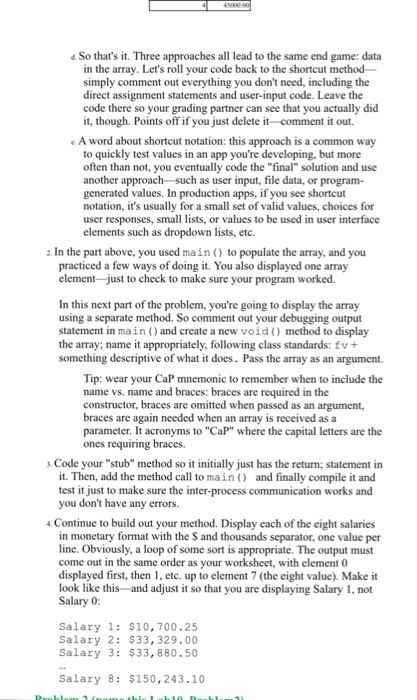
This program puts into practice the material from your One-Dimensional 1. Use the main ) method to create and populate the array with the 8 ferent ways to populate arrays, you will do this three different For the first approach, you will use direct assignment statements Array Basics worksheet. values from the salary array in the worksheet. To give you practice in the dif ways for this problem. to populate the array. First, construct the array to hold eight Then, add eight individual assignment statements to populate the array Finally, add a "debugging" statement to ensure at least one of the elements displays properly (e.g. System.out.println (dSals [4]) should output the fifth array element's value) Compile and run it. If it works, great. Comment out the constructor and on to the next approach. b Next, you'll use "shortcut" notation. First, using a block comment /comment out the array constructor and the eight assignment statements Then, create a new constructor that uses the "shortcut" method and assigns all eight values in the same Java statement using a comma-separated list in curly braces. See Notes 10 for examples. Compile and run it. Your debugging output should still work and display the fifth element. Assuming it does, comment out the constructor using shortcut e Your third approach to populating the array will be from user- supplied console input. As usual, prompt the user for a value, capture the value to an input-capture variable, and then store the value to the next available array element. But use a loop There are a couple ways to code it take your pick, but make sure you are efficient. USE THE ORDER YOU LISTED THEM ON IN YOUR WORKSHEET (see table on the right below). The dialog needs to look like on the left: Enter salary:10700.25 Enter salary 2: 33329.00 Enter salary 3: 33880.50 Enter salary 8: 150243.10
Step by Step Solution
There are 3 Steps involved in it

Get step-by-step solutions from verified subject matter experts
 Study Help