







Question: JAVA Using Java GUI to implement a programming calculator as below CALCULATOR HAS TO BE CLOSE OR EXACTLY AS DESCRIBED IN THE IMAGE BELOW. Disable
JAVA
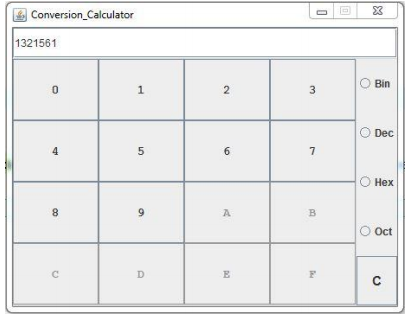
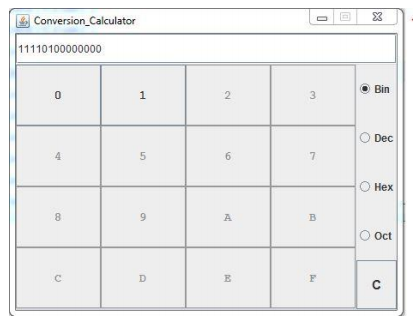
Using Java GUI to implement a programming calculator as below
CALCULATOR HAS TO BE CLOSE OR EXACTLY AS DESCRIBED IN THE IMAGE BELOW.
Disable Dword, Word, Byte, but keep the buttons there. Also, no interaction of the mouse on the binary bits area is required. Just display 64 bits for all the items with appropriate bits filled in based on the value in the number field.
Test Case: Please find below the list of test cases. 1.Look and feel of the calculator. 2.The 64 bits binary value of the entered number in the number field should be displayed correctly. 3.There is no order of operation expected; if someone has implemented it that way then it is OK either way 4.There should be no interaction of the mouse expected on the binary bits area. 5.use exception
Functionality Test Cases Basic Conversion of Hex, Dec, Bin, Oct shall work (Handling of Overflow of numbers is not required)
Conversion Calculator 1321561 Bin 0 Dec 0 Hex O oct
Step by Step Solution
There are 3 Steps involved in it

Get step-by-step solutions from verified subject matter experts
 Study Help