







Question: Java: Write a program to print a histogram of the frequency of letters 'a' to 'z' found in the input. Treat upper case as lower
Java: Write a program to print a histogram of the frequency of letters 'a' to 'z' found in the input. Treat upper case as lower case (e.g. include 'A' in the 'a' count). Ignore anything other than 'a'-'z' and 'A'-'Z'. Format the output like the histogram example done in class starting each row with the corresponding letter, a colon (":") then a row of asterisks ('*') corresponding to the frequency of that letter.
For example if the input was:
aabbbcab!& xyzzz eeeeee
The output would be:
a:*** b:**** c:* d: e:****** f: g: h: i: j: k: l: m: n: o: p: q: r: s: t: u: v: w: x:* y:* z:***
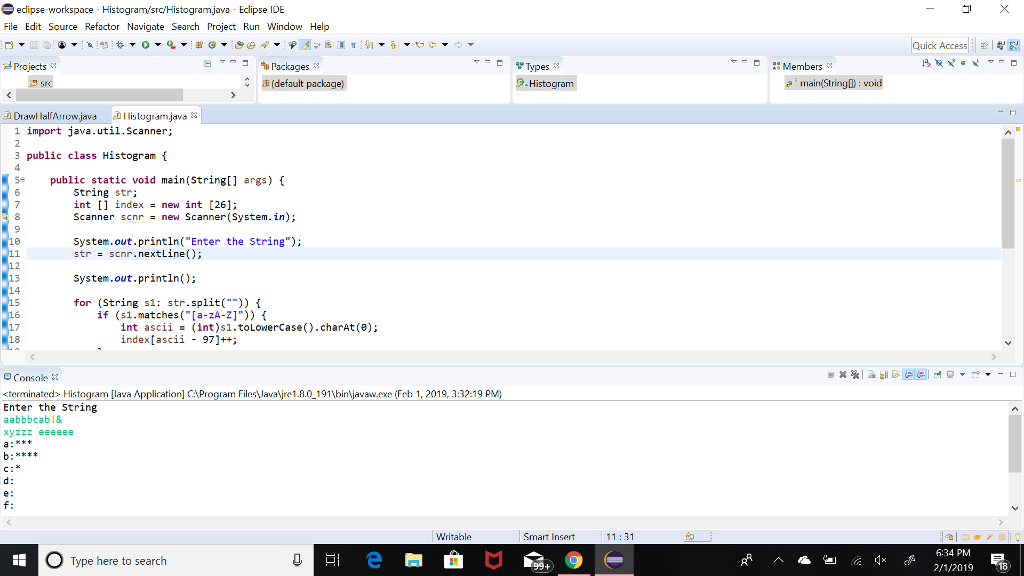
My code stops short on letter c.. What should be done differently?
import java.util.Scanner;
public class Histogram {
public static void main(String[] args) { String str; int [] index = new int [26]; Scanner scnr = new Scanner(System.in); System.out.println("Enter the String"); str = scnr.nextLine(); System.out.println(); for (String s1: str.split("")) { if (s1.matches("[a-zA-Z]")) { int ascii = (int)s1.toLowerCase().charAt(0); index[ascii - 97]++; } } for (int i = 0; i
}
}
edipse workspace Histogram/src/Histogram.java Eclipse IDE File Edit Source Refactor Navigate Search Project Run Window Help ck Access 7- 911 Packages Members - d Projects Types (default package) a mainfStringD: void 1 import java.util.Scanner; 3 public class Histogram i 5 public static void main(String[] args) f String str; int [] indexnew int [26] Scanner scnr-new Scanner(System.in); System.out.println( "Enter the String"); strscnr.nextLine 16 System.out.println); 13 14 for (String sl: str.split("")) 1 if (s1.matches("[a-zA-Z]")) int ascii index[ascii (int)s1.toLowerCase().charAt(8); 97]+; 18 Console cterminated> Histogram [lava Application] CA Program F Enter the String aabbbcabl& xyzzz eeeeee re1.8.0 191binjavaw.x Fch 1, 2019. 3:32:19 PM) e: Writable Smart Insert 11:31 6:34 PM Type here to search 2/1/2019 18
Step by Step Solution
There are 3 Steps involved in it

Get step-by-step solutions from verified subject matter experts
 Study Help