







Question: Java You run four computer labs. Each lab contains computer stations that are numbered as shown in the table below Lab Number Computer Station Numbers
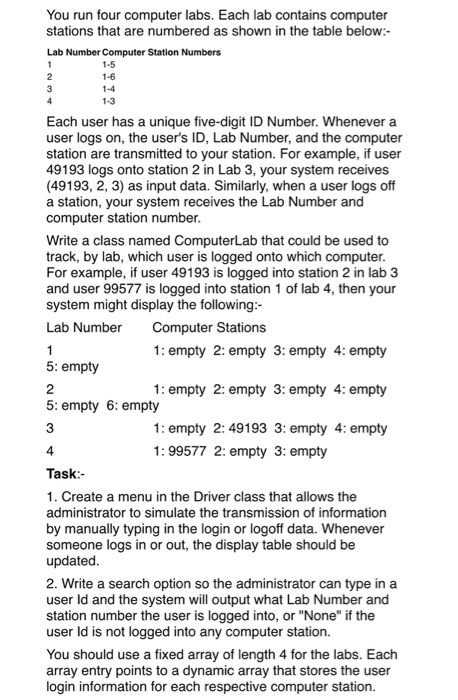
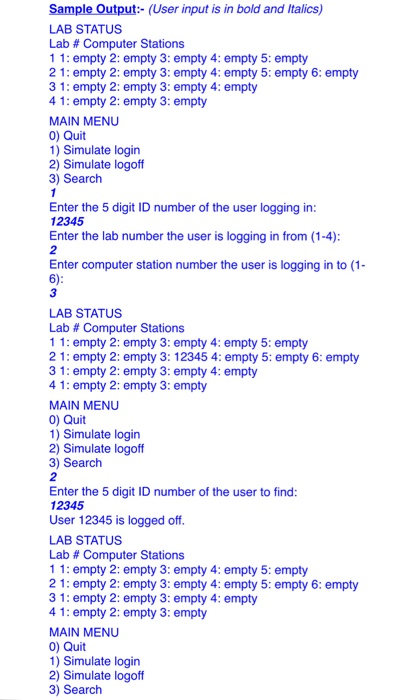
You run four computer labs. Each lab contains computer stations that are numbered as shown in the table below Lab Number Computer Station Numbers 1-5 1-6 1-3 Each user has a unique five-digit ID Number. Whenever a user logs on, the users ID, Lab Number, and the computer station are transmitted to your station. For example, if user 49193 logs onto station 2 in Lab 3, your system receives (49193, 2, 3) as input data. Similarly, when a user logs off a station, your system receives the Lab Number and computer station number. Write a class named ComputerLab that could be used to track, by lab, which user is logged onto which computer For example, if user 49193 is logged into station 2 in lab 3 and user 99577 is logged into station 1 of lab 4, then your system might display the following Lab Number Computer Stations 1: empty 2: empty 3: empty 4: empty 1: empty 2: empty 3: empty 4: empty 1: empty 2:49193 3: empty 4: empty 5: empty 2 5: empty 6: empty 3 4 Task 1. Create a menu in the Driver class that allows the administrator to simulate the transmission of information by manually typing in the login or logoff data. Whenever someone logs in or out, the display table should be updated. 2. Write a search option so the administrator can type in a user ld and the system will output what Lab Number and station number the user is logged into, or "None" if the user ld is not logged into any computer station. You should use a fixed array of length 4 for the labs. Each array entry points to a dynamic array that stores the user login information for each respective computer station. 1: 99577 2: empty 3: empty Sample Output:- (User input is in bold and Italics) LAB STATUS Lab # Computer Stations 11: empty 2: empty 3: empty 4: empty 5: empty 2 1: empty 2: empty 3: empty 4: empty 5: empty 6: empty 3 1: empty 2: empty 3: empty 4: empty 4 1: empty 2: empty 3: empty MAIN MENU 0) Quit 1) Simulate login 2) Simulate logoff 3) Search Enter the 5 digit ID number of the user logging in 12345 Enter the lab number the user is logging in from (1-4) 2 Enter computer station number the user is logging in to (1 6) 3 LAB STATUS Lab # Computer Stations 11: empty 2: empty 3: empty 4: empty 5: empty 2 1: empty 2: empty 3: 12345 4: empty 5: empty 6: empty 3 1: empty 2: empty 3: empty 4: empty 4 1: empty 2: empty 3: empty MAIN MENU 0) Quit 1) Simulate login 2) Simulate logoff 3) Search 2 Enter the 5 digit ID number of the user to find: 12345 User 12345 is logged off LAB STATUS Lab # Computer Stations 11: empty 2: empty 3: empty 4: empty 5: empty 2 1: empty 2: empty 3: empty 4: empty 5: empty 6: empty 3 1: empty 2: empty 3: empty 4: empty 4 1: empty 2: empty 3: empty MAIN MENU 0) Quit 1) Simulate login 2) Simulate logoff 3) Search
Step by Step Solution
There are 3 Steps involved in it

Get step-by-step solutions from verified subject matter experts
 Study Help