



Question: JavaFX and Files Exercises (2 Parts) : Fix & complete the provided code for Exercise 1 ( See bottom ): Write a code for Exercise
JavaFX and Files Exercises (2 Parts): Fix & complete the provided code for Exercise 1 (See bottom): Write a code for Exercise 2
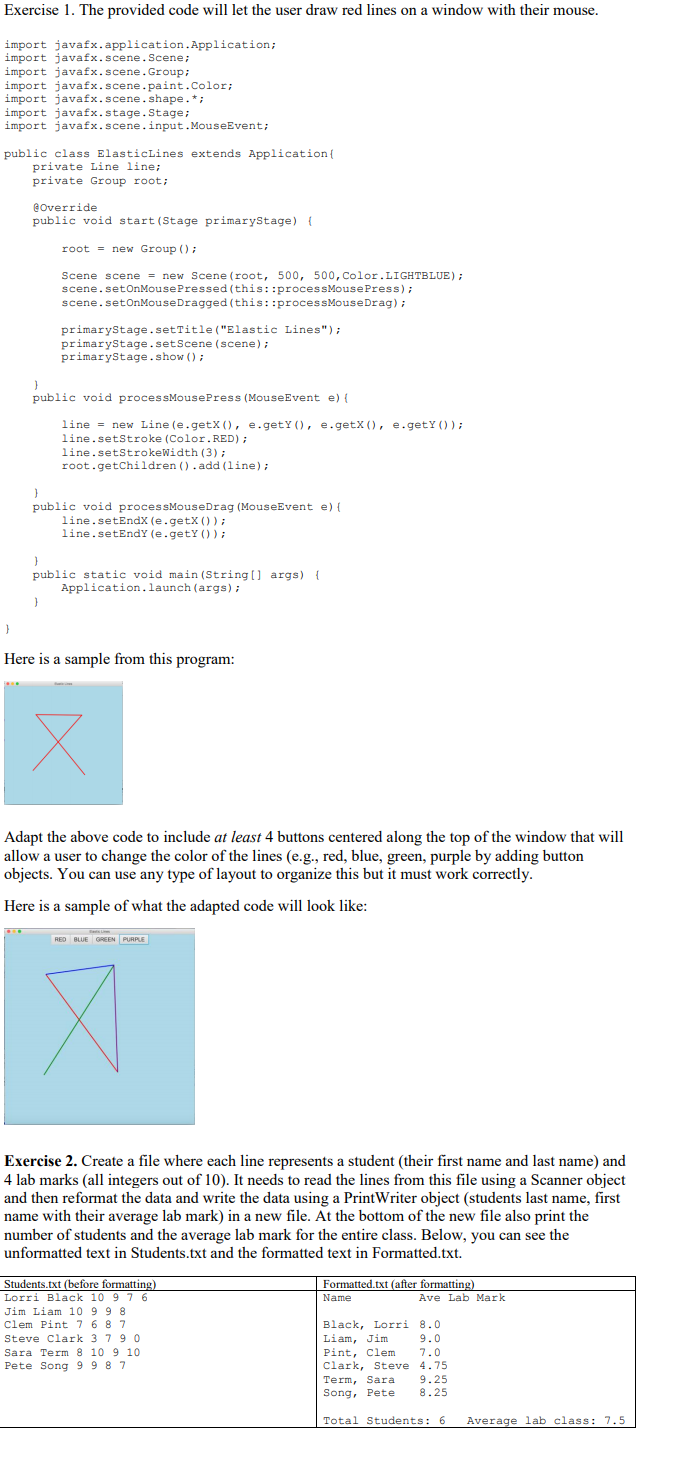
Exercise 1 Code to be fixed & completed: 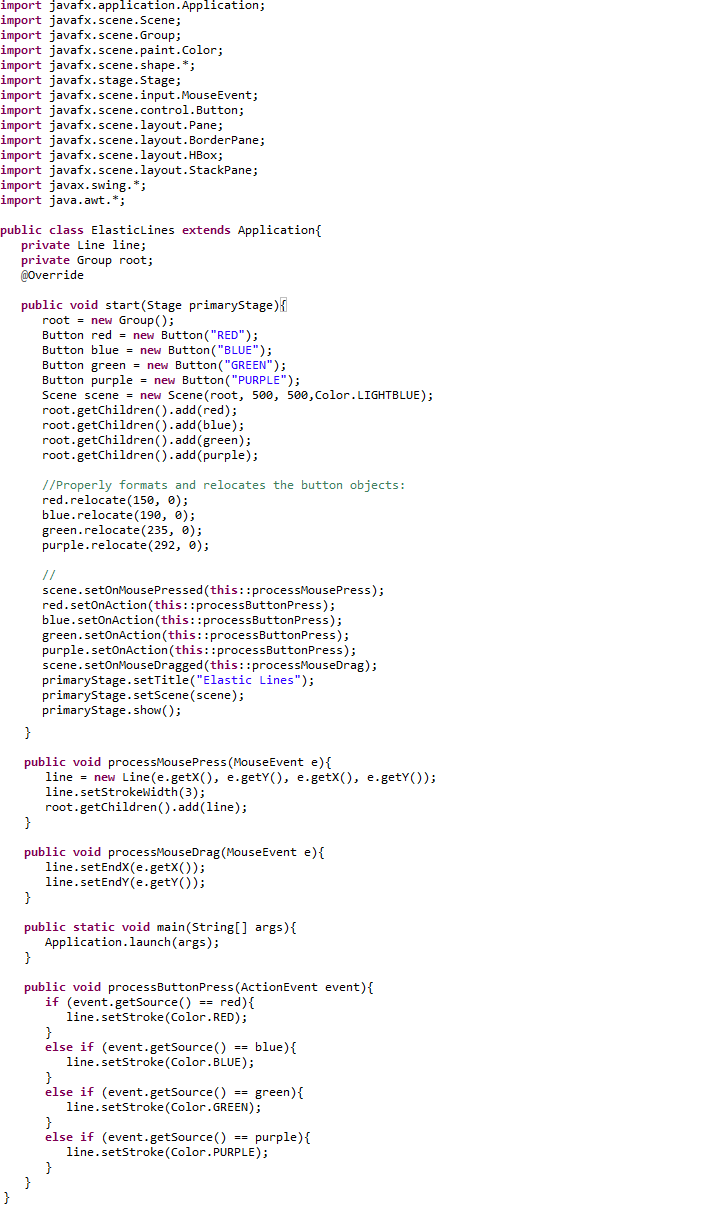
Exercise 1. The provided code will let the user draw red lines on a window with their mouse. import javafx.application.Application; import javafx.scene.Scene; import javafx.scene.Group; import javafx.scene.paint.Color; import javafx.scene.shape.* import javafx.stage.Stage; import javafx.scene.input.MouseEvent; public class ElasticLines extends Application( private Line line: private Group root; Override public void start (Stage primaryStage) rootnew Group ) Scene scene = new scene (root, 500, 500, color.LIGHTBLUE); scene.setOnMousePressed (this: :processMousePress) scene.setOnMouseDragged (this::processMouseDrag) primaryStage.setTitle ("Elastic Lines") primaryStage.setScene (scene) primaryStage.show ) public void processMousePress (MouseEvent e) line = new Line (e. getX ( ) , e . getY ( ) , line.setStroke (Color.RED) line.setStrokeWidth (3) root.getChildren ().add (line) e . getX ( ) , e . getY ( ) ) ; public void processMouseDrag (MouseEvent e) line.setEndX (e.getx ()) line.setEndY (e.getY ()) public static void main (String[] args) Application.launch (args); Here is a sample from this program: Adapt the above code to include at least 4 buttons centered along the top of the window that will allow a user to change the color of the lines (e.g., red, blue, green, purple by adding button objects. You can use any type of layout to organize this but it must work correctly Here is a sample of what the adapted code will look like Exercise 2. Create a file where each line represents a student (their first name and last name) and 4 lab marks (all integers out of 10). It needs to read the lines from this file using a Scanner object and then reformat the data and write the data using a PrintWriter object (students last name, first name with their average lab mark) in a new file. At the bottom of the new file also print the number of students and the average lab mark for the entire class. Below, you can see the unformatted text in Students.txt and the formatted text in Formatted.txt Formatted.txt (after formattin Name Students.txt (before formatti Lorri Black 10 9 7 6 Jim Liam 10 9 9 8 Clem Pint 7 6 87 Steve Clark 379 0 Sara Term 8 10 9 10 Pete Song 9 98 7 Ave Lab Mark Black, Lorri 8.0 Liam, Jim Pint, Clem7.0 Clark, Steve 4.75 Term, Sara 9.25 Song, Pete 8.25 9.0 Total Students: 6 Average lab class 7.5 Exercise 1. The provided code will let the user draw red lines on a window with their mouse. import javafx.application.Application; import javafx.scene.Scene; import javafx.scene.Group; import javafx.scene.paint.Color; import javafx.scene.shape.* import javafx.stage.Stage; import javafx.scene.input.MouseEvent; public class ElasticLines extends Application( private Line line: private Group root; Override public void start (Stage primaryStage) rootnew Group ) Scene scene = new scene (root, 500, 500, color.LIGHTBLUE); scene.setOnMousePressed (this: :processMousePress) scene.setOnMouseDragged (this::processMouseDrag) primaryStage.setTitle ("Elastic Lines") primaryStage.setScene (scene) primaryStage.show ) public void processMousePress (MouseEvent e) line = new Line (e. getX ( ) , e . getY ( ) , line.setStroke (Color.RED) line.setStrokeWidth (3) root.getChildren ().add (line) e . getX ( ) , e . getY ( ) ) ; public void processMouseDrag (MouseEvent e) line.setEndX (e.getx ()) line.setEndY (e.getY ()) public static void main (String[] args) Application.launch (args); Here is a sample from this program: Adapt the above code to include at least 4 buttons centered along the top of the window that will allow a user to change the color of the lines (e.g., red, blue, green, purple by adding button objects. You can use any type of layout to organize this but it must work correctly Here is a sample of what the adapted code will look like Exercise 2. Create a file where each line represents a student (their first name and last name) and 4 lab marks (all integers out of 10). It needs to read the lines from this file using a Scanner object and then reformat the data and write the data using a PrintWriter object (students last name, first name with their average lab mark) in a new file. At the bottom of the new file also print the number of students and the average lab mark for the entire class. Below, you can see the unformatted text in Students.txt and the formatted text in Formatted.txt Formatted.txt (after formattin Name Students.txt (before formatti Lorri Black 10 9 7 6 Jim Liam 10 9 9 8 Clem Pint 7 6 87 Steve Clark 379 0 Sara Term 8 10 9 10 Pete Song 9 98 7 Ave Lab Mark Black, Lorri 8.0 Liam, Jim Pint, Clem7.0 Clark, Steve 4.75 Term, Sara 9.25 Song, Pete 8.25 9.0 Total Students: 6 Average lab class 7.5
Step by Step Solution
There are 3 Steps involved in it

Get step-by-step solutions from verified subject matter experts