







Question: JAVA_HA4.0: Payroll Console Write an application (PayrollConsole.java) that reads the following information and prints a payroll statement: Employee's name (e.g., John Doe) Number of hours
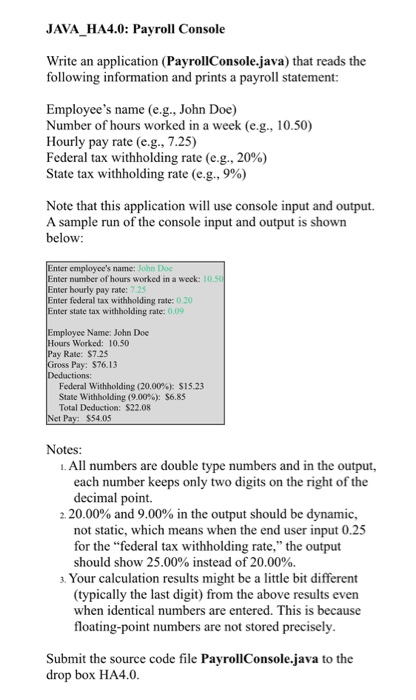
JAVA_HA4.0: Payroll Console Write an application (PayrollConsole.java) that reads the following information and prints a payroll statement: Employee's name (e.g., John Doe) Number of hours worked in a week (e.g., 10.50) Hourly pay rate (e.g., 7.25) Federal tax withholding rate (eg, 2096) State tax withholding rate (eg, 9%) Note that this application will use console input and output. A sample run of the console input and output is shown below: number of hours worked in a week:10 hourly pay rate: 7.25 Enter federal tax withholding rate: 0.20 state tax withholding rate: 0.09 Name: John Doe Worked: 10.50 Rate: $7.25 Pay: $76.13 Federal Withholding (20.00%): $15.23 State Withholding (9.00%): $6.85 Total Deduction: $22.08 $54.05 Notes . All numbers are double type numbers and in the output, each number keeps only two digits on the right of the decimal point. 20.00% and 9.00% in the output should be dynamic, not static, which means when the end user input 0.25 for the "federal tax withholding rate," the output should show 25.00% instead of 20.00%. . Your calculation results might be a little bit different (typically the last digit) from the above results even when identical numbers are entered. This is because floating-point numbers are not stored precisely Submit the source code file PayrollConsole.java to the drop box HA4.0
Step by Step Solution
There are 3 Steps involved in it

Get step-by-step solutions from verified subject matter experts
 Study Help