







Question: JavaScript 1: Language Fundamentals SHOPPING CART Produca Amo Replace markup with JavaScript loop using supplied array data 240 00 , i - Create function to
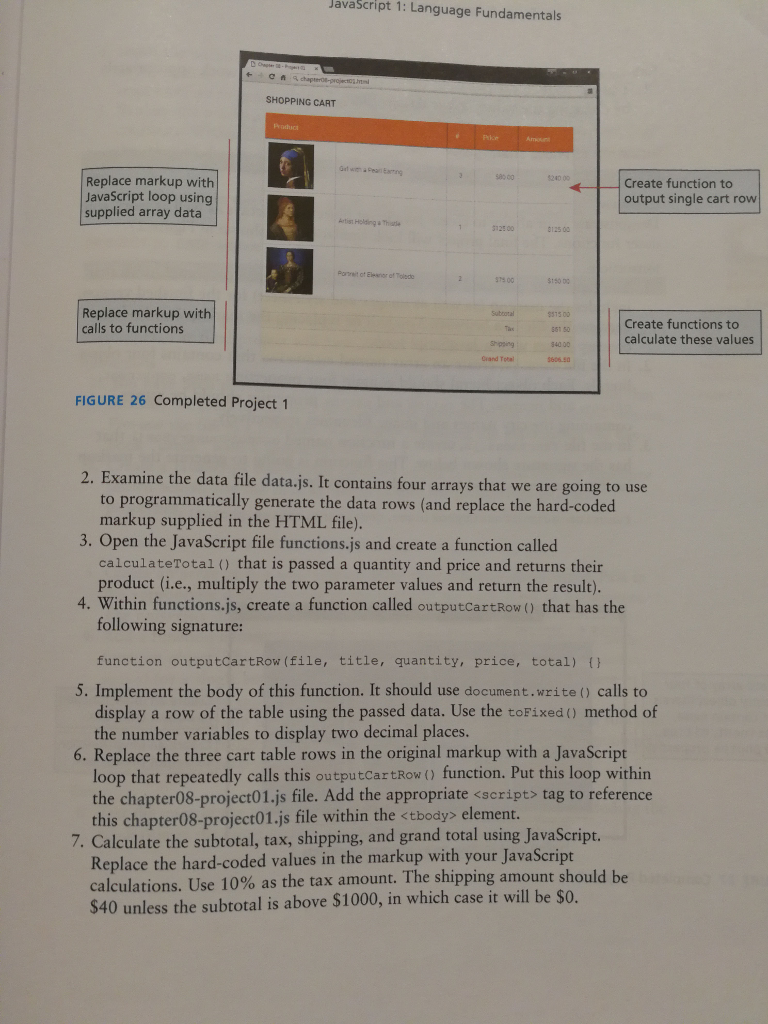
JavaScript 1: Language Fundamentals SHOPPING CART Produca Amo Replace markup with JavaScript loop using supplied array data 240 00 , i - Create function to output single cart row etist Helding aThae 5125 00 8125 00 Port of Elesor of Toledo 75 00 $150 0 Replace markup with calls to functions Subootal 1500 551 50 540 00 3606.50 Create functions to calculate these values shipping Crand Totel FIGURE 26 Completed Project1 xamine the data file data.js. It contains four arrays that we are going to use to programmatically generate the data rows (and replace the hard-coded markup supplied in the HTML file). 2. E 3. Open the JavaScript file functions.js and create a function called calculateTotal ) that is passed a quantity and price and returns their product (i.e., multiply the two parameter values and return the result). 4. Within functions.js, create a function called outputCartRow( that has the following signature: function outputCartRow(file, title, quantity, price, total) ( 5. Implement the body of this function. It should use document.write () calls to display a row of the table using the passed data. Use the toFixed (0) method of the number variables to display two decimal places 6. Replace the three cart table rows in the original markup with a JavaScript loop that repeatedly calls this outputcartRow ( function. Put this loop within the chapter08-project01.js file. Add the appropriate
Step by Step Solution
There are 3 Steps involved in it

Get step-by-step solutions from verified subject matter experts
 Study Help