Question: JavaScript loops, functions, conditional statements - Assignment07 THE PROBLEM: Write a program that generates a 10x10 HTML table filled with randomly selected numbers between 1
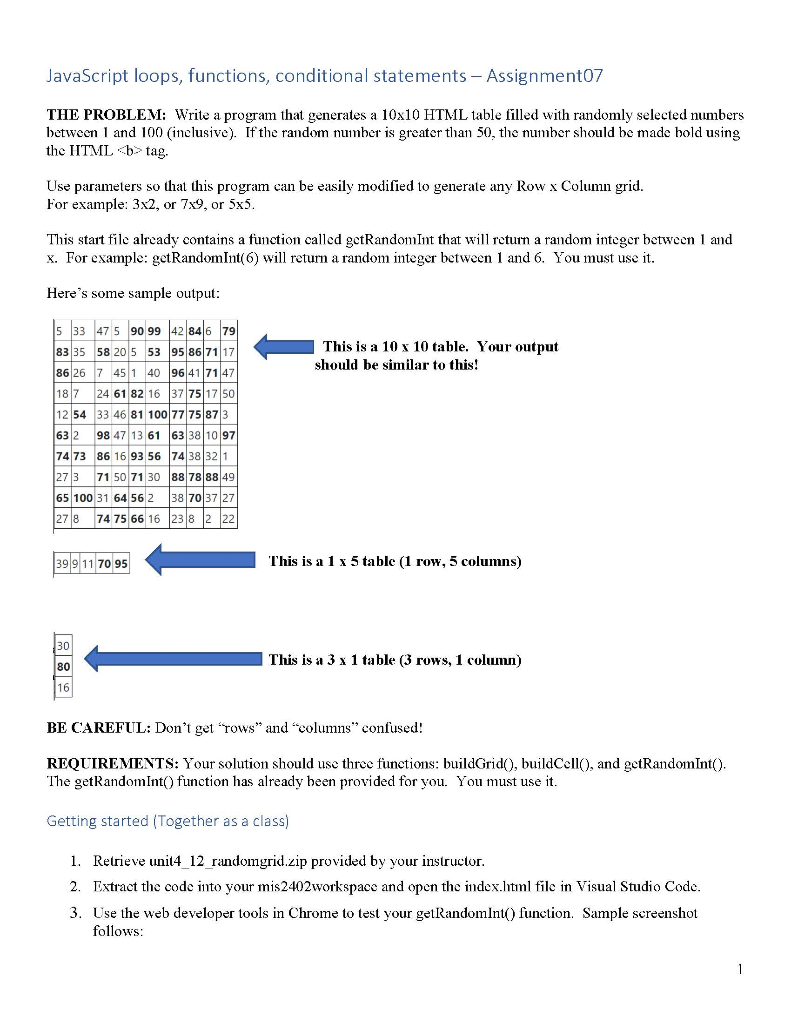
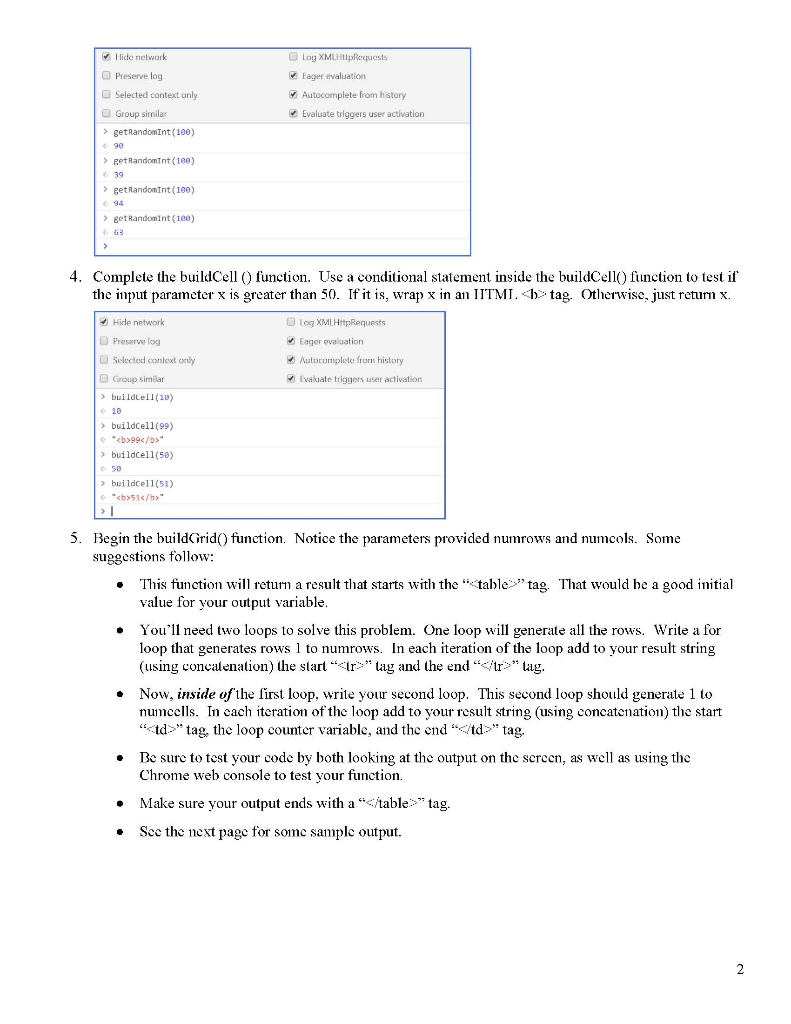
JavaScript loops, functions, conditional statements - Assignment07 THE PROBLEM: Write a program that generates a 10x10 HTML table filled with randomly selected numbers between 1 and 100 (inclusive). If the random number is greater than 50, the number should be made bold using the HTML tag. Use parameters so that this program can be easily modified to generate any Row x Column grid. For example: 3x2, or 7x9, or 5x5. This start file already contains a function called getRandom Int that will return a random integer between 1 and x. For example: getRandom Int(6) will return a random integer between 1 and 6. You must use it. Here's some sample output: This is a 10 x 10 table. Your output should be similar to this! s 33 47 5 90 99 42 846 79 83 35 58 20 5 53 95 86 7117 86 26 7 451 40 96 41 7147 18 7 24 61 82 16 37 751750 12 54 33 46 81 100 63 2 98 47 13 61 74 73 86 16 93 56 27 3 71 50 71 30 65 100 31 64 56 2 278 74 75 66 16 399 11 70 95 This is a 1 x 5 table (1 row, 5 columns) This is a 3 x 1 table (3 rows, 1 column) BE CAREFUL: Don't get "rows" and "columns" confused! REQUIREMENTS: Your solution should use three functions: buildGrido, buildCell(), and getRandom Int(). The getRandom Int() function has already been provided for you. You must use it. Getting started (Together as a class) 1. Retrieve unit4_12 randomgrid.zip provided by your instructor. 2. Extract the code into your mis2402workspace and open the index.litil file in Visual Studio Code. 3. Use the web developer tools in Chrome to test your getRandomlnt() function. Sample screenshot follows: Hide network Preserve log Selected context only Group similar >getRandomint(100) Log XMLHttpRequests Eager evaluation Autocomplete from history Evaluate triggers user activation >getRandomtnt (160) getRandom Int(180) >getRandomint(1ee) 4. Complete the buildCell() function. Use a conditional statement inside the buildCell() function to test if the input parameter x is greater than 50. If it is, wrap x in an IITML tag. Otherwise, just return x. Hide network Preserve log Selected context only Log XMLHttpRequests Eager evaluation Autocumplete from history Evaluate triggers user activation Group similar buildcell(10) > buildcell(99) *99 > buildcell(50) > buildcell(51) *51 5. Begin the build Grid function. Notice the parameters provided numrows and numcols. Some suggestions follow: This function will retum a result that starts with the "table" tag. That would be a good initial value for your output variable. You'll need two loops to solve this problem. One loop will generate all the rows. Write a for loop that generates rows 1 to numrows. In each iteration of the loop add to your result string (using concatenation) the start tag and the end "" tag. Now, inside of the first loop, write your second loop. This second loop should generate 1 to numcells. In each iteration of the loop add to your result string (using concatenation) the start
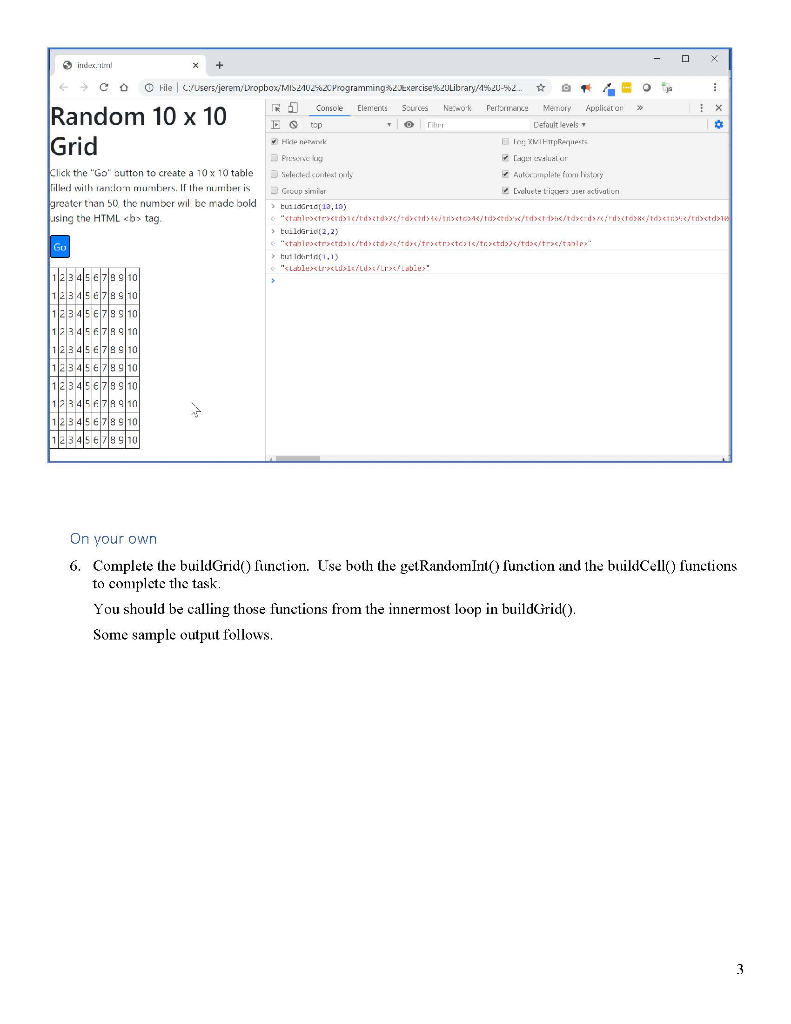
" tag, the loop counter variable, and the end " tag Be sure to test your code by both looking at the output on the screen, as well as using the Chrome web console to test your function. Make sure your output ends with a "" tag. Sec the next page for some sample output. je X Random 10 x 10 Grid indum X + & C o Hile Users/jerem/DropboxMI2402%2C Programming 20exercise%20Library/1%20-%2. T o 1 Console Elements Sources Newok Performance Memory Application >> Do top Default levels Hink lo XIFRA Presente Lagu valul or Click the "Go" button to create a 10 x 10 table Selected context only Automation listory Tilled with ran:lan mumbers. If the number is Group similar Evolucte tiguers user activation greater than 50 the number will be made bold > tutorid(12, 19) using the HTML tag. "Star |
| | | : | : | tuilderid(2,2) "ctalpastrctic/td>ctd>/td>
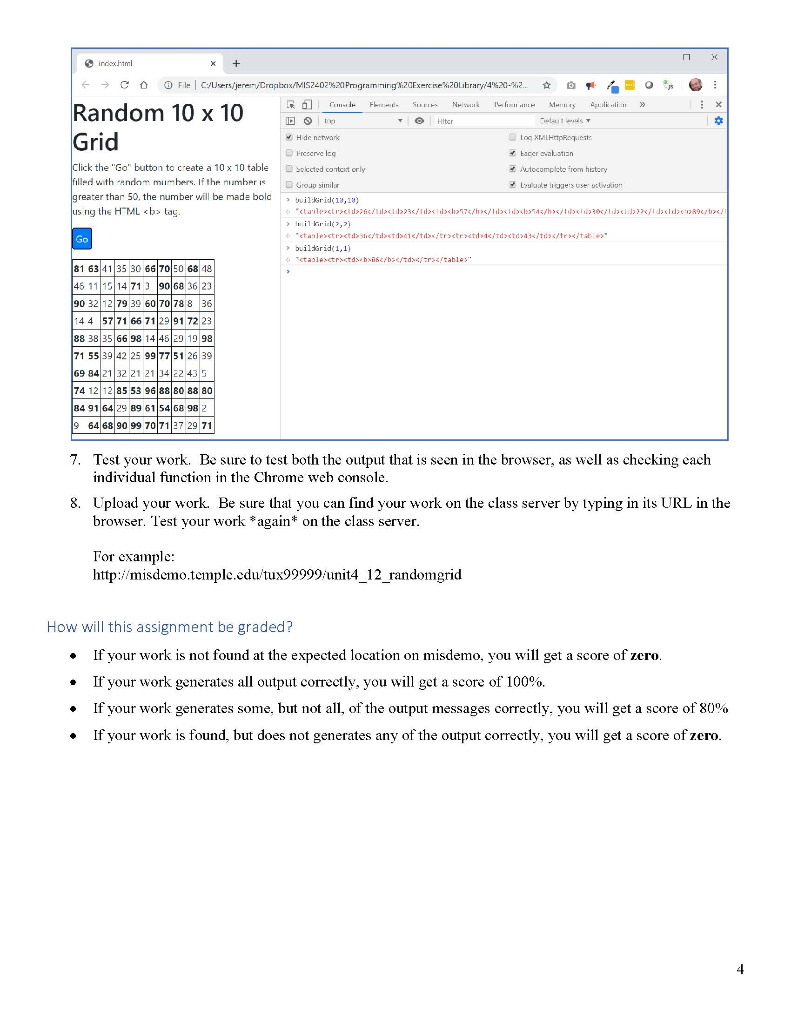
> but d id(1.1) Lable>1/LI>" > LI : L an oor on 00000000 01 02 03 001 00 on LLL LL w w On your own 6. Complete the buildGrid function. Use both the getRandom Into function and the buildCell() functions to complete the task. You should be calling those functions from the innermost loop in buildGrid). Some sample output follows. @ >> X /dxcd97b/ index.html E c o File Users/jerenry Dralacix/MISZ_021.20 Programmining:20Exercise izolibrary/420-22. O O Roland See Newek L EM MASA Random 10 x 10 I to Hitcr Hide netvark Log Haust Grid rcccrve lcg Eacer evaluation Click the "Go" button to create a 10 x 10 table Selected content orly utocomplete from history filled with andam mumbers. If the number is D u similar > Luseres Use olivation greater than 50, the number will be made bold > builkrid(1920) us ng the HTML tag. lalett / 23/ 1 7 / bs/li> /b> a> mil bril(2,7) stanlerstrasts /d / t r > | |
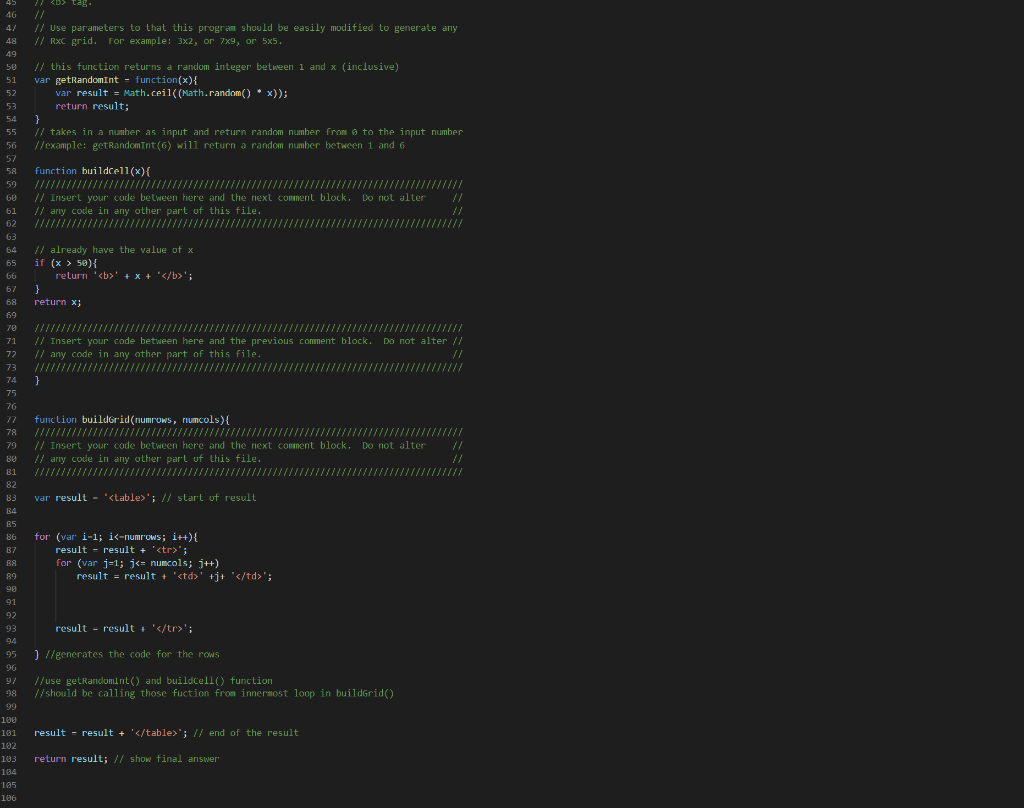
builderid 1,1) tag. // // Use parameters to that this program should be easily modified to generate any // Rxc grid. For example: 3x2, or 7x9, or 5x5. 50 51 52 // this function returns a random integer between 1 and x (inclusive) var getRandonInt = function(x){ var result = Math.ceil((Math.random() * x)); return result; } // takes in a number as input and return random number from @ to the input number //example: getRandom Int(6) will return a random number between 1 and 6 54 55 56 58 function buildcell(x) { // 60 61 // Insert your code between here and the next comment block. Do not alter // any code in any other part of this file. 64 65 // already have the value of x if (x > 50){ relurn '' + x + ''; 66 68 return x; 69 71 72 // Insert your code between here and the previous comment block. Do not alter // // any code in any other part of this file. / 74 } 77 function buildGrid(numrows, riumcols) { // 79 80 // Insert your code between here and the next comment block. Do not alter // any code in any other part of this file. 83 var result - ''; // start of result 86 for (var i-1; i'; for (var j=1; j' +j+ ''; result - result + ''; } //generates the code for the rows 96 97 98 99 //use getRandomint) and buildcell function //should be calling those fuction from innermost loop in buildrid) 100 181 result - result + '
'; // end of the result 102 103 184 return result; // show final answer 105 106 JavaScript loops, functions, conditional statements - Assignment07 THE PROBLEM: Write a program that generates a 10x10 HTML table filled with randomly selected numbers between 1 and 100 (inclusive). If the random number is greater than 50, the number should be made bold using the HTML tag. Use parameters so that this program can be easily modified to generate any Row x Column grid. For example: 3x2, or 7x9, or 5x5. This start file already contains a function called getRandom Int that will return a random integer between 1 and x. For example: getRandom Int(6) will return a random integer between 1 and 6. You must use it. Here's some sample output: This is a 10 x 10 table. Your output should be similar to this! s 33 47 5 90 99 42 846 79 83 35 58 20 5 53 95 86 7117 86 26 7 451 40 96 41 7147 18 7 24 61 82 16 37 751750 12 54 33 46 81 100 63 2 98 47 13 61 74 73 86 16 93 56 27 3 71 50 71 30 65 100 31 64 56 2 278 74 75 66 16 399 11 70 95 This is a 1 x 5 table (1 row, 5 columns) This is a 3 x 1 table (3 rows, 1 column) BE CAREFUL: Don't get "rows" and "columns" confused! REQUIREMENTS: Your solution should use three functions: buildGrido, buildCell(), and getRandom Int(). The getRandom Int() function has already been provided for you. You must use it. Getting started (Together as a class) 1. Retrieve unit4_12 randomgrid.zip provided by your instructor. 2. Extract the code into your mis2402workspace and open the index.litil file in Visual Studio Code. 3. Use the web developer tools in Chrome to test your getRandomlnt() function. Sample screenshot follows: Hide network Preserve log Selected context only Group similar >getRandomint(100) Log XMLHttpRequests Eager evaluation Autocomplete from history Evaluate triggers user activation >getRandomtnt (160) getRandom Int(180) >getRandomint(1ee) 4. Complete the buildCell() function. Use a conditional statement inside the buildCell() function to test if the input parameter x is greater than 50. If it is, wrap x in an IITML tag. Otherwise, just return x. Hide network Preserve log Selected context only Log XMLHttpRequests Eager evaluation Autocumplete from history Evaluate triggers user activation Group similar buildcell(10) > buildcell(99) *99 > buildcell(50) > buildcell(51) *51 5. Begin the build Grid function. Notice the parameters provided numrows and numcols. Some suggestions follow: This function will retum a result that starts with the "table" tag. That would be a good initial value for your output variable. You'll need two loops to solve this problem. One loop will generate all the rows. Write a for loop that generates rows 1 to numrows. In each iteration of the loop add to your result string (using concatenation) the start tag and the end "" tag. Now, inside of the first loop, write your second loop. This second loop should generate 1 to numcells. In each iteration of the loop add to your result string (using concatenation) the start " tag, the loop counter variable, and the end " tag Be sure to test your code by both looking at the output on the screen, as well as using the Chrome web console to test your function. Make sure your output ends with a "" tag. Sec the next page for some sample output. je X Random 10 x 10 Grid indum X + & C o Hile Users/jerem/DropboxMI2402%2C Programming 20exercise%20Library/1%20-%2. T o 1 Console Elements Sources Newok Performance Memory Application >> Do top Default levels Hink lo XIFRA Presente Lagu valul or Click the "Go" button to create a 10 x 10 table Selected context only Automation listory Tilled with ran:lan mumbers. If the number is Group similar Evolucte tiguers user activation greater than 50 the number will be made bold > tutorid(12, 19) using the HTML tag. "Star |
| | | : | : | tuilderid(2,2) "ctalpastrctic/td>ctd>/td>
> but d id(1.1) Lable>1/LI>" > LI : L an oor on 00000000 01 02 03 001 00 on LLL LL w w On your own 6. Complete the buildGrid function. Use both the getRandom Into function and the buildCell() functions to complete the task. You should be calling those functions from the innermost loop in buildGrid). Some sample output follows. @ >> X /dxcd97b/ index.html E c o File Users/jerenry Dralacix/MISZ_021.20 Programmining:20Exercise izolibrary/420-22. O O Roland See Newek L EM MASA Random 10 x 10 I to Hitcr Hide netvark Log Haust Grid rcccrve lcg Eacer evaluation Click the "Go" button to create a 10 x 10 table Selected content orly utocomplete from history filled with andam mumbers. If the number is D u similar > Luseres Use olivation greater than 50, the number will be made bold > builkrid(1920) us ng the HTML tag. lalett / 23/ 1 7 / bs/li> /b> a> mil bril(2,7) stanlerstrasts /d / t r > | |
builderid 1,1) tag. // // Use parameters to that this program should be easily modified to generate any // Rxc grid. For example: 3x2, or 7x9, or 5x5. 50 51 52 // this function returns a random integer between 1 and x (inclusive) var getRandonInt = function(x){ var result = Math.ceil((Math.random() * x)); return result; } // takes in a number as input and return random number from @ to the input number //example: getRandom Int(6) will return a random number between 1 and 6 54 55 56 58 function buildcell(x) { // 60 61 // Insert your code between here and the next comment block. Do not alter // any code in any other part of this file. 64 65 // already have the value of x if (x > 50){ relurn '' + x + ''; 66 68 return x; 69 71 72 // Insert your code between here and the previous comment block. Do not alter // // any code in any other part of this file. / 74 } 77 function buildGrid(numrows, riumcols) { // 79 80 // Insert your code between here and the next comment block. Do not alter // any code in any other part of this file. 83 var result - ''; // start of result 86 for (var i-1; i'; for (var j=1; j' +j+ ''; result - result + ''; } //generates the code for the rows 96 97 98 99 //use getRandomint) and buildcell function //should be calling those fuction from innermost loop in buildrid) 100 181 result - result + '
'; // end of the result 102 103 184 return result; // show final answer 105 106









 Study Help