







Question: JavaScript Questions Question 1 True or False: JavaScript is a case-sensitive language. Question 1 options: True False Question 2 Matching (8 points): For each item
JavaScript Questions
Question 1
True or False: JavaScript is a case-sensitive language.
Question 1 options:
| True | |
| False |
Question 2
Matching (8 points): For each item on the left, please choose the BEST match from the list on the right. There are extra items on the right that are not used.
Question 2 options:
| |
| Things that an item can do, or can be done to an item, such as write(), open(), and alert(). |
| Something that can be used to trigger code to run, such as load, click, or mouseover. |
| The general term for a symbol or name that stands for a value. |
| A container for a section of code that can be "called" from elsewhere in the program. |
| A characteristic of an object. |
| Term for the items in parentheses after a function name. |
| Items that can be acted upon, such as a person, place or thing. |
|
|
Question 3
True or False: Both of these are equally correct in JavaScript:
document.write("
" + "text" + "
"); document.write("" + "text" + "
");Question 3 options:
| True | |
| False |
Question 4
Matching (4 points): The DOM: For each of the numbered items, please choose the BEST choice from the list on the right, based on what is shown in the picture (Note: there are extra items on the right that are not used). Note: There are 9 items on the right. Scroll down if you don't see all of them.
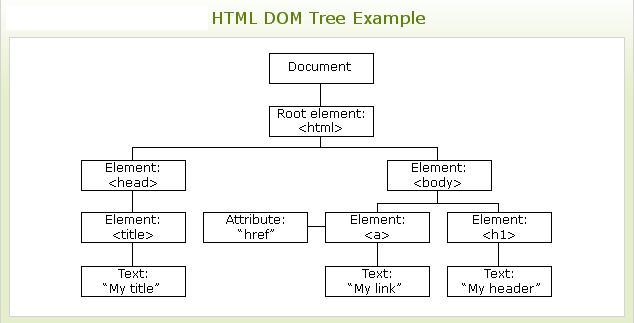
Question 4 options:
| |
| Top-most object in the DOM |
| Second child of html |
| First tag on the 3rd level |
|
|
Question 5
Matching (6 points): Javascript Symbols: For each of the numbered items, please choose the BEST choice from the list on the right. (Note: there may be extra items on the right that are not used).
Question 5 options:
| |
| Appears at the end of the name of a method or function in JavaScript |
| Used around the code inside a function in JavaScript |
| Appears between an object and a property or between an object and a method |
| Used in front of a one-line comment in JavaScript |
| Used at the ends of most lines in JavaScript |
|
|
Question 6
True or False: These 2 statements do the same thing: alert("Hi!"); window.alert("Hi!");
Question 6 options:
| True | |
| False |
Question 7
Both of these types of comments will work in JavaScript files: // /* ... */
Question 7 options:
| True | |
| False |
Question 8
True or False: When you call a function, you simply list the name of the function without the parentheses, like this:
functionName;
Question 8 options:
| True | |
| False |
Question 9 (1 point)
Which of the following statement(s) will correctly create a variable named homeCity and assign the word "Portland" to it?
Question 9 options:
| |||
| |||
| |||
|
Question 10
Matching (5 points): HTML DOM: For each of the numbered items, please choose the BEST choice from the list on the right. (Note: there are extra items on the right that are not used).
Question 10 options:
| |
| Object used to access CSS properties and values |
| An object that is below the html object |
| Top level in the DOM |
| Property used to display or change text between 2 HTML tags |
|
|
Step by Step Solution
There are 3 Steps involved in it

Get step-by-step solutions from verified subject matter experts
 Study Help