Question: JAVASCRIPT tagcloud.html /span> http://www.w3.org/TR/xhtml11/DTD/xhtml11.dtd> xmlns = http://www.w3.org/1999/xhtml > http-equiv = Content-Type content = application/xhtml+xml; charset=utf-8 /> Make a Tag Cloud rel = stylesheet

JAVASCRIPT tagcloud.html

/span>
"http://www.w3.org/TR/xhtml11/DTD/xhtml11.dtd">
xmlns="http://www.w3.org/1999/xhtml">
http-equiv="Content-Type" content="application/xhtml+xml; charset=utf-8"/>
Make a Tag Cloud
rel="stylesheet" type="text/css" href="tcstyle.css" />
="text/javascript" src="tagcloud.js">

Tag Cloud Form
action
="">
="tags">Enter a bunch of tags separated by spaces.
="tags" id="tags" rows="10" cols="100">grape cherry cherry apple pineapple cherry apple banana apple pineapple banana pineapple apple pineapple pineapple pineapple banana apple banana peach plum peach plum grape lemon lemon peach lemon lime lime lemon lemon lemon peach peach mango guava mango lemon lemon lemon peach cherry cherry cherry lime lime plum pineapple cherry pineapple

type="button" name="makecloud" id="makecloud" value="Make Cloud" onclick="makeCloud()"/>
type="button" name="savecloud" id="savecloud" value="Save Cloud" onclick="saveCloud()"/>
type="button" name="loadcloud" id="loadcloud" value="Load Cloud" onclick="loadCloud()"/>
type="button" name="cleararea" id="cleararea" value="Clear TextArea" onclick="clearArea()"/>
type="reset" value="Reset TextArea" />

Tag Cloud

href="http://validator.w3.org/check?uri=referer">
src="http://www.w3.org/Icons/valid-xhtml11"
alt="Valid XHTML 1.1" height="31" width="88" />

Questions I need help with.

Define an external JavaScript file tagcloud.js which contains the following functions:

  • makeCloud() This function is the event handler for button "Make Cloud". It should
    1. grab the contents of the textarea, a string of tags separated by spaces.
    2. parse that string into an array of tag strings, sorted by lexicographic ordering. (Remember this array may have repeat tags.)
    3. Create two arrays: One array contains unique tags and second corresponding array will contain the frequencies of each of those tags.
    4. The unique tag array and the frequency tag array pair is an example of parallel arrays. If the unique array contains elements apple, banana, cherry in indeces 0, 1 and 2 respectively, then the frequency array will contain elements 5,3,4 (for example) in indices 0,1 and 2. Where 5,3 and 4 are frequencies for apple, banana and cherry respectively.
    5. keep track of the maximum frequency for the set of tags. (Write a helper function to compute this.)
    6. create a div element containing all the tags as span elements as described above. (You should write a helper fuction to achieve this.)
    7. use the properties of the DOM address for the div element to set a .1em solid silver border for the div. Give the div a blue background. a silver foreground color, and an extra large serif font.
    8. loop through all the span child elements (the tags) in the div (tag cloud) and assign a suitable font size to them. The font size should at least be 15pt. The font size will be determined by taking the frequency at which the tag occurs divided by the max number of occurrences, then the resulting fraction is multiplied by 20. This will give you a decimal number between 0 and 20. Round the number to nearest integer and add 15. Now append the string "pt" and you have a string that is something like "22pt". This string should be used in setting the font-size. (I suggest defining a helper function to do this step.)
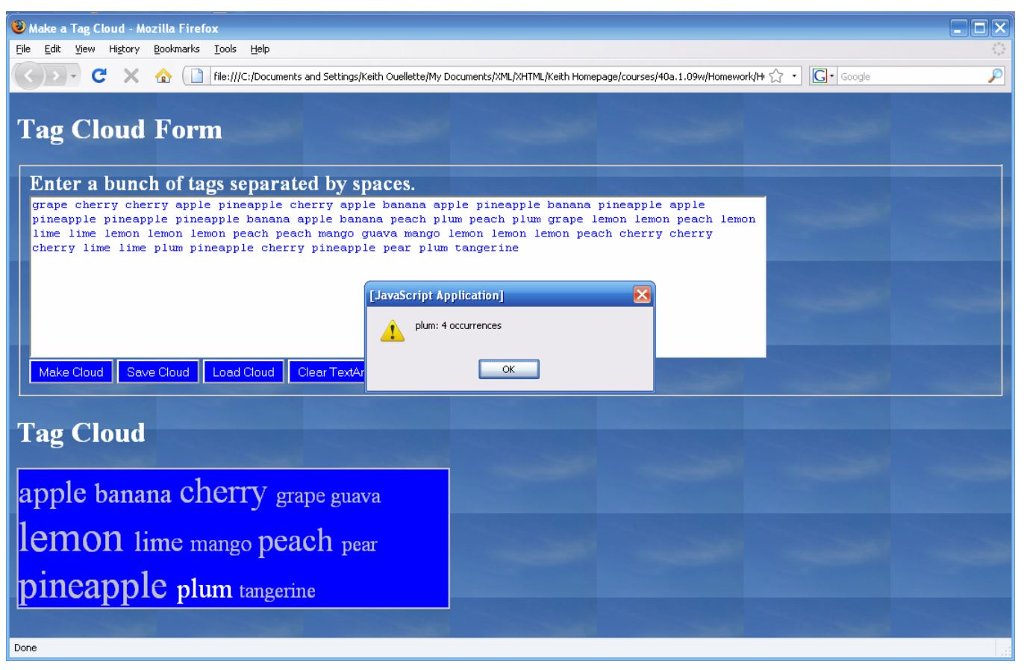
    9. Add onclick function to each span element. When you click on the span element it should alert how many times the tag appears. See image below for an example.
    10. remove the div element already belonging to tagcloud.html and replace it with the new div you just created. The new div should be in the same position in the DOM tree as the old div was.
  • saveCloud() This function is the event handler for button "Save Cloud".
  • loadCloud() This function is the event handler for button "Load Cloud".
  • clearArea() This function is the event handler for button "Clear TextArea".JAVASCRIPT tagcloud.html /span> "http://www.w3.org/TR/xhtml11/DTD/xhtml11.dtd"> xmlns="http://www.w3.org/1999/xhtml"> http-equiv="Content-Type" content="application/xhtml+xml; charset=utf-8"/> Make a Tag Cloud

Make a Tag Cloud- Mozilla Firefox Ele Edit iew Higtory Bookmarks Ioos Help C ? D file://C: Documents and Setti gs Keith Ouellette My Documents XMLXHTML Keith Homepage courses 40 10 (HoevorH? G Google Tag Cloud Form Enter a bunch of tags separated by spaces grape cherry cherry apple pineapple cherry apple banana apple pineapple banana pineapple apple pineapple pineapple pineapple banana apple banana peach plum peach plum grape lemon lemon peach lemon 11me lime lemon lemon lemon peach peach mango guava mango lemon lemon lemon peach cherry cherry cherry lime 1ime plum pineapple cherry pineapple pear plum tangerine [JavaScript Application plum: 4 occurrences Make Cloud Save Cloud Load Cloud Clear TeA Tag Cloud apple banana cherry grape guava lemon lime mango peach pear pineapple plum tangerine Done

Step by Step Solution

There are 3 Steps involved in it

1 Expert Approved Answer
Step: 1 Unlock blur-text-image
Question Has Been Solved by an Expert!

Get step-by-step solutions from verified subject matter experts

Step: 2 Unlock
Step: 3 Unlock

Students Have Also Explored These Related Databases Questions!