







Question: JavaScript The discount.js file must begin with a multi-line comment block that includes your name , and this description : This program will add a
JavaScript
- The discount.js file must begin with a multi-line comment block that includes your name, and this description: This program will add a couple of values, calculate the discount amount, calculate sales tax, and output the subtotal, discounted subtotal amount, the amount of sales tax, and the final total cost to the browser's console.
- Following the comment block, the program turns on "strict mode"
- Following the "strict mode" statement, the program must declare and initialize all variables to their starting/initial values.
- The program uses "const" to assign unchanging values - (the item prices, tax rate, and discount rate).
- The program uses "let" to assign values that might change - (the subtotal, tax amount, discount amount, and final total cost).
- The program will use a conditional statement ( if/else) to determine if the purchase qualifies for a discount.
- The program must use "console.log" to output the discounted subtotal, the amount of sales tax, and the final total cost to the browser's web development tool console.
- The output to the console will be formatted using template literals to look something like the below sample. Note in the sample display (below) that your numeric values will be different than this sample output: Subtotal: 232.84 Sales tax: 23.28 Total: 256.12 You must use template literals to format the output. Do not use the (+) concatenation operator to format the output.
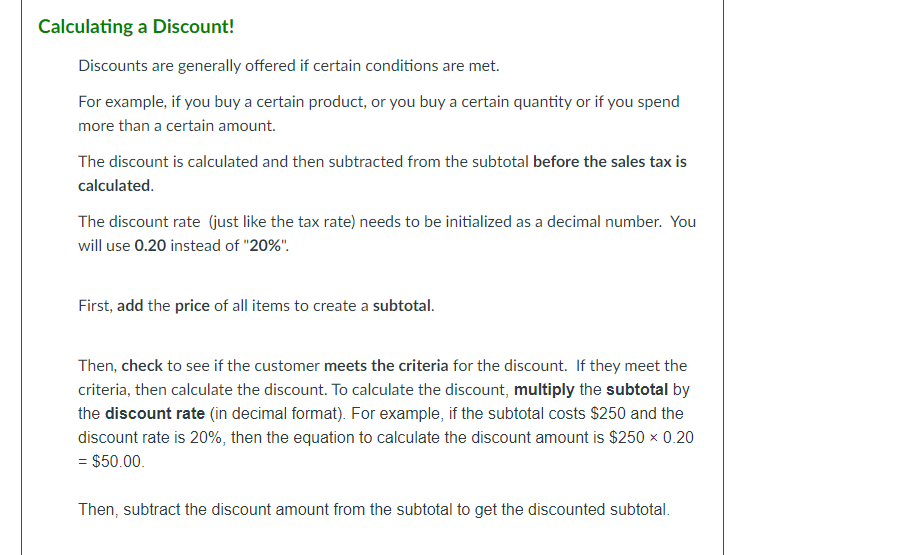
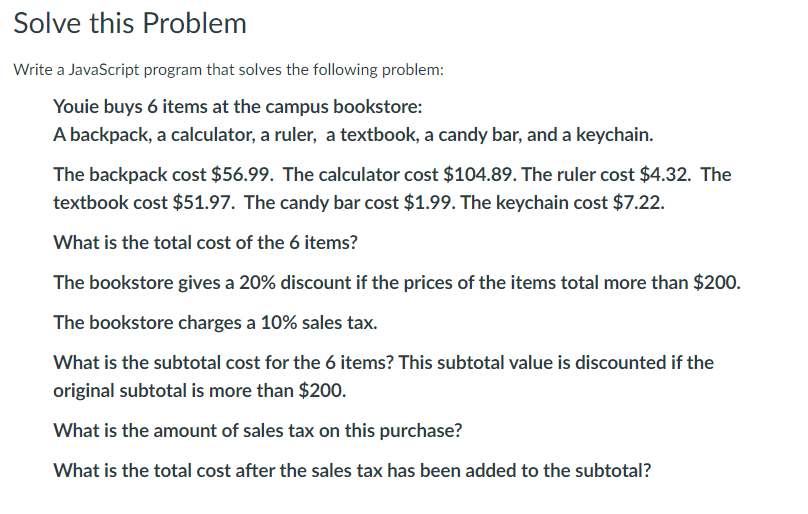
Calculating a Discount! Discounts are generally offered if certain conditions are met. For example, if you buy a certain product, or you buy a certain quantity or if you spend more than a certain amount. The discount is calculated and then subtracted from the subtotal before the sales tax is calculated. The discount rate (just like the tax rate) needs to be initialized as a decimal number. You will use 0.20 instead of "20%". First, add the price of all items to create a subtotal. Then, check to see if the customer meets the criteria for the discount. If they meet the criteria, then calculate the discount. To calculate the discount, multiply the subtotal by the discount rate (in decimal format). For example, if the subtotal costs $250 and the discount rate is 20%, then the equation to calculate the discount amount is $250 x 0.20 = $50.00 Then, subtract the discount amount from the subtotal to get the discounted subtotal. Solve this problem Write a JavaScript program that solves the following problem: Youie buys 6 items at the campus bookstore: A backpack, a calculator, a ruler, a textbook, a candy bar, and a keychain. The backpack cost $56.99. The calculator cost $104.89. The ruler cost $4.32. The textbook cost $51.97. The candy bar cost $1.99. The keychain cost $7.22. What is the total cost of the 6 items? The bookstore gives a 20% discount if the prices of the items total more than $200. The bookstore charges a 10% sales tax. What is the subtotal cost for the 6 items? This subtotal value is discounted if the original subtotal is more than $200. What is the amount of sales tax on this purchase? What is the total cost after the sales tax has been added to the subtotal
Step by Step Solution
There are 3 Steps involved in it

Get step-by-step solutions from verified subject matter experts
 Study Help