







Question: JAVASCRIPT The validCredentials() function contains two parallel arrays of usernames and passwords. Modify validCredentials() to use the .indexOf () method to search the usernames array
JAVASCRIPT
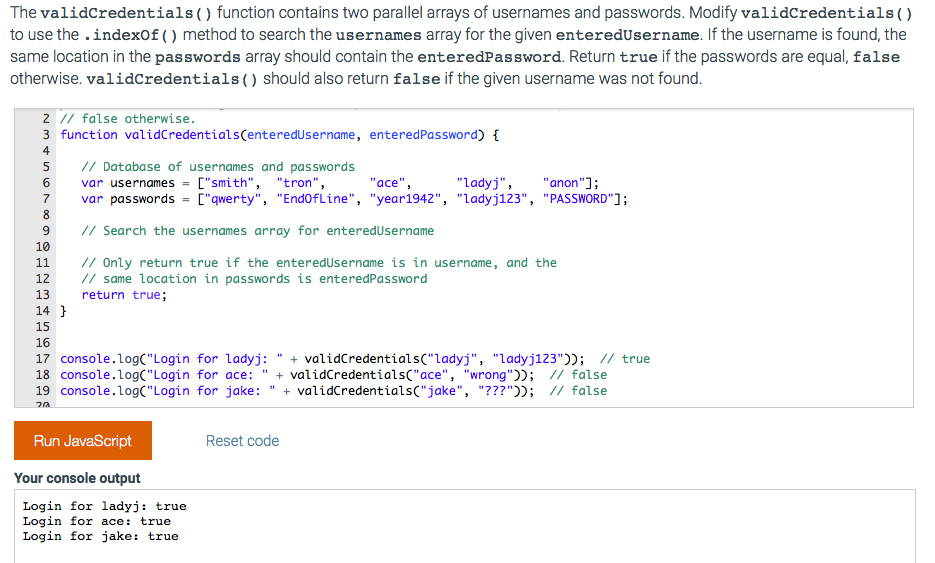
The validCredentials() function contains two parallel arrays of usernames and passwords. Modify validCredentials() to use the .indexOf () method to search the usernames array for the given enteredUsername. If the username is found, the same location in the passwords array should contain the enteredPassword. Return true if the passwords are equal, false otherwise. validCredentials() should also return false if the given username was not found 2 I false otherwise 3 function validCredentialsCenteredUsername, enteredPassword) 4 5// Database of usernames and passwords 6 var usernames = ["smith", "tron", 7 var passwords = ["qwerty", "End0fL ine", "year1942", "1adyj123", ace" "ladyj", "anon"]; "PASSWORD"); 9 I Search the usernames array for enteredUsername 10 11 // Only return true if the enteredUsername is in username, and the 12 // same location in passwords is enteredPassword 13 return true 15 17 console.log(" Login for ladyj:"validCredentialsC"Ladyj", "ladyj123)); // true 18 console.log("Login for ace: " validCredentialsC"ace", "wrong"); // false 19 console.log("Login for jake: " validCredentialsC"jake", "???"); // false Run JavaScript Reset code Your console output Login for ladyj: true Login for ace: true Login for jake: true
The validCredentials() function contains two parallel arrays of usernames and passwords. Modify validCredentials() to use the .indexOf () method to search the usernames array for the given enteredUsername. If the username is found, the same location in the passwords array should contain the enteredPassword. Return true if the passwords are equal, false otherwise. validCredentials() should also return false if the given username was not found 2 I false otherwise 3 function validCredentialsCenteredUsername, enteredPassword) 4 5// Database of usernames and passwords 6 var usernames = ["smith", "tron", 7 var passwords = ["qwerty", "End0fL ine", "year1942", "1adyj123", ace" "ladyj", "anon"]; "PASSWORD"); 9 I Search the usernames array for enteredUsername 10 11 // Only return true if the enteredUsername is in username, and the 12 // same location in passwords is enteredPassword 13 return true 15 17 console.log(" Login for ladyj:"validCredentialsC"Ladyj", "ladyj123)); // true 18 console.log("Login for ace: " validCredentialsC"ace", "wrong"); // false 19 console.log("Login for jake: " validCredentialsC"jake", "???"); // false Run JavaScript Reset code Your console output Login for ladyj: true Login for ace: true Login for jake: true
Step by Step Solution
There are 3 Steps involved in it

Get step-by-step solutions from verified subject matter experts
 Study Help