







Question: Just need a little help with the source code here. It has to do with android mobile app development. Theres 3 activity here and when
Just need a little help with the source code here. It has to do with android mobile app development. Theres 3 activity here and when i type in CS4322 or cs4322, the typed course (cs4322) should show in second activity. it should get that data from first activity, not typed manually. I just can't get the second page to show the typed input from first page. I will post the source code for all 3 activity.
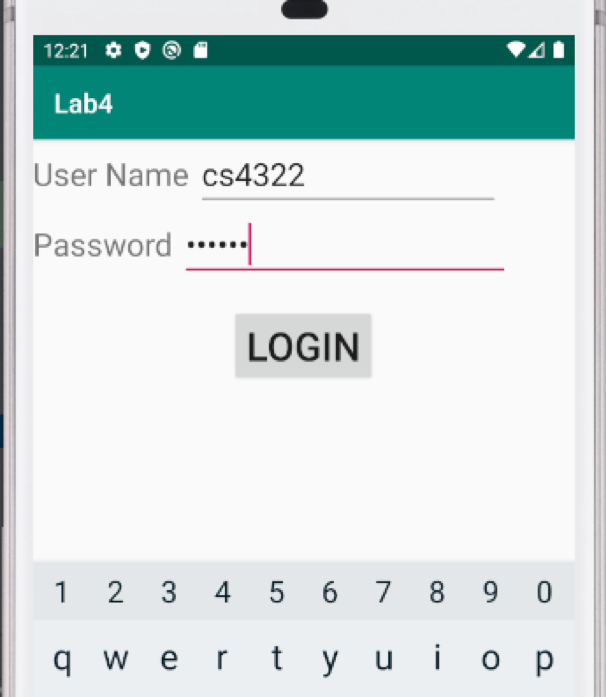
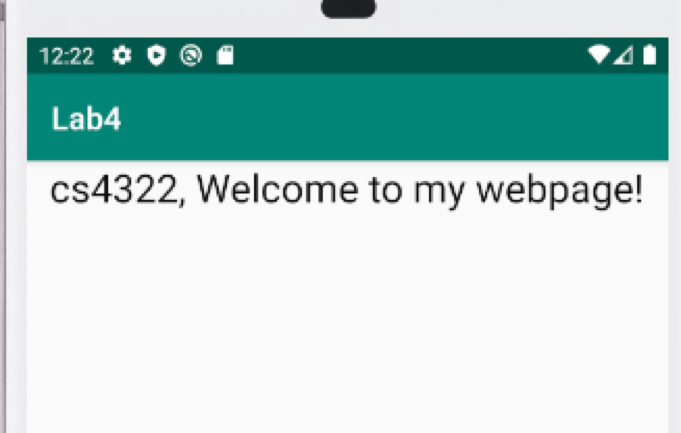
It shows cs4322 here but thats because i put that manually in the layout page textview.
MainActivity (First Activity)
import androidx.appcompat.app.AppCompatActivity; import android.os.Bundle; import android.content.Intent; import android.view.View; import android.widget.Button; import android.widget.EditText; public class MainActivity extends AppCompatActivity { EditText et1,et2; Button b; @Override protected void onCreate(Bundle savedInstanceState) { super.onCreate(savedInstanceState); setContentView(R.layout.activity_main); et1=findViewById(R.id.et1); et2=findViewById(R.id.et2); b=findViewById(R.id.b); b.setOnClickListener(new View.OnClickListener() { @Override public void onClick(View view) { String name=et1.getText().toString(); String password=et2.getText().toString(); Intent i=new Intent(getApplicationContext(),Second_Activity.class); Intent i1=new Intent(getApplicationContext(),Third_Activity.class); if(name.equals("cs4322") && password.equals("123456")) { startActivity(i); } else { startActivity(i1); } } }); } } Second_Activity (SecondActivity)
package com.example.lab4; import androidx.appcompat.app.AppCompatActivity; import android.os.Bundle; public class Second_Activity extends AppCompatActivity { @Override protected void onCreate(Bundle savedInstanceState) { super.onCreate(savedInstanceState); setContentView(R.layout.second_page); } } Third_Activity (ThirdActivity)
package com.example.lab4; import androidx.appcompat.app.AppCompatActivity; import android.content.Intent; import android.os.Bundle; import android.view.View; import android.widget.Button; public class Third_Activity extends AppCompatActivity { Button btn; @Override protected void onCreate(Bundle savedInstanceState) { super.onCreate(savedInstanceState); setContentView(R.layout.third_page); btn=findViewById(R.id.btn); btn.setOnClickListener(new View.OnClickListener() { @Override public void onClick(View view) { Intent i=new Intent(getApplicationContext(),MainActivity.class); startActivity(i); } }); } }
12:21 O Lab4 User Name cs4322 Password ...... LOGIN 1 2 3 4 5 6 7 8 9 0 qwertyuiop 12:22 O @ Lab4 cs4322, Welcome to my webpage
Step by Step Solution
There are 3 Steps involved in it

Get step-by-step solutions from verified subject matter experts
 Study Help