







Question: JUST NEED SQL STATEMENTS. SELECT * FROM dictionary; to find all available dictionary views. 1. Find all tables that keep information about roles. 2. Use
JUST NEED SQL STATEMENTS.
SELECT * FROM dictionary; to find all available dictionary views.
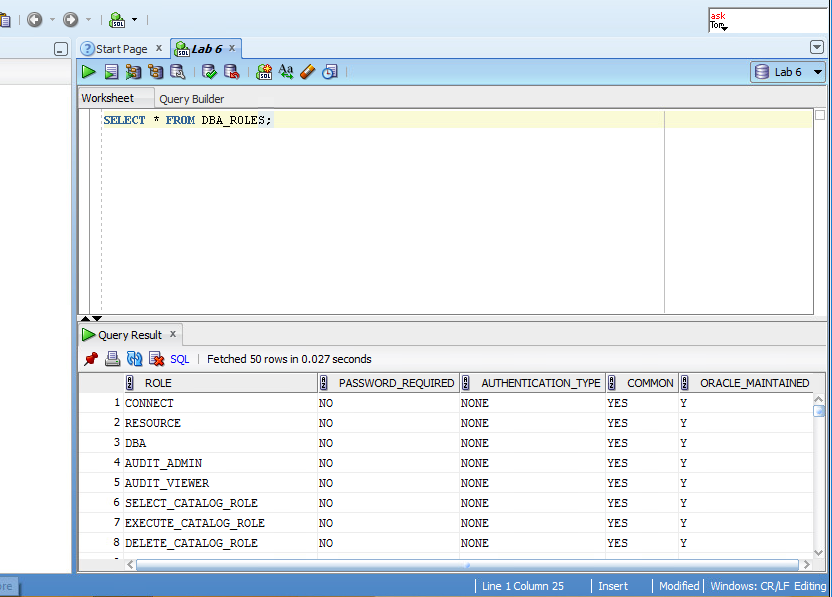
1. Find all tables that keep information about roles.
2. Use found tables to check what privileges does role CONNECT have?
3. Find all dictionary views that contain information about indexes.
4. How many indexes are defined on DVSYS.RULE_SET_RULE$ table? (Hint: all views have meaningful name, just search the page)
5. For each index you found in #3 how many distinct keys?
6. Describe the purpose of V$THREAD . Use V$THREAD to find enable time and las redo time.
7. Describe the purpose of V$BACKUP . Use V$BACKUP to find details about backups.
8. Find V$... view that will tell you what size of the following data types: DOUBLE, FLOAT, BOOLEAN
9. Use V$...stat views to find information about "free memory" and "DB time"
Hint: DB time is system parameter free memory is SGA (System Global Area) parameter
10. From your standpoint what is the most useful Oracle data dictionary view/table/procedure.
Start Page x La6 x Lab 6 Worksheet Query Builder SELECTFROM DBA ROLES; Query Result x 13 GBI | sQL | Fetched 50 rows in 0.027 seconds ROLE PASSWORDREQUIRED AUTHENTICATION-TYPE| COMMONg ORACLE-MAINTAINED 1 CONNECT 2 RESOURCE 3 DBA 4 AUDIT ADMIN 5 AUDIT VIEWER 6 SELECT_CATALOG_ROLE 7 EXECUTE CATALOG ROLE 8 DELETE CATALOG ROLE NO NO NO NO NO NO NO NO Line 1 Column 25 Insert Modified Windows: CR/LF Editing re Start Page x La6 x Lab 6 Worksheet Query Builder SELECTFROM DBA ROLES; Query Result x 13 GBI | sQL | Fetched 50 rows in 0.027 seconds ROLE PASSWORDREQUIRED AUTHENTICATION-TYPE| COMMONg ORACLE-MAINTAINED 1 CONNECT 2 RESOURCE 3 DBA 4 AUDIT ADMIN 5 AUDIT VIEWER 6 SELECT_CATALOG_ROLE 7 EXECUTE CATALOG ROLE 8 DELETE CATALOG ROLE NO NO NO NO NO NO NO NO Line 1 Column 25 Insert Modified Windows: CR/LF Editing re
Step by Step Solution
There are 3 Steps involved in it

Get step-by-step solutions from verified subject matter experts
 Study Help