







Question: Just need the code for the GUI. Attached is an incomplete Python template file. checkbox_ counter Q.py Download this file and complete it to solve
Just need the code for the GUI.
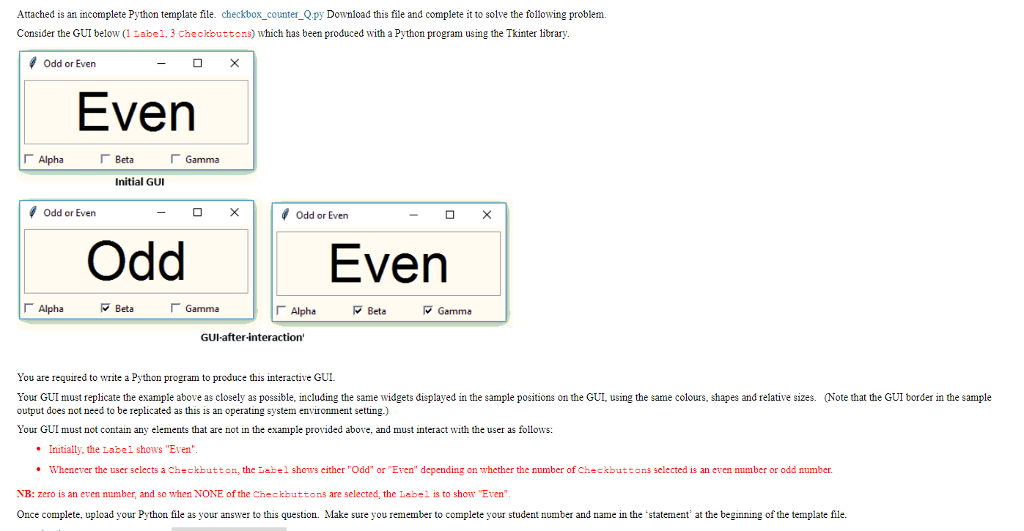
Attached is an incomplete Python template file. checkbox_ counter Q.py Download this file and complete it to solve the following problem Consider the GUI below (1 Label, 3 Checkbuttons) which has been produced with a Python program using the Tkinter library Odd or Even Even Alpha ?Beta Gamma Initial GUI Odd or Even Odd or Even Odd Even Alpha Beta Gamma ?Alpha Beta ?Gamma GUI-after-interaction You are required to wite a Python program to produce this interactive GUI Your GUI must replicate the example above as closely as possible, including the same widgets displayed in the sample positions on the GUI using the same colours, shapes and relative sizes. Note that the GUI border in the sample output does not need to be replicated as this is an operating system envionment setting.) Your GUI must not contain any elements that are not in the example provided above, and must interact with the use as follows: Initially, the Label shows "Even" Whenever the user selects a Checkbutton, the Label shows either "Odd" or "Even" depending on whether the number of checkbuttons selected is an even number or odd number. NB: zero is an even number, and so when NONE of the Checkbuttons are selected, the Label is to show Even" Once complete, upload your Python file as your answer to this question. Make sure you remember to complete your student number and name in the statement' at the beginning of the template file
Step by Step Solution
There are 3 Steps involved in it

Get step-by-step solutions from verified subject matter experts
 Study Help