







Question: just the formulas please! cell range ex A 2 :A 1 1 3 2 5 . Employees with Years of Service longer than ten will
just the formulas please!
cell range ex A:A
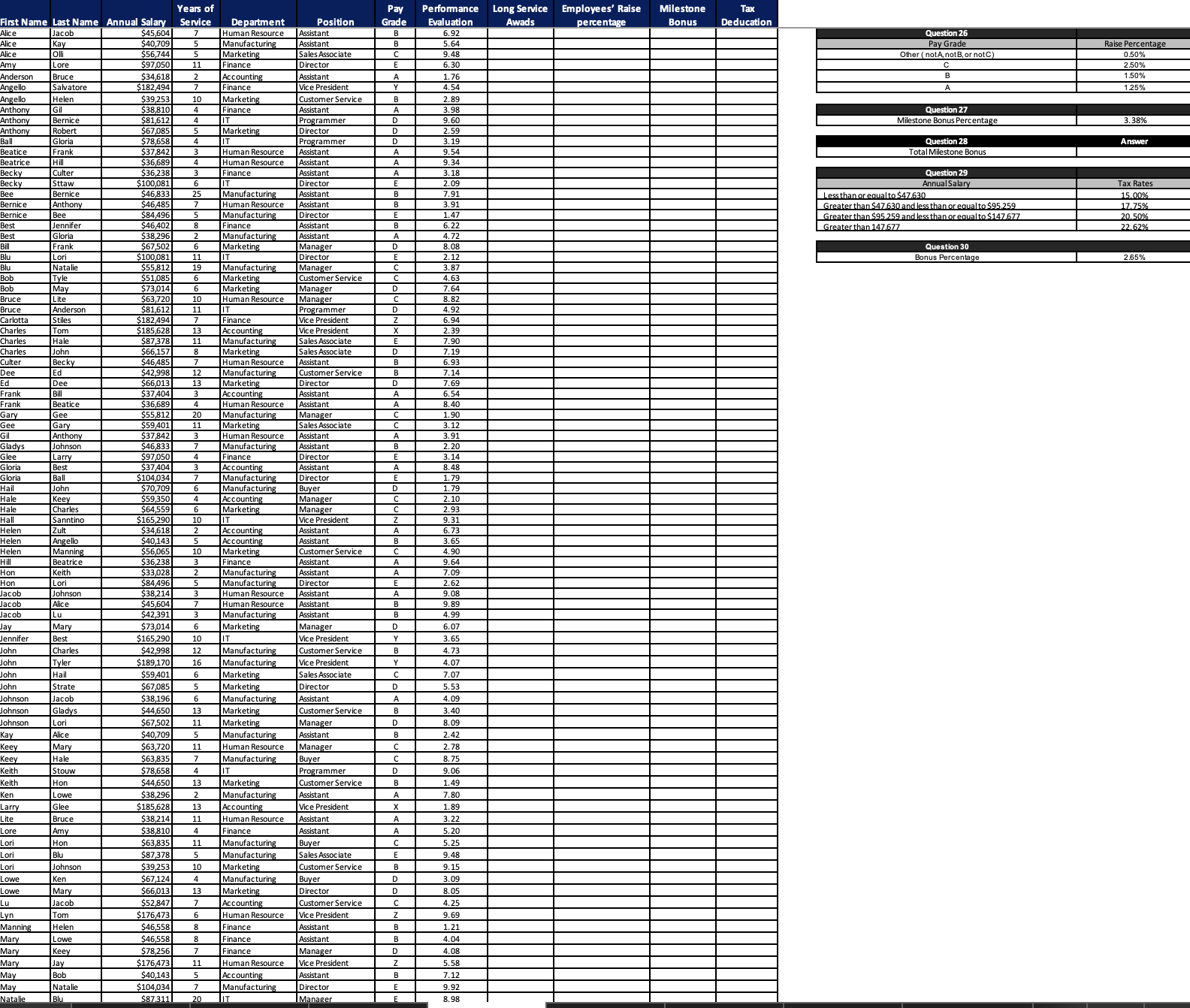
Employees with Years of Service longer than ten will receive Long Service
Awards. Use the Logical function to determine who qualifies for the
awards in the Long Service Awards column. If so show Yes. Otherwise,
indicate No marks
Refer to Tutorial Q
Employees' Raise percentage determines by their Pay Grade. See the
Question table in the Q Worksheet. Use the Logical function to
determine the Employee's Raise percentage in the Employees' Raise
percentage column. marks
Refer to Tutorial Q
Hint: This question requires three If functions to solve it
The first If function checks whether the employee is a Pay Grade A If
so it returns If not, go to the second if function.
The second If function checks whether the employee is a Pay Grade B
If so it returns If not, go to the third if function
The third If function checks whether the employee is a Pay Grade C If
so it returns If not, it will return because it is not A B or C
Remember to use the Absolute Cell Reference for the Range
Employees will receive a milestone bonus for or Years of
Service. In Milestone Bonus column uses the Logical function to calculate
Milestone Bonus Milestone Bonus Annual Salary Milestone Bonus
Percentage for the eligible employees. For ineligible employees, the
milestone bonus will equal $ Milestone Bonus Percentage can be found
in the Q Worksheet.
Change the column category to Currency and set decimal to marks
Hint: This question requires using the If with Or function to solve it
Start with the If function. In the LogicalTest field, use Or function to create
the logictest, similar to Tutorial Q In the Valueiftrue field, return
the calculation value. In the Valueiffalse field, return $
iflogicaltest,valueiftrue,valueiffalse
logicaltest: Or D D D D
valueiftrue: Annual Salary Milestone Bonus Percentage
valueiffalse:
Remember to use the Absolute Cell Reference for the Milestone Stone
Percentage
The Board of Directors wants to keep the total Milestone Bonus equal to
$ Use the Solver function to find the Milestone Bonus percentage
to meet the $ target. marks
Refer to Tutorial Q
Hint: First, determine the Total Milestone Bonus. Then use the Solver
function to find the Milestone Bonus percentage that will meet the $
target.
To use the Solver function to solve the Milestone Bonus Percentage, you
must use the Absolute Cell Reference for the Milestone Stone Percentage in
Question
Use the Logical function to calculate Tax Deduction for each employee in
the Tax Deduction column.
Tax Deduction Annual Salary Tax Rate.
The Annual Salary determines the Tax Rate. See Question table in
Q Worksheet. marks
Annual Salary Tax Rates
Less than or equal to $
Greater than $ and less than or equal to $
Greater than $ and less than or equal to $
Greater than
Refer to Tutorial Q
Employees who belong to Pay Grade B C or D have over Years of
Service, and are in the Finance or Marketing department, will receive a
Bonus. Using the Logical functions determines the Bonus Bonus Annual
Salary Bonus Percentage
Please find the Bonus Percentage in the Q Worksheet. If the
employee doesn't match the criteria, the Bonus will equal $
Insert a new column on the left of the Tax Deduction; name the column
with the heading "Bonus." Change the column category to Currency and
set decimal to marks
Refer Tutorial Q
Hint: First, determine all the criteria. Then use if and, or functions to
combine all the requirements.
Here are the requirements:
Paygarde is B C or D
Years of Service
Finance or Marketing department
Step by Step Solution
There are 3 Steps involved in it
1 Expert Approved Answer
Step: 1 Unlock

Question Has Been Solved by an Expert!
Get step-by-step solutions from verified subject matter experts
Step: 2 Unlock
Step: 3 Unlock
 Study Help