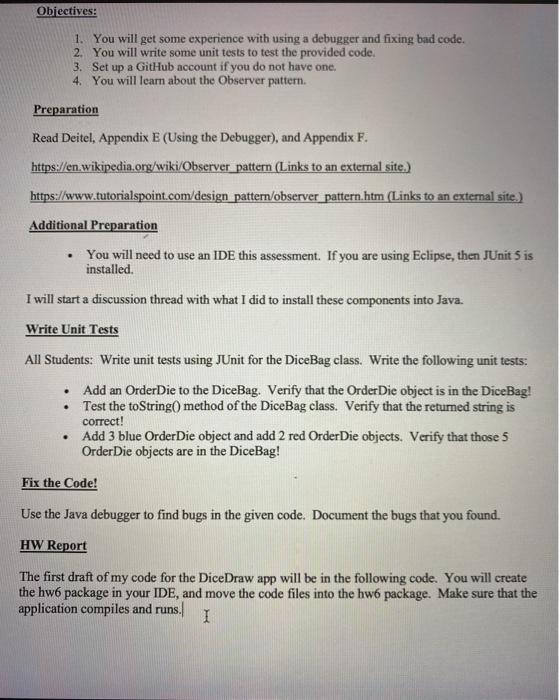
Question: just write the code in javaScript by fixing the following code please. Following the instruction Objectives: 1. You will get some experience with using a
 just write the code in javaScript by fixing the following code
please. Following the instruction Objectives: 1. You will get some experience with
using a debugger and fixing bad code. 2. You will write some
unit tests to test the provided code. 3. Set up a GitHub
account if you do not have one, 4. You will learn about
the Observer pattern. Preparation Read Deitel, Appendix E (Using the Debugger), and
Appendix F. https://en.wikipedia.org/wiki/Observer pattern (Links to an external site.) https://www.tutorialspoint.com/design pattern/observer pattern.htm
(Links to an external site.) Additional Preparation You will need to use
just write the code in javaScript by fixing the following code please. Following the instruction

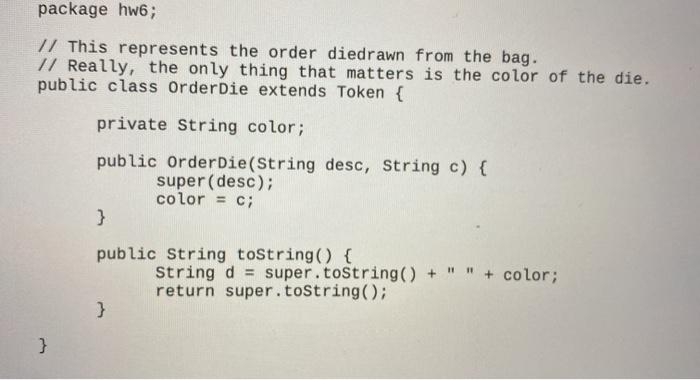
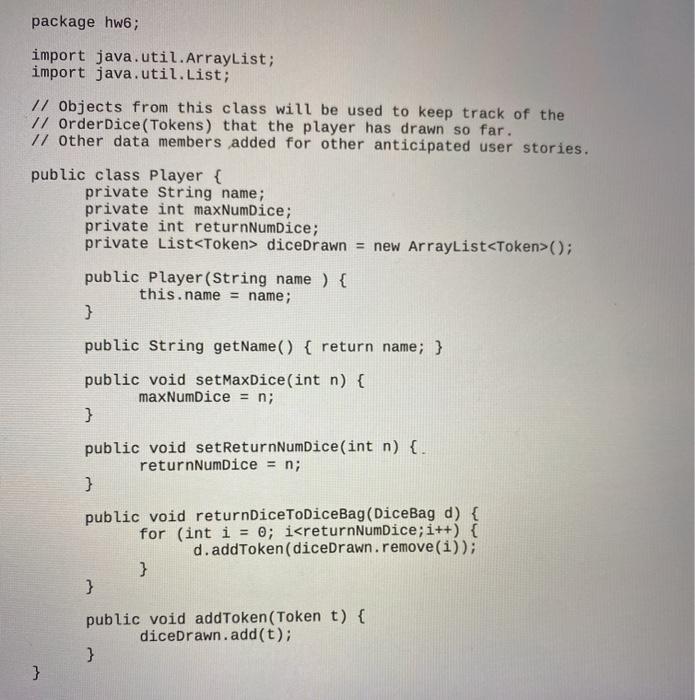
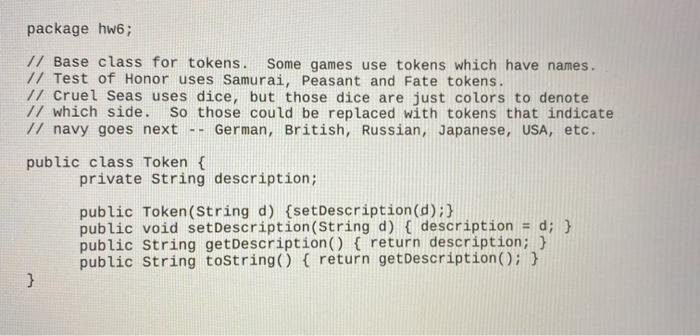
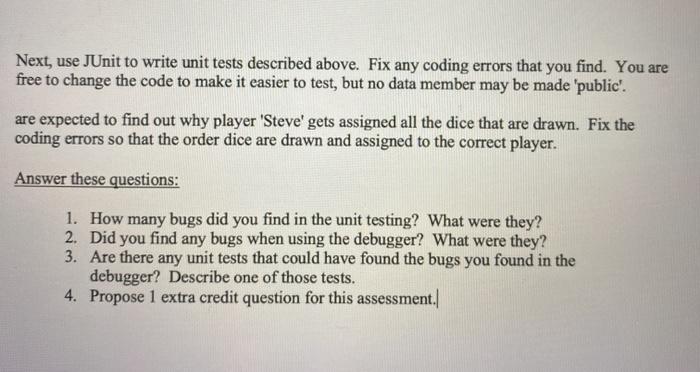
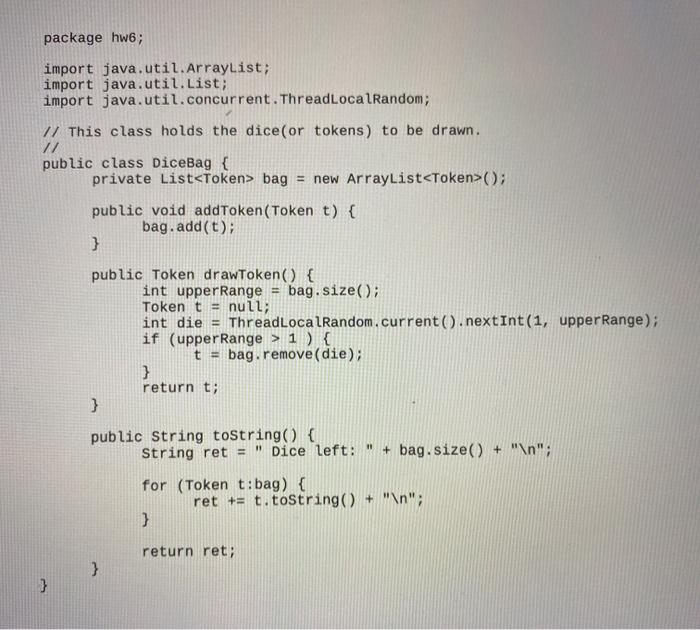
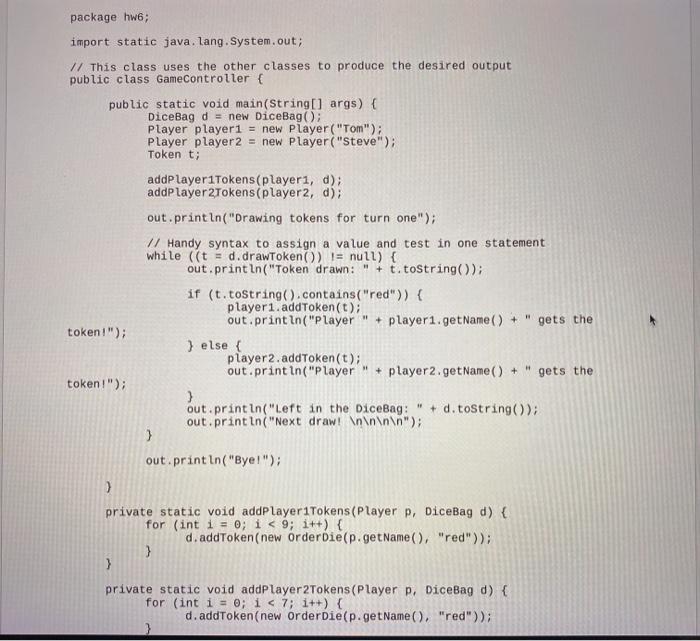
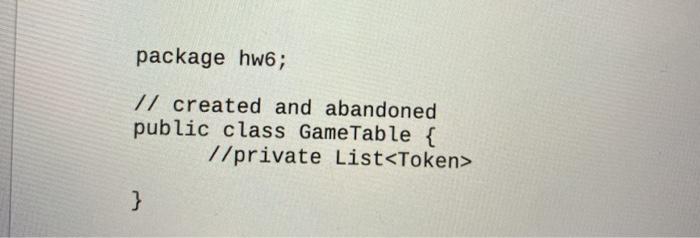
Objectives: 1. You will get some experience with using a debugger and fixing bad code. 2. You will write some unit tests to test the provided code. 3. Set up a GitHub account if you do not have one, 4. You will learn about the Observer pattern. Preparation Read Deitel, Appendix E (Using the Debugger), and Appendix F. https://en.wikipedia.org/wiki/Observer pattern (Links to an external site.) https://www.tutorialspoint.com/design pattern/observer pattern.htm (Links to an external site.) Additional Preparation You will need to use an IDE this assessment. If you are using Eclipse, then JUnit 5 is installed. I will start a discussion thread with what I did to install these components into Java. Write Unit Tests All Students: Write unit tests using JUnit for the DiceBag class. Write the following unit tests: Add an Order Die to the DiceBag. Verify that the Order Die object is in the DiceBag! Test the toString() method of the DiceBag class. Verify that the returned string is correct! Add 3 blue Order Die object and add 2 red Order Die objects. Verify that those 5 Order Die objects are in the DiceBag! . Fix the Code! Use the Java debugger to find bugs in the given code. Document the bugs that you found. HW Report The first draft of my code for the DiceDraw app will be in the following code. You will create the hw6 package in your IDE, and move the code files into the hwo package. Make sure that the application compiles and runs. I package hw6; import java.util.ArrayList; import java.util.List; import java.util.concurrent.ThreadLocalRandom; // This class holds the dice(or tokens) to be drawn. // public class DiceBag { private List bag = new ArrayList(); public void addToken (Token t) { bag.add(t); } public Token drawToken() { int upper Range bag.size(); Token t = null; int die = ThreadLocalRandom.current().nextInt(1, upper Range); if (upper Range > 1 ) { t = bag.remove(die); } return t; } public String toString() { String ret = " Dice left: " + bag.size() + " "; for (Token t:bag) { ret += t.toString() + " "; } return ret; } } package hw6; import static java.lang. System.out; // This class uses the other classes to produce the desired output public class GameController { public static void main(String[] args) { DiceBag d = new DiceBag(); Player player1 = new Player("Tom"); Player player2 = new Player("Steve"); Token t; addPlayeriTokens(playeri, d); addPlayer 2Tokens(player2, d); out.println("Drawing tokens for turn one"); // Handy syntax to assign a value and test in one statement while ((t = d.drawToken()) != null) { out.println("Token drawn: " + t.toString()); if (t.toString().contains("red")) { player1.addToken(t); out.println("Player + player1.getName() + " gets the token!"); } else { player 2.addToken(t); out.println("Player + player2.getName() + " gets the token!"); ) out.println("left in the DiceBag: " + d.toString(); out.println("Next draw! "); } out.println("Bye!"); ) private static void addPlayer1Tokens (Player P, DiceBag d) { for (int i = 0; i } package hw6; // This represents the order diedrawn from the bag. // Really, the only thing that matters is the color of the die. public class OrderDie extends Token { private String color; public orderDie(String desc, String c) { super (desc); color = c; } public String toString() { String d = super.toString() + " " + color; return super.toString(); } } package hw6; import java.util.ArrayList; import java.util.List; 1/ Objects from this class will be used to keep track of the // OrderDice(Tokens) that the player has drawn so far. // Other data members added for other anticipated user stories. public class Player { private String name; private int maxNumDice; private int returnNumDice; private List diceDrawn = new ArrayList(); public player (String name ) { this.name = name; } public String getName() { return name; } public void setMaxDice(int n) { maxNumDice = n; } public void setReturnNumDice(int n) {. returnNumDice = n; 3 public void returnDiceToDiceBag (DiceBag d) { for (int i = 0; i
Step by Step Solution

There are 3 Steps involved in it

1 Expert Approved Answer
Step: 1 Unlock blur-text-image
Question Has Been Solved by an Expert!

Get step-by-step solutions from verified subject matter experts

Step: 2 Unlock
Step: 3 Unlock

Students Have Also Explored These Related Databases Questions!