



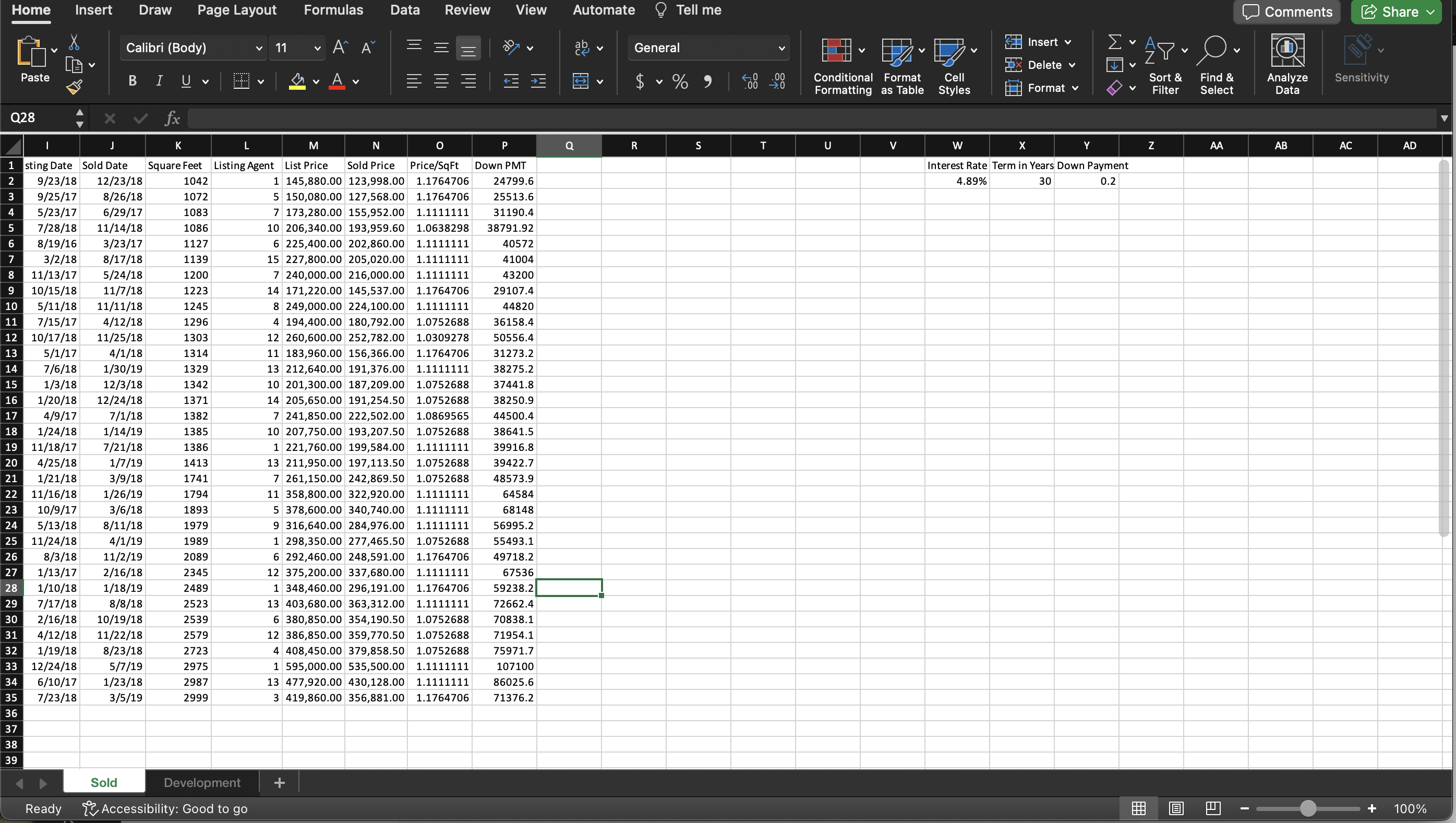
Question: k . Enter Days on MKT in cell Q 1 . Then create a formula to calculate the number of days each property was
k Enter "Days on MKT in cell Q Then create a formula to calculate the number of
days each property was on the market. The time on the market is the sold date
minus the listing date. CopyPaste or fill this formula to the remaining cells in
column for the details of property listings.
I. Enter "Monthly Payment" in cell R Using the PMT function, create a formula in
cell R to calculate the monthly mortgage payment for each property. In the PMT
function, you need to divide the annual interest by for the first argument. For
the second argument, you need to multiply the loan term in years by In the
third argument, you need to use the sold price minus the down payment. Edit the
formula to display positive numbers by multiplying the result by CopyPaste or
fill this formula to the remaining cells in column for the details of property
listings.
m Enter "Monthly Taxes" in cell S Enter a formula in cell S to calculate the monthly
taxes. Since each development has a different tax rate, you need to use the
VLookup function with the Development ID to retrieve the development's Tax Rate
from the Development worksheet. This lookup is exact, so you need to use FALSE
for the fourth argument of the VLOOKUP function. To determine the actual tax,
multiply the tax rate by the sold price, and divide the tax by To reference a
lookup table on a different worksheet, click on the worksheet tab that contains the
lookup table, select the range, type a comma and then click the original
worksheet tab. Edit the formula to use a mixed reference for the lookup table to fix
the rows. CopyPaste or fill this formula to the remaining cells in column for the
details of property listings.
n Enter "Monthly Insurance" in cell T Enter a formula in cell T to calculate the
monthly insurance. Since insurance cost varies by development, you should use the
Vlookup function with the Development ID to retrieve the insurance rate from the
Development worksheet. This lookup is exact, so you need to use FALSE for the
fourth argument of the VLOOKUP function. To determine the monthly insurance
amount, multiply the insurance rate by the sold price and divide by Edit the
formula to use a mixed reference for the lookup table to fix the rows. CopyPaste
or fill this formula to the remaining cells in column for the details of property
listings.
o Enter "Total Payment" in cell U Create a formula in cell U to add the monthly tax
and insurance to the monthly payment to determine the total payment for the new
home. CopyPaste or fill this formula to the remaining cells in column for the
details of property listings.
p In the Sold worksheet, ensure that your columns are sufficiently wide to display
their content fully. You may need to hide column E again. Wrap the text in the
header rows on each worksheet if desired. Format the workbook professionally.
Format all cells containing dollar amount values using the Currency Number Format
with two decimal digits displayed except for listing and sold prices with no decimal
digits. Format the square foot values with a comma and no decimal places. Format
down payment Y as a percentage with no decimal places.
Step by Step Solution
There are 3 Steps involved in it
1 Expert Approved Answer
Step: 1 Unlock

Question Has Been Solved by an Expert!
Get step-by-step solutions from verified subject matter experts
Step: 2 Unlock
Step: 3 Unlock