







Question: Kindly use Processing to solve the following question. ASSIGNMENT 3: Two sided (forward and reverse) chronometer DEPARTMENT AND COURSE NUMBER: COMP 1010 COURSE TITLE: Introduction
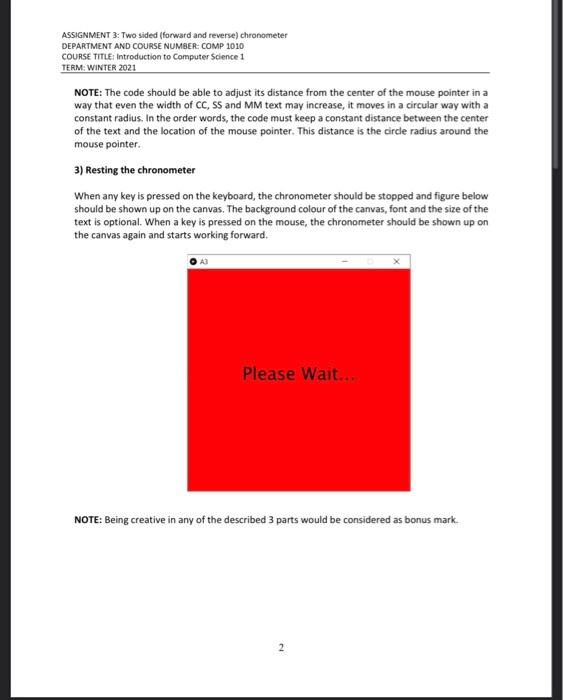
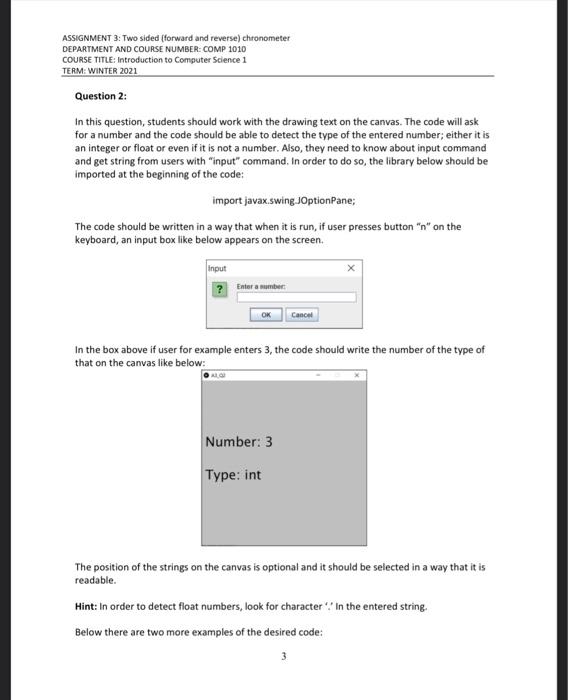
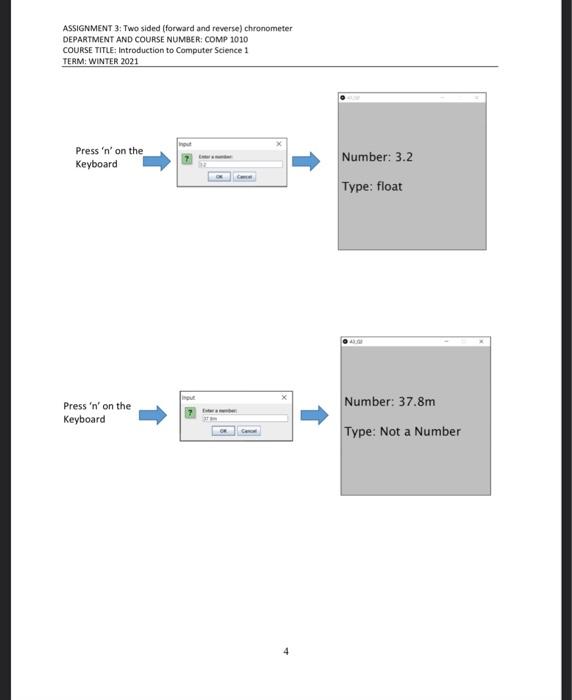
ASSIGNMENT 3: Two sided (forward and reverse) chronometer DEPARTMENT AND COURSE NUMBER: COMP 1010 COURSE TITLE: Introduction to Computer Science 1 TERM: WINTER 2021 Assignment 3: Two sided (forward and reverse) chronometer DUE DATE:MARCH 14", 2021 AT 11:55PM Notes: Name your sketches using your name, the assignment number, and the question number, cactly as in this example: LastnameFirstnameA3Q1 Your program for each question must run upon download to receive any marks Submit one PDE file for each question Assignments must follow the programming standards document published on the course website on Moodle These assignments are your chance to learn the material for the exams. Code your tigrements independently We review and compare all submitted assignments to each other, and pursue academic disbenestly vigorously. Question 1: The aim of this question is designing a chronometer that can work both forward and reverse and shows different portions of the time. In this assignment, it is expected that students use different concepts that they have learned so far, particularly writing condition blocks and drawing texts in the canvas. This assignment is coming with a video guidance. Depends on the portion of each part that students answer, they will get mark. This assignment consists of 3 major parts: 1) Building chronometer working forward and reverse, 2) Showing the chronometer moving around the mouse pointer 3) Resting the chronometer 1) Building chronometer working forward and reverse In order to build a chronometer, we have to first build 1/60 (s) time counter. By default when the code is run, the chronometer should count forward every 1/60 of second. When a mouse key is pressed, the chronometer will start counting reverse. The chronometer style is: HH:MM:SS.CC, where HH,MM,SS and CC show 2 digits hours, minutes, seconds and 1/60 seconds respectively. When the chronometer is counting reversely and reaches zero, it should not be negative. It means that when the chronometer is reduced to get negative values, its value should be stopped on zero. 2) Showing the chronometer moving around the mouse pointer In the forward mode, each second that passes, the numbers of chronometer should pass 1 complete circle around the mouse pointer in a circular clockwise direction. If the mouse key is pressed, the chronometer should start counting reverse from the last value that it had and starts rotating around the mouse pointer in a circular counter clockwise direction. ASSIGNMENT 3: Two sided (forward and reverse) chronometer DEPARTMENT AND COURSE NUMBER: COMP 1010 COURSE TITLE: Introduction to Computer Science 1 TERM: WINTER 2021 NOTE: The code should be able to adjust its distance from the center of the mouse pointer in a way that even the width of CC, SS and MM text may increase, it moves in a circular way with a constant radius. In the order words, the code must keep a constant distance between the center of the text and the location of the mouse pointer. This distance is the circle radius around the mouse pointer. 3) Resting the chronometer When any key is pressed on the keyboard, the chronometer should be stopped and figure below should be shown up on the canvas. The background colour of the canvas, font and the size of the text is optional. When a key is pressed on the mouse, the chronometer should be shown up on the canvas again and starts working forward. Please Wait.. NOTE: Being creative in any of the described 3 parts would be considered as bonus mark 2 ASSIGNMENT 3: Two sided (forward and reverse) chronometer DEPARTMENT AND COURSE NUMBER: COMP 1010 COURSE TITLE: Introduction to Computer Science 1 TERM: WINTER 2021 Question 2: In this question, students should work with the drawing text on the canvas. The code will ask for a number and the code should be able to detect the type of the entered number; either it is an integer or float or even if it is not a number. Also, they need to know about input command and get string from users with "input" command. In order to do so, the library below should be imported at the beginning of the code: import javax.swing JOptionPane; The code should be written in a way that when it is run, if user presses button "n" on the keyboard, an input box like below appears on the screen. input ? Enter a number OK Cance In the box above if user for example enters 3, the code should write the number of the type of that on the canvas like below: Number: 3 Type: int The position of the strings on the canvas is optional and it should be selected in a way that it is readable. Hint: In order to detect float numbers, look for character in the entered string. Below there are two more examples of the desired code: 3 ASSIGNMENT 3: Two sided (forward and reverse) chronometer DEPARTMENT AND COURSE NUMBER: COMP 1010 COURSE TITLE: Introduction to Computer Science 1 TERM: WINTER 2021 Press 'n' on the Keyboard Number: 3.2 Type: float Press 'n' on the Keyboard Number: 37.8m Type: Not a Number
Step by Step Solution
There are 3 Steps involved in it

Get step-by-step solutions from verified subject matter experts
 Study Help