







Question: king inventory availability 12.4 Excel Project. REQUIRED a. Create a 12-month cash flow budget in Excel using the following assumptions: Initial sales of $5 million,
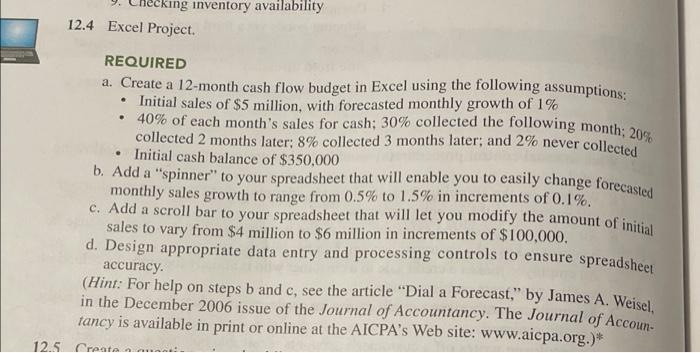

king inventory availability 12.4 Excel Project. REQUIRED a. Create a 12-month cash flow budget in Excel using the following assumptions: Initial sales of $5 million, with forecasted monthly growth of 1% 40% of each month's sales for cash; 30% collected the following month: 20% collected 2 months later: 8% collected 3 months later, and 2% never collected Initial cash balance of $350,000 b. Add a "spinner" to your spreadsheet that will enable you to easily change forecasted monthly sales growth to range from 0.5% to 1.5% in increments of 0.1%. c. Add a scroll bar to your spreadsheet that will let you modify the amount of initial sales to vary from $4 million to $6 million in increments of $100,000. d. Design appropriate data entry and processing controls to ensure spreadsheet accuracy (Hint: For help on steps b and c, see the article "Dial a Forecast," by James A. Weisel, in the December 2006 issue of the Journal of Accountancy. The Journal of Accoun tancy is available in print or online at the AICPA's Web site: www.aicpa.org.)* 12.5 Cresta 13.6 Excel Project a. Expand the cash flow budget you created in Problem 12.4 to include a row for ex- pected cash outflows equal to 77% of the current month's sales. b. Also add a row to calculate the amount of cash that needs to be borrowed in order to maintain a minimum cash balance of $50,000 at the end of each month. c. Add another row to show the cash inflow from borrowing. d. Add another row to show the cumulative amount borrowed. e. Add another row to show the amount of the loan that can be repaid, being sure to maintain a minimum ending balance of $50,000 each month. f. Add appropriate data validation controls to ensure spreadsheet accuracy
Step by Step Solution
There are 3 Steps involved in it

Get step-by-step solutions from verified subject matter experts
 Study Help