







Question: Lab 06 Chapter 7: Arrays Lab Objectives Be able to declare and instantiate arrays Be able to fill an array using a loop Be able
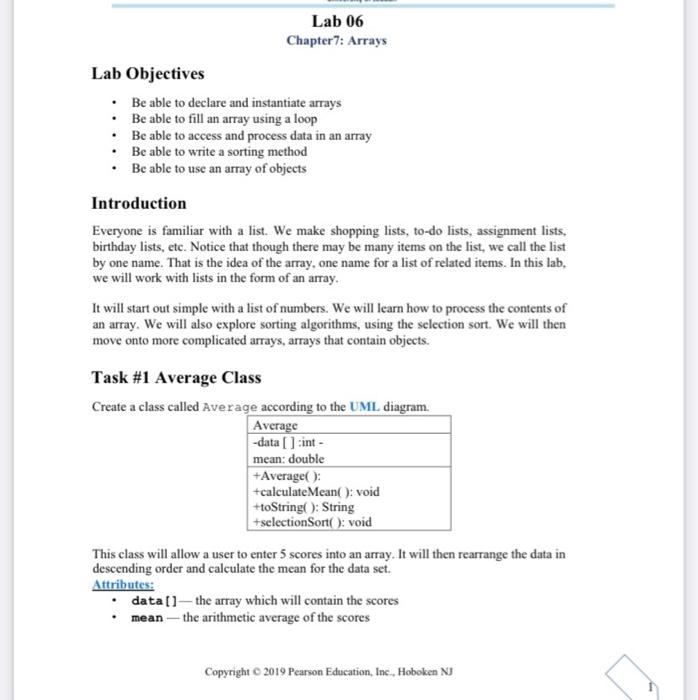
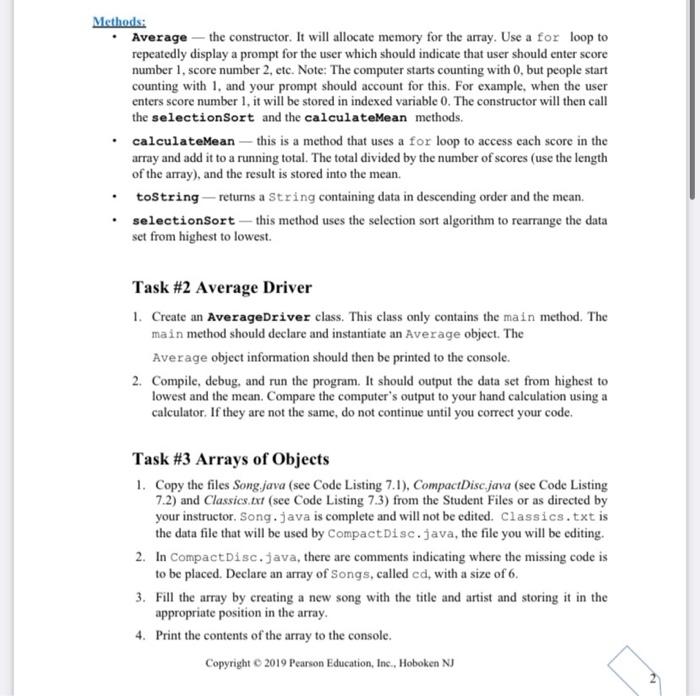
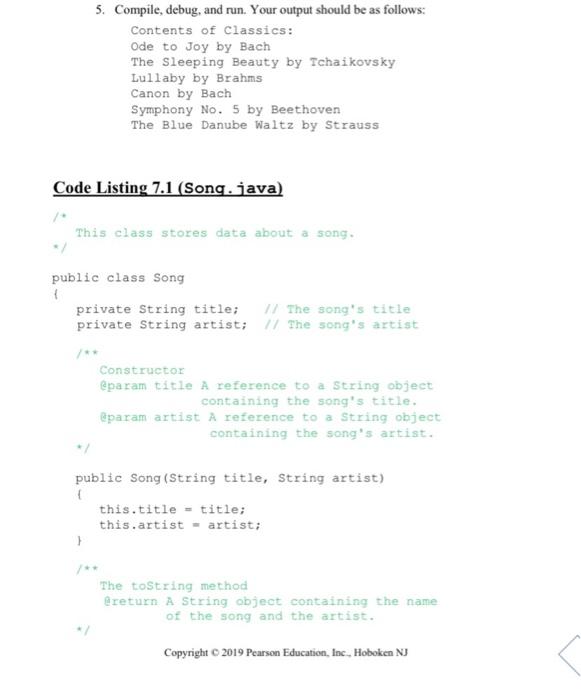
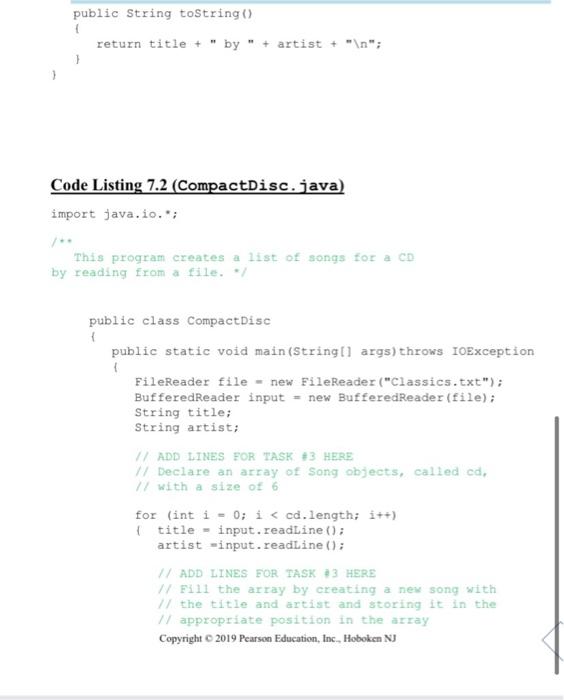
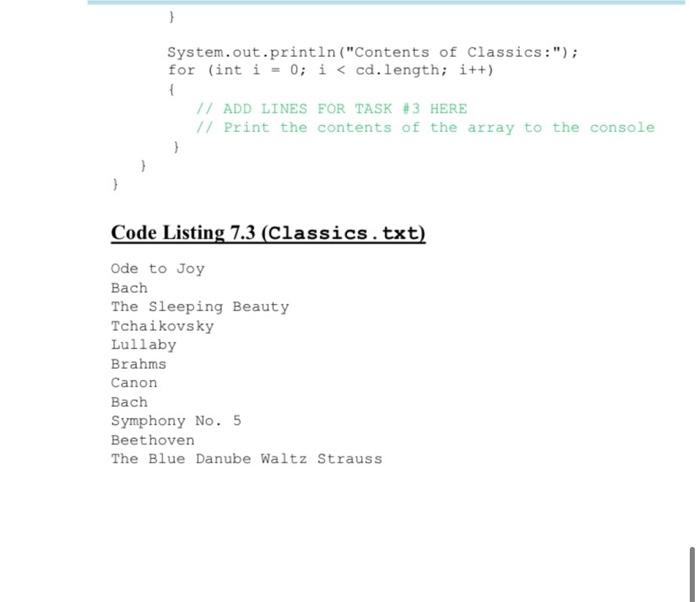
Lab 06 Chapter 7: Arrays Lab Objectives Be able to declare and instantiate arrays Be able to fill an array using a loop Be able to access and process data in an array Be able to write a sorting method Be able to use an array of objects Introduction Everyone is familiar with a list. We make shopping lists, to-do lists, assignment lists, birthday lists, etc. Notice that though there may be many items on the list, we call the list by one name. That is the idea of the array, one name for a list of related items. In this lab, we will work with lists in the form of an array. It will start out simple with a list of numbers. We will learn how to process the contents of an array. We will also explore sorting algorithms, using the selection sort. We will then move onto more complicated arrays, arrays that contain objects. Task #1 Average Class Create a class called Average according to the UML diagram. Average -dataint- mean: double +Average(): +calculate Mean(); void +toString(): String +selectionSort(): void This class will allow a user to enter 5 scores into an array. It will then rearrange the data in descending order and calculate the mean for the data set. Attributes: data[]- the array which will contain the scores mean--the arithmetic average of the scores Copyright 2019 Pearson Education, Inc., Hoboken NJ Methods: Average - the constructor. It will allocate memory for the array. Use a for loop to repeatedly display a prompt for the user which should indicate that user should enter score number 1, score number 2, etc. Note: The computer starts counting with 0, but people start counting with 1, and your prompt should account for this. For example, when the user enters score number 1, it will be stored in indexed variable 0. The constructor will then call the selectionsort and the calculateMean methods. calculateMean -- this is a method that uses a for loop to access each score in the array and add it to a running total. The total divided by the number of scores (use the length of the array), and the result is stored into the mean. toString - returns a String containing data in descending order and the mean. selectionsort - this method uses the selection sort algorithm to rearrange the data set from highest to lowest Task #2 Average Driver 1. Create an AverageDriver class. This class only contains the main method. The main method should declare and instantiate an Average object. The Average object information should then be printed to the console. 2. Compile, debug, and run the program. It should output the data set from highest to lowest and the mean. Compare the computer's output to your hand calculation using a calculator. If they are not the same, do not continue until you correct your code. Task #3 Arrays of Objects 1. Copy the files Song java (see Code Listing 7.1), Compact Disc java (see Code Listing 7.2) and Classics.txt (see Code Listing 7.3) from the Student Files or as directed by your instructor. Song.java is complete and will not be edited. Classics.txt is the data file that will be used by Compact Disc.java, the file you will be editing. 2. In Compact Disc.java, there are comments indicating where the missing code is to be placed. Declare an array of Songs, called cd, with a size of 6. 3. Fill the array by creating a new song with the title and artist and storing it in the appropriate position in the array, 4. Print the contents of the array to the console. Copyright 2019 Pearson Education, Inc., Hoboken NJ 5. Compile, debug, and run. Your output should be as follows: Contents of Classics: Ode to Joy by Bach The Sleeping Beauty by Tchaikovsky Lullaby by Brahms Canon by Bach Symphony No. 5 by Beethoven The Blue Danube Waltz by Strauss Code Listing 7.1 (Song.java) This class stores data about a song. . public class Song private String title; 1/ The song's title private String artist; // The song's artist Constructor @param title A reference to a string object containing the song's title. @param artist A reference to a string object containing the song's artist. public Song (String title, String artist) this.title = title; this.artist - artist; The toString method @return A string object containing the name of the song and the artist. Copyright 2019 Pearson Education, Inc., Hoboken NJ public String toString() return title + " by " + artist + " "; 1 Code Listing 7.2 (CompactDisc.java) import java.io.; This program creates a list of songs for a co by reading from a file. */ public class Compact Disc 1 public static void main(String[] args) throws IOException FileReader file - new FileReader("Classics.txt"); BufferedReader input = new BufferedReader (file); String title; String artist; // ADD LINES FOR TASK 13 HERE W Declare an array of Song objects, called cd, 17 with a size of 6 for (int i = 0; i
Step by Step Solution
There are 3 Steps involved in it

Get step-by-step solutions from verified subject matter experts
 Study Help