







Question: Lab 1 12.20 Programming Exercises The following programming exercises are to be developed using all phases of the developmental method. Be sure to make use
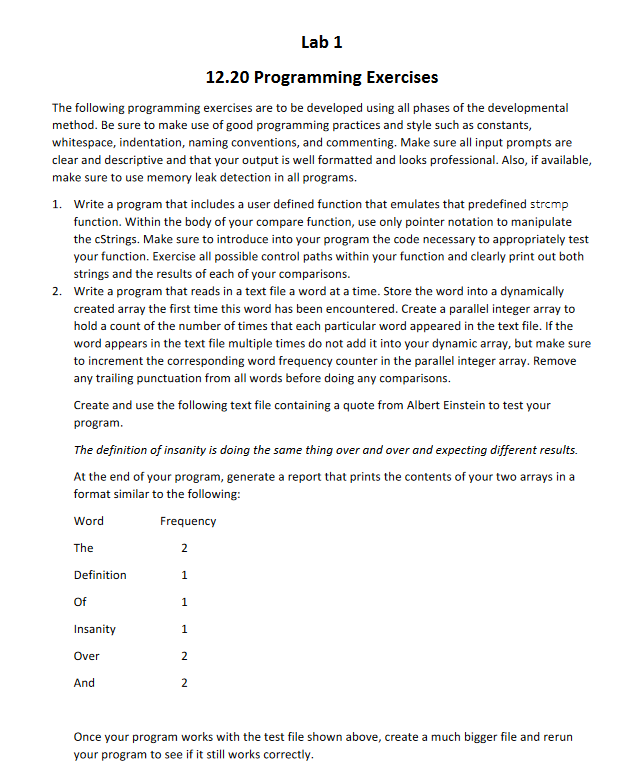
Lab 1 12.20 Programming Exercises The following programming exercises are to be developed using all phases of the developmental method. Be sure to make use of good programming practices and style such as constants, whitespace, indentation, naming conventions, and commenting. Make sure all input prompts are clear and descriptive and that your output is well formatted and looks professional. Also, if available, make sure to use memory leak detection in all programs. 1. Write a program that includes a user defined function that emulates that predefined strcmp function. Within the body of your compare function, use only pointer notation to manipulate the cStrings. Make sure to introduce into your program the code necessary to appropriately test your function. Exercise all possible control paths within your function and clearly print out both strings and the results of each of your comparisons. 2. Write a program that reads in a text file a word at a time. Store the word into a dynamically created array the first time this word has been encountered. Create a parallel integer array to hold a count of the number of times that each particular word appeared in the text file. If the word appears in the text file multiple times do not add it into your dynamic array, but make sure to increment the corresponding word frequency counter in the parallel integer array. Remove any trailing punctuation from all words before doing any comparisons. Create and use the following text file containing a quote from Albert Einstein to test your program. The definition of insanity is doing the same thing over and over and expecting different results. At the end of your program, generate a report that prints the contents of your two arrays in a format similar to the following: Word Frequency The 2 Definition 1 Of 1 Insanity 1 Over 2 And 2 Once your program works with the test file shown above, create a much bigger file and rerun your program to see if it still works correctly
Step by Step Solution
There are 3 Steps involved in it

Get step-by-step solutions from verified subject matter experts
 Study Help