







Question: Lab 1: Basic Digital Simulation Objectives: To learn the basic digital simulation and verify selected circuits using digital circuit simulator called Deeds (Digital Electronics
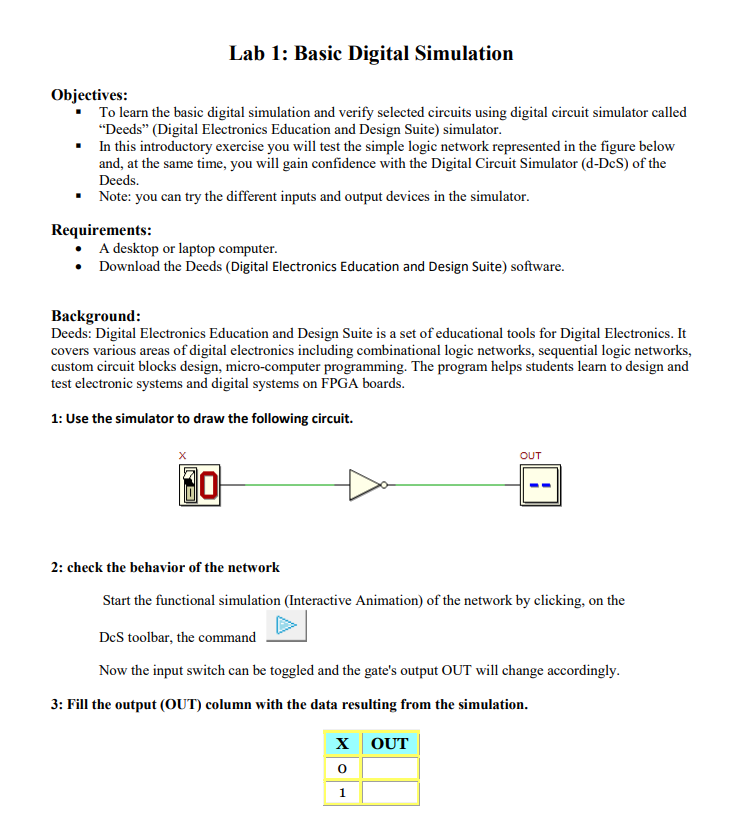
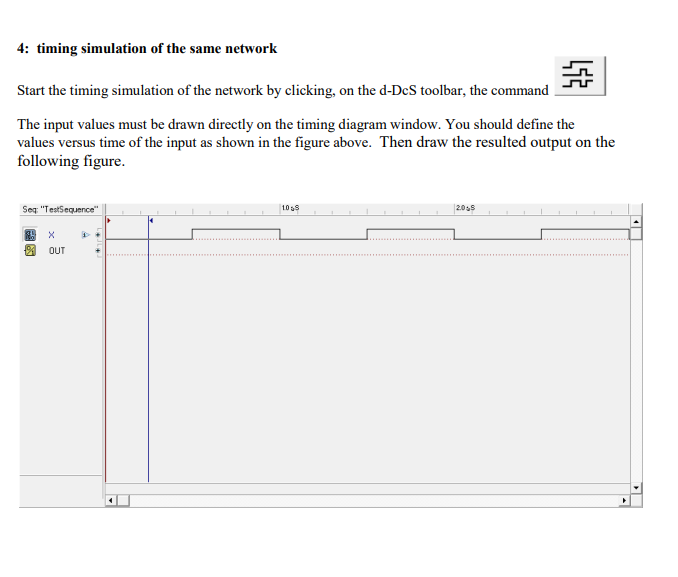
Lab 1: Basic Digital Simulation Objectives: To learn the basic digital simulation and verify selected circuits using digital circuit simulator called "Deeds" (Digital Electronics Education and Design Suite) simulator. In this introductory exercise you will test the simple logic network represented in the figure below and, at the same time, you will gain confidence with the Digital Circuit Simulator (d-Dcs) of the Deeds. Note: you can try the different inputs and output devices in the simulator. Requirements: A desktop or laptop computer. Download the Deeds (Digital Electronics Education and Design Suite) software. Background: Deeds: Digital Electronics Education and Design Suite is a set of educational tools for Digital Electronics. It covers various areas of digital electronics including combinational logic networks, sequential logic networks, custom circuit blocks design, micro-computer programming. The program helps students learn to design and test electronic systems and digital systems on FPGA boards. 1: Use the simulator to draw the following circuit. 30 OUT 2: check the behavior of the network Start the functional simulation (Interactive Animation) of the network by clicking, on the DCS toolbar, the command Now the input switch can be toggled and the gate's output OUT will change accordingly. 3: Fill the output (OUT) column with the data resulting from the simulation. X OUT 1 4: timing simulation of the same network Start the timing simulation of the network by clicking, on the d-DcS toolbar, the command The input values must be drawn directly on the timing diagram window. You should define the values versus time of the input as shown in the figure above. Then draw the resulted output on the following figure. Seq: "TestSequence" OUT D 1065 2055
Step by Step Solution
There are 3 Steps involved in it

Get step-by-step solutions from verified subject matter experts
 Study Help