







Question: Lab 11: Hangman ... Note: the pics above don't sort the list of guessed letters, but we're going to do that this time. Also, if
Lab 11: Hangman
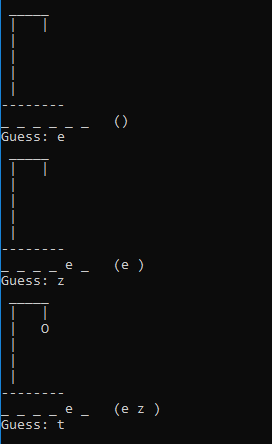 ...
... 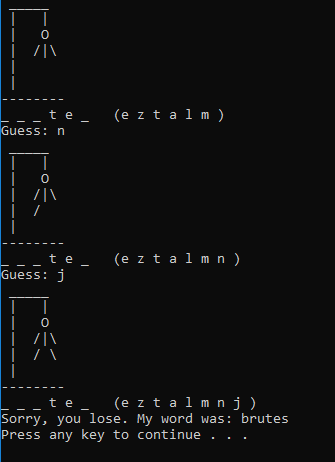
Note: the pics above don't sort the list of guessed letters, but we're going to do that this time. Also, if the player guesses a letter that's already been guessed, tell them so, like "You already guessed q".
Decomposition and Abstraction
We've been talking all week about how to break the hangman game down in to parts and create classes that abstract away those parts. Each class combines the data and actions relevant to that part of the game.
To start, add all these files to a new empty project.
main.cpp
filedb.h, filedb.cpp
guesses.h
gallows.h, gallows.cpp
secret_word.h
secret_words.txt
Part I: Testing
The provided main.cpp has comments about how to test the different classes that you need for the hangman game.
FileDB is completed for you.
Gallows is mostly done from class.
Guesses should be a port of your SortedSet.
SecretWord is stubbed out with empty methods for you to finish.
Complete and test all the classes in isolation in main before you move on.
Part II: For Love of the Game
To complete the lab, create a game.cpp file that also has a main function in it. You can't compile with both files included in the project, but you can switch between them using right click -> Exclude from Project and right click -> Add Existing.
Finish the game.
Guess: e Guess: z(e ) 0 e z Guess: t Guess: e Guess: z(e ) 0 e z Guess: t
Step by Step Solution
There are 3 Steps involved in it

Get step-by-step solutions from verified subject matter experts
 Study Help