







Question: Lab 2 Putting it to practice It is time to put all these notions into practice! We will start using the MSP - EXP 4
Lab Putting it to practice
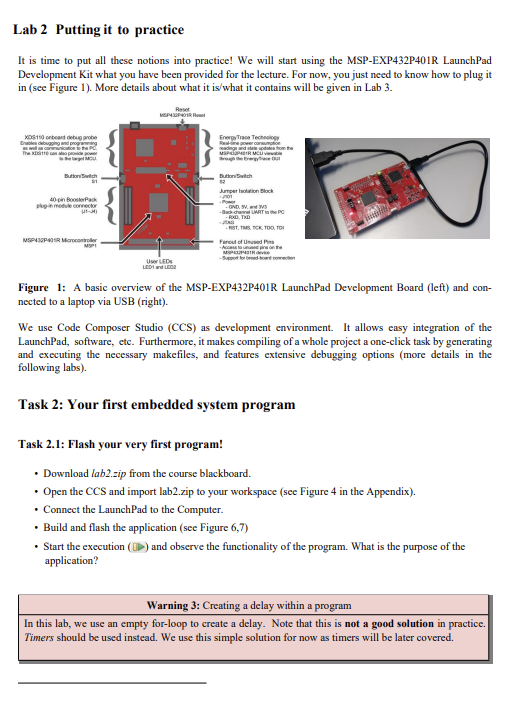
It is time to put all these notions into practice! We will start using the MSPEXPPR LaunchPad
Development Kit what you have been provided for the lecture. For now, you just need to know how to plug it
in see Figure More details about what it iswhat it contains will be given in Lab
Figure : A basic overview of the MSPEXPPR LaunchPad Development Board left and con
nected to a laptop via USB right
We use Code Composer Studio CCS as development environment. It allows easy integration of the
LaunchPad, software, etc. Furthermore, it makes compiling of a whole project a oneclick task by generating
and executing the necessary makefiles, and features extensive debugging options more details in the
following labs
Task : Your first embedded system program
Task : Flash your very first program!
Download labzip from the course blackboard.
Open the CCS and import labzip to your workspace see Figure in the Appendix
Connect the LaunchPad to the Computer.
Build and flash the application see Figure
Start the execution and observe the functionality of the program. What is the purpose of the
application?
Warning : Creating a delay within a program
In this lab, we use an empty forloop to create a delay. Note that this is not a good solution in practice.
Timers should be used instead. We use this simple solution for now as timers will be later covered.
Step by Step Solution
There are 3 Steps involved in it
1 Expert Approved Answer
Step: 1 Unlock

Question Has Been Solved by an Expert!
Get step-by-step solutions from verified subject matter experts
Step: 2 Unlock
Step: 3 Unlock
 Study Help