







Question: Lab 3 Creating Profiles, Users and Roles Overview: In this lab, you will demonstrate you are comfortable creating users, profiles and roles. You must connect
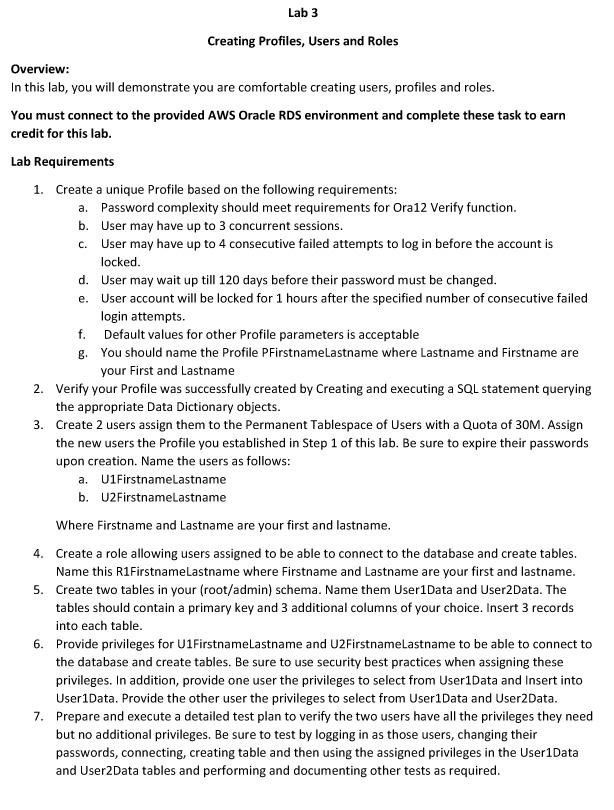
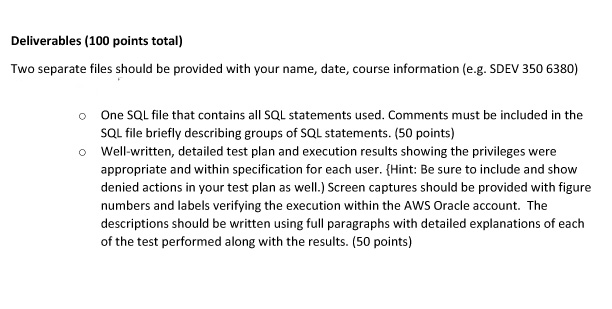
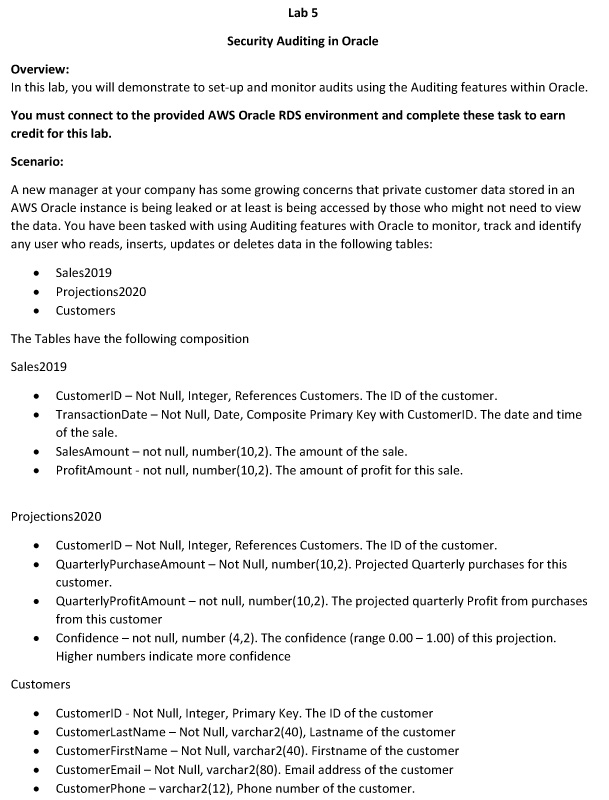
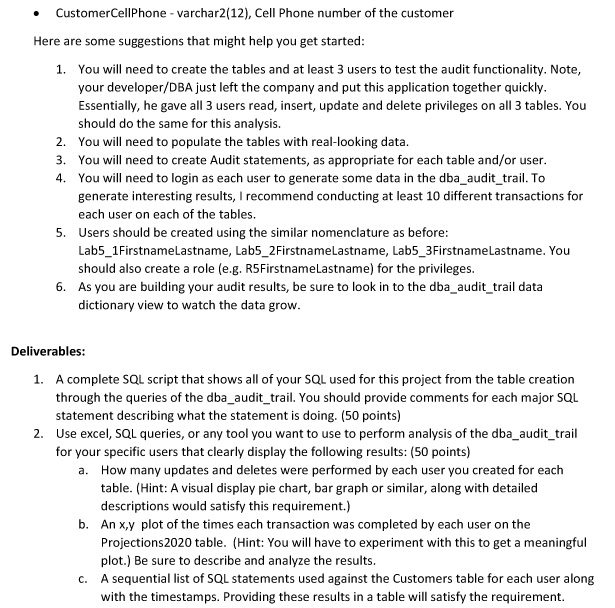
Lab 3 Creating Profiles, Users and Roles Overview: In this lab, you will demonstrate you are comfortable creating users, profiles and roles. You must connect to the provided AWS Oracle RDS environment and complete these task to earn credit for this lab. Lab Requirements 1. Create a unique Profile based on the following requirements: a. Password complexity should meet requirements for Ora12 Verify function. b. User may have up to 3 concurrent sessions. c. User may have up to 4 consecutive failed attempts to log in before the account is locked. d. User may wait up till 120 days before their password must be changed. e. User account will be locked for 1 hours after the specified number of consecutive failed login attempts. f. Default values for other Profile parameters is acceptable g. You should name the Profile PFirstnameLastname where Lastname and Firstname are your First and Lastname 2. Verify your Profile was successfully created by Creating and executing a SQL statement querying the appropriate Data Dictionary objects. 3. Create 2 users assign them to the Permanent Tablespace of Users with a Quota of 30M. Assign the new users the Profile you established in Step 1 of this lab. Be sure to expire their passwords upon creation. Name the users as follows: a. U1FirstnameLastname b. U2FirstnameLastname Where Firstname and Lastname are your first and lastname. 4. Create a role allowing users assigned to be able to connect to the database and create tables. Name this R1FirstnameLastname where Firstname and Lastname are your first and lastname. 5. Create two tables in your (root/admin) schema. Name them User1Data and UserData. The tables should contain a primary key and 3 additional columns of your choice. Insert 3 records into each table. 6. Provide privileges for U1FirstnameLastname and U2FirstnameLastname to be able to connect to the database and create tables. Be sure to use security best practices when assigning these privileges. In addition, provide one user the privileges to select from UserData and Insert into UserData. Provide the other user the privileges to select from User1Data and UserData. 7. Prepare and execute a detailed test plan to verify the two users have all the privileges they need but no additional privileges. Be sure to test by logging in as those users, changing their passwords, connecting, creating table and then using the assigned privileges in the User1Data and User Data tables and performing and documenting other tests as required. Deliverables (100 points total) Two separate files should be provided with your name, date, course information (e.g. SDEV 350 6380) One SQL file that contains all SQL statements used. Comments must be included in the SQL file briefly describing groups of SQL statements. (50 points) o Well-written, detailed test plan and execution results showing the privileges were appropriate and within specification for each user. (Hint: Be sure to include and show denied actions in your test plan as well.) Screen captures should be provided with figure numbers and labels verifying the execution within the AWS Oracle account. The descriptions should be written using full paragraphs with detailed explanations of each of the test performed along with the results. (50 points) Lab 5 Security Auditing in Oracle Overview: In this lab, you will demonstrate to set-up and monitor audits using the Auditing features within Oracle. You must connect to the provided AWS Oracle RDS environment and complete these task to earn credit for this lab. Scenario: A new manager at your company has some growing concerns that private customer data stored in an AWS Oracle instance is being leaked or at least is being accessed by those who might not need to view the data. You have been tasked with using Auditing features with Oracle to monitor, track and identify any user who reads, inserts, updates or deletes data in the following tables: Sales 2019 Projections 2020 Customers The Tables have the following composition Sales2019 . CustomerID - Not Null Integer, References Customers. The ID of the customer. TransactionDate - Not Null, Date, Composite Primary key with Customers. The date and time of the sale. SalesAmount - not null, number(10,2). The amount of the sale. ProfitAmount - not null, number(10,2). The amount of profit for this sale. Projections2020 CustomerID - Not Null, Integer, References Customers. The ID of the customer. Quarterly PurchaseAmount - Not Null, number(10,2). Projected Quarterly purchases for this customer. QuarterlyProfit Amount - not null, number(10,2). The projected quarterly Profit from purchases from this customer Confidence - not null, number (4,2). The confidence (range 0.00 1.00) of this projection. Higher numbers indicate more confidence . Customers CustomerID - Not Null, Integer, Primary key. The ID of the customer CustomerLastName - Not Null, varchar(40), Lastname of the customer Customer FirstName - Not Null, varchar(40). Firstname of the customer CustomerEmail Not Null, varchar2(80). Email address of the customer CustomerPhone - varchar2(12), Phone number of the customer. . CustomerCellPhone-varchar2(12), Cell Phone number of the customer Here are some suggestions that might help you get started: 1. You will need to create the tables and at least 3 users to test the audit functionality. Note, your developer/DBA just left the company and put this application together quickly. Essentially, he gave all 3 users read, insert, update and delete privileges on all 3 tables. You should do the same for this analysis. 2. You will need to populate the tables with real-looking data. 3. You will need to create Audit statements, as appropriate for each table and/or user. 4. You will need to login as each user to generate some data in the dba_audit_trail. To generate interesting results, I recommend conducting at least 10 different transactions for each user on each of the tables. 5. Users should be created using the similar nomenclature as before: Lab5_1FirstnameLastname, Lab5_2FirstnameLastname, Lab5_3FirstnameLastname. You should also create a role (e.g. RSFirstnameLastname) for the privileges. 6. As you are building your audit results, be sure to look in to the dba_audit_trail data dictionary view to watch the data grow. Deliverables: 1. A complete SQL script that shows all of your SQL used for this project from the table creation through the queries of the dba_audit_trail. You should provide comments for each major SQL statement describing what the statement is doing. (50 points) 2. Use excel, SQL queries, or any tool you want to use to perform analysis of the dba_audit_trail for your specific users that clearly display the following results: (50 points) a. How many updates and deletes were performed by each user you created for each table. (Hint: A visual display pie chart, bar graph or similar, along with detailed descriptions would satisfy this requirement.) b. An x,y plot of the times each transaction was completed by each user on the Projections2020 table. (Hint: You will have to experiment with this to get a meaningful plot.) Be sure to describe and analyze the results. C. A sequential list of SQL statements used against the Customers table for each user along with the timestamps. Providing these results in a table will satisfy the requirement. Lab 3 Creating Profiles, Users and Roles Overview: In this lab, you will demonstrate you are comfortable creating users, profiles and roles. You must connect to the provided AWS Oracle RDS environment and complete these task to earn credit for this lab. Lab Requirements 1. Create a unique Profile based on the following requirements: a. Password complexity should meet requirements for Ora12 Verify function. b. User may have up to 3 concurrent sessions. c. User may have up to 4 consecutive failed attempts to log in before the account is locked. d. User may wait up till 120 days before their password must be changed. e. User account will be locked for 1 hours after the specified number of consecutive failed login attempts. f. Default values for other Profile parameters is acceptable g. You should name the Profile PFirstnameLastname where Lastname and Firstname are your First and Lastname 2. Verify your Profile was successfully created by Creating and executing a SQL statement querying the appropriate Data Dictionary objects. 3. Create 2 users assign them to the Permanent Tablespace of Users with a Quota of 30M. Assign the new users the Profile you established in Step 1 of this lab. Be sure to expire their passwords upon creation. Name the users as follows: a. U1FirstnameLastname b. U2FirstnameLastname Where Firstname and Lastname are your first and lastname. 4. Create a role allowing users assigned to be able to connect to the database and create tables. Name this R1FirstnameLastname where Firstname and Lastname are your first and lastname. 5. Create two tables in your (root/admin) schema. Name them User1Data and UserData. The tables should contain a primary key and 3 additional columns of your choice. Insert 3 records into each table. 6. Provide privileges for U1FirstnameLastname and U2FirstnameLastname to be able to connect to the database and create tables. Be sure to use security best practices when assigning these privileges. In addition, provide one user the privileges to select from UserData and Insert into UserData. Provide the other user the privileges to select from User1Data and UserData. 7. Prepare and execute a detailed test plan to verify the two users have all the privileges they need but no additional privileges. Be sure to test by logging in as those users, changing their passwords, connecting, creating table and then using the assigned privileges in the User1Data and User Data tables and performing and documenting other tests as required. Deliverables (100 points total) Two separate files should be provided with your name, date, course information (e.g. SDEV 350 6380) One SQL file that contains all SQL statements used. Comments must be included in the SQL file briefly describing groups of SQL statements. (50 points) o Well-written, detailed test plan and execution results showing the privileges were appropriate and within specification for each user. (Hint: Be sure to include and show denied actions in your test plan as well.) Screen captures should be provided with figure numbers and labels verifying the execution within the AWS Oracle account. The descriptions should be written using full paragraphs with detailed explanations of each of the test performed along with the results. (50 points) Lab 5 Security Auditing in Oracle Overview: In this lab, you will demonstrate to set-up and monitor audits using the Auditing features within Oracle. You must connect to the provided AWS Oracle RDS environment and complete these task to earn credit for this lab. Scenario: A new manager at your company has some growing concerns that private customer data stored in an AWS Oracle instance is being leaked or at least is being accessed by those who might not need to view the data. You have been tasked with using Auditing features with Oracle to monitor, track and identify any user who reads, inserts, updates or deletes data in the following tables: Sales 2019 Projections 2020 Customers The Tables have the following composition Sales2019 . CustomerID - Not Null Integer, References Customers. The ID of the customer. TransactionDate - Not Null, Date, Composite Primary key with Customers. The date and time of the sale. SalesAmount - not null, number(10,2). The amount of the sale. ProfitAmount - not null, number(10,2). The amount of profit for this sale. Projections2020 CustomerID - Not Null, Integer, References Customers. The ID of the customer. Quarterly PurchaseAmount - Not Null, number(10,2). Projected Quarterly purchases for this customer. QuarterlyProfit Amount - not null, number(10,2). The projected quarterly Profit from purchases from this customer Confidence - not null, number (4,2). The confidence (range 0.00 1.00) of this projection. Higher numbers indicate more confidence . Customers CustomerID - Not Null, Integer, Primary key. The ID of the customer CustomerLastName - Not Null, varchar(40), Lastname of the customer Customer FirstName - Not Null, varchar(40). Firstname of the customer CustomerEmail Not Null, varchar2(80). Email address of the customer CustomerPhone - varchar2(12), Phone number of the customer. . CustomerCellPhone-varchar2(12), Cell Phone number of the customer Here are some suggestions that might help you get started: 1. You will need to create the tables and at least 3 users to test the audit functionality. Note, your developer/DBA just left the company and put this application together quickly. Essentially, he gave all 3 users read, insert, update and delete privileges on all 3 tables. You should do the same for this analysis. 2. You will need to populate the tables with real-looking data. 3. You will need to create Audit statements, as appropriate for each table and/or user. 4. You will need to login as each user to generate some data in the dba_audit_trail. To generate interesting results, I recommend conducting at least 10 different transactions for each user on each of the tables. 5. Users should be created using the similar nomenclature as before: Lab5_1FirstnameLastname, Lab5_2FirstnameLastname, Lab5_3FirstnameLastname. You should also create a role (e.g. RSFirstnameLastname) for the privileges. 6. As you are building your audit results, be sure to look in to the dba_audit_trail data dictionary view to watch the data grow. Deliverables: 1. A complete SQL script that shows all of your SQL used for this project from the table creation through the queries of the dba_audit_trail. You should provide comments for each major SQL statement describing what the statement is doing. (50 points) 2. Use excel, SQL queries, or any tool you want to use to perform analysis of the dba_audit_trail for your specific users that clearly display the following results: (50 points) a. How many updates and deletes were performed by each user you created for each table. (Hint: A visual display pie chart, bar graph or similar, along with detailed descriptions would satisfy this requirement.) b. An x,y plot of the times each transaction was completed by each user on the Projections2020 table. (Hint: You will have to experiment with this to get a meaningful plot.) Be sure to describe and analyze the results. C. A sequential list of SQL statements used against the Customers table for each user along with the timestamps. Providing these results in a table will satisfy the requirement
Step by Step Solution
There are 3 Steps involved in it

Get step-by-step solutions from verified subject matter experts
 Study Help