







Question: lab 3 .html Lab3_1 Lab 3_1 You will identify and fix errors in the Javascript, and make functions Click to calculate years Click to roll
lab 3 .html
Lab 3_1
You will identify and fix errors in the Javascript, and make functions
lab 3 function.js this is the javascript file
function calculateYears() { let a = prompt('Please enter a number'); let 2022 + a = futureyear; // error in this line, Hint: assignment order let 2022 - a = pastyear; // error in this line, Hint: assignment order alert('a + years from now is year + futureyear + ,and + a + years ago was year + pastyear.'); // find and errors in this function to show the correct message like ' 3 years from now is year 2025, and 3 years ago was year 2019.' // Double check the result }
function rollDice(){ //Write code here to get a random integer from 1 and 6 //Use alert() to show the result as 'The point you get this time is INTEGER'
}
function getVolumeOfSphere() {
//Write code here to ask your user to input the radius of the sphere with message 'Please enter the radius of the sphere in meters.' //Write code here to calculate the volume //User alert() to to show the result as 'The volume of a sphere with radius of RADIOUS m is m^3' //Write code here to return the value}
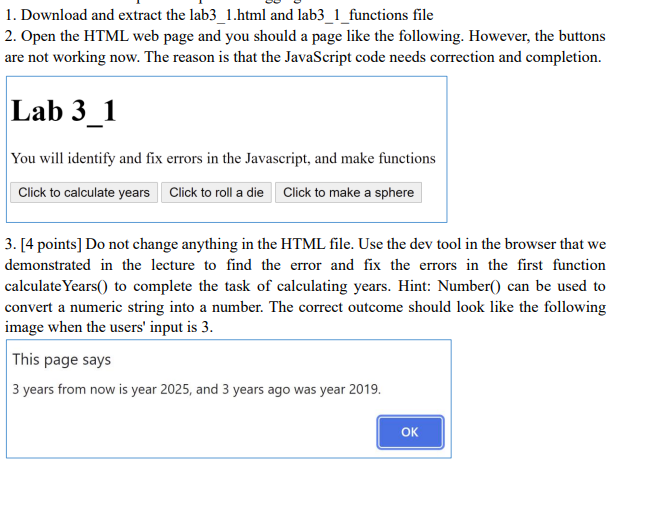
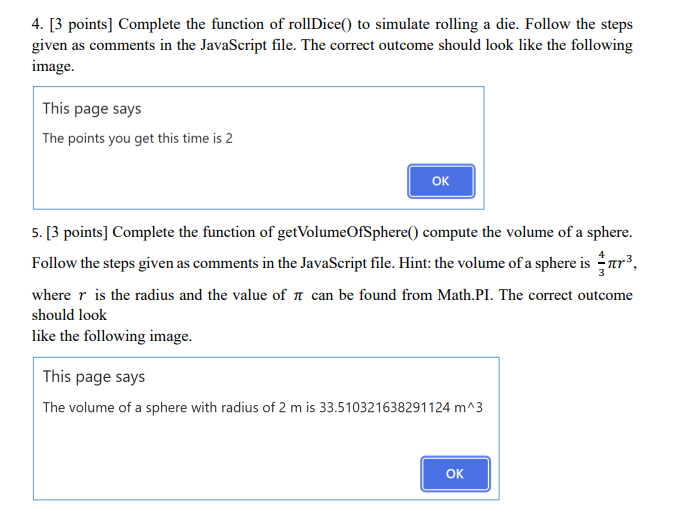
1. Download and extract the lab3_1.html and lab3_1_functions file 2. Open the HTML web page and you should a page like the following. However, the buttons are not working now. The reason is that the JavaScript code needs correction and completion. Lab 3_1 You will identify and fix errors in the Javascript, and make functions Click to calculate years Click to roll a die Click to make a sphere 3. [4 points] Do not change anything in the HTML file. Use the dev tool in the browser that we demonstrated in the lecture to find the error and fix the errors in the first function calculate Years() to complete the task of calculating years. Hint: Number() can be used to convert a numeric string into a number. The correct outcome should look like the following image when the users' input is 3. This page says 3 years from now is year 2025, and 3 years ago was year 2019. OK 4. [3 points] Complete the function of rollDice() to simulate rolling a die. Follow the steps given as comments in the JavaScript file. The correct outcome should look like the following image. This page says The points you get this time is 2 OK 5. [3 points] Complete the function of getVolumeOfSphere() compute the volume of a sphere. Follow the steps given as comments in the JavaScript file. Hint: the volume of a sphere is rer), where r is the radius and the value of it can be found from Math.PI. The correct outcome should look like the following image. This page says The volume of a sphere with radius of 2 m is 33.510321638291124 m^3 OK
Step by Step Solution
There are 3 Steps involved in it

Get step-by-step solutions from verified subject matter experts
 Study Help