Question: Lab #3 - Writing Statements: the String class Use this code to type. package lab3; /** * Title: * Description: * * @author your names
Lab #3 - Writing Statements: the String class
![names here */ public class Lab3App { public static void main(String[] args)](https://dsd5zvtm8ll6.cloudfront.net/si.experts.images/questions/2024/09/66f4e4cbefb26_38766f4e4cb5e35b.jpg)
Use this code to type.
package lab3; /** * Title:
* Description:
* * @author your names here */ public class Lab3App { public static void main(String[] args) { String item1 = new String(" water "); String item2 = new String("pasta"); String item3 = new String("Pasta"); String item4 = new String("milk"); String item5 = new String("chocolate chip cookies and milk"); String item6 = "Apple"; String item7 = "Apple"; String item8 = new String("Apple"); String item9 = new String("Apples"); String item10 = new String("Appld"); String item11 = new String("Applc"); // place #3 statement here System.out.println("Before trim: " + item1 + "* After trim: " + item1T + "*"); // place #5 statement here //System.out.println(" The result of checking the indexOf " + item4 + " in " + item5 + " is " + position); // place #7 statement here //System.out.println("The result of checking the indexOf " + item2 + " in " + item5 + " is " + position); // place #8 statement here //System.out.println(" The result of checking if " + item5 + " contains " + item4 + " is " + result); // place #10 statement here //System.out.println("The result of checking if " + item5 + " contains " + item2 + " is " + result); // place #11 statement here //System.out.println(" The result of checking if " + item5 + " starts with choco is " + result); // place #12 statement here //System.out.println("The result of checking if " + item5 + " starts with Choco is " + result + " "); // #14 - uncomment the two if/else statements below /* if (item6 == item7) { System.out.println(item6 + " and " + item7 + " are the same"); } else { System.out.println(item6 + " and " + item7 + " are NOT the same"); } if (item6 == item8) { System.out.println(item6 + " and " + item8 + " are the same"); } else { System.out.println(item6 + " and " + item8 + " are NOT the same"); } System.out.println(); */ // #15 - uncomment the two if/else statements below /* if () { System.out.println(item6 + " and " + item7 + " are the same"); } else { System.out.println(item6 + " and " + item7 + " are NOT the same"); } if () { System.out.println(item6 + " and " + item8 + " are the same"); } else { System.out.println(item6 + " and " + item8 + " are NOT the same"); } System.out.println(); */ // If time permits // place #16 statement here //System.out.println("The result of comparing " + item2 + " to " + item4 + " is " + num); // place #17 statement here //System.out.println("The result of comparing " + item2 + " to " + item3 + " is " + num); // place #18 statement here //System.out.println("The result of comparing " + item3 + " to " + item4 + " is " + num); // place #19 here //System.out.println("The result of comparing " + item8 + " to " + item7 + " is " + num); } }
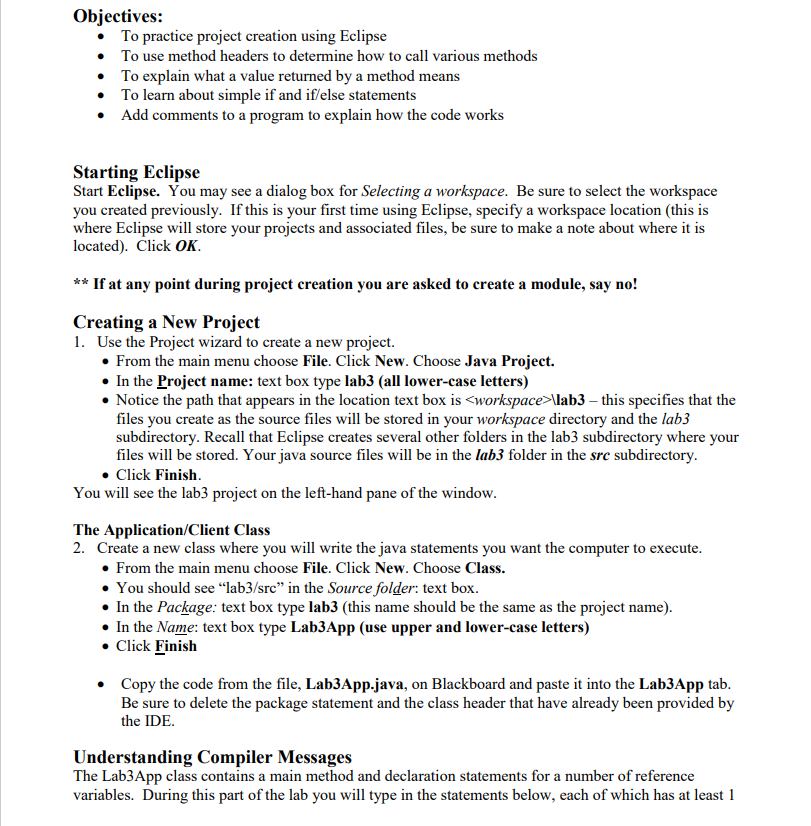
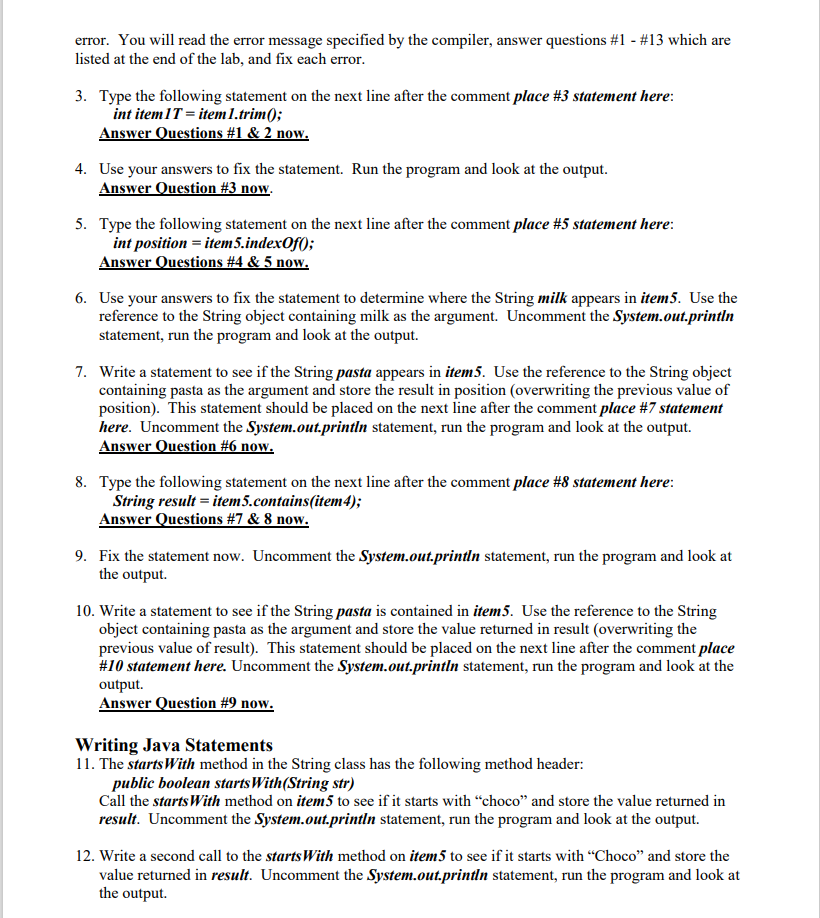
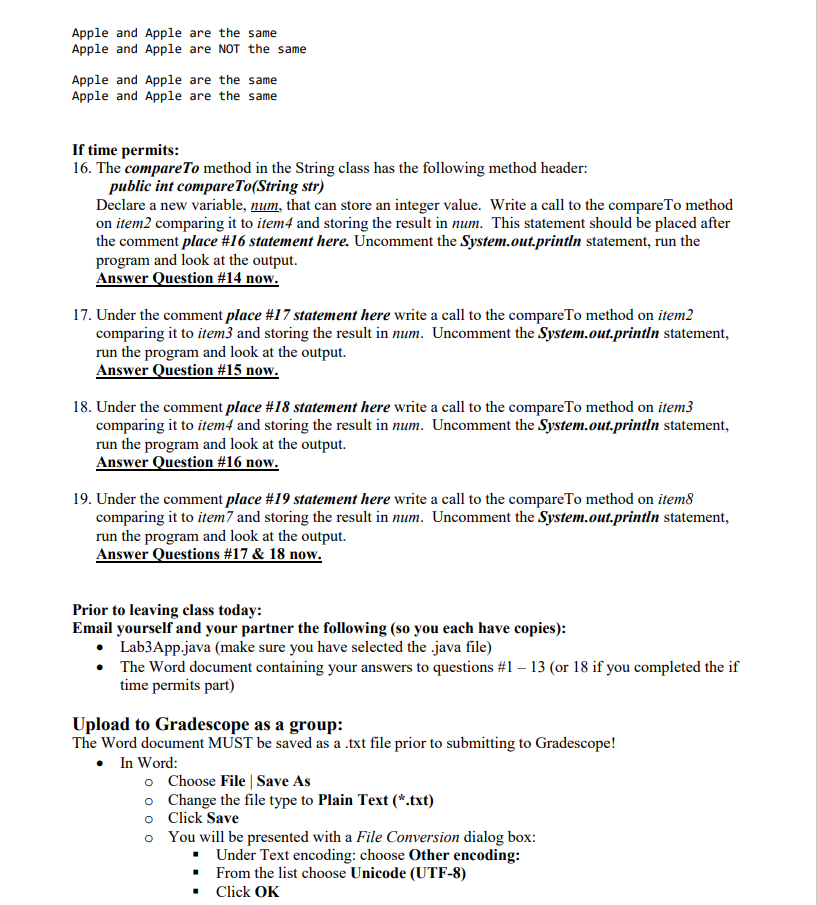
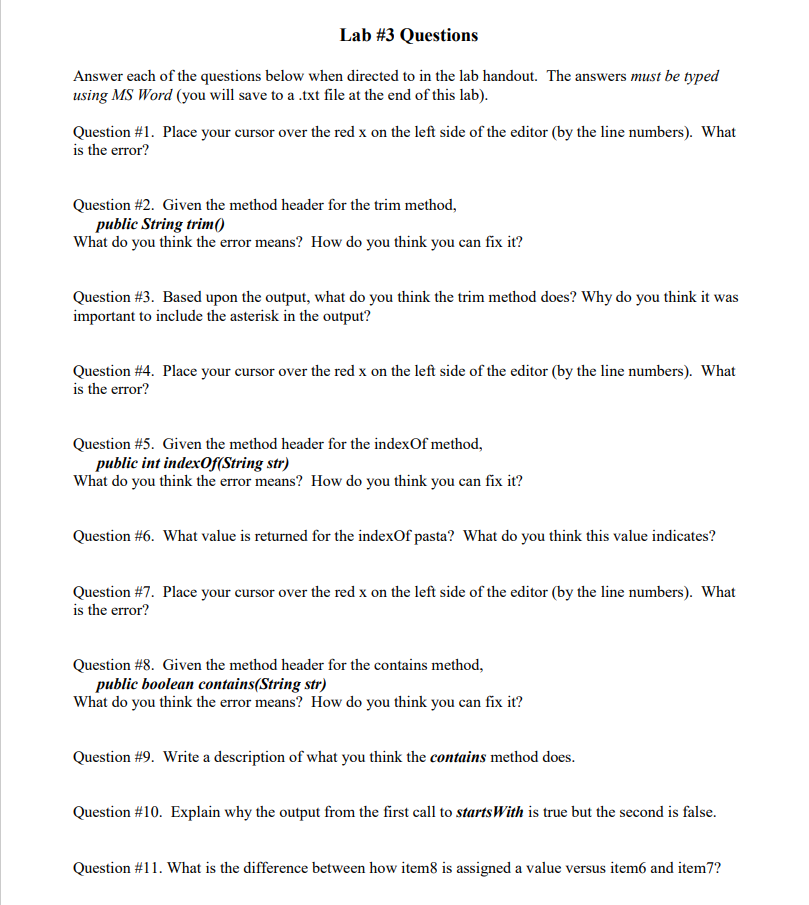
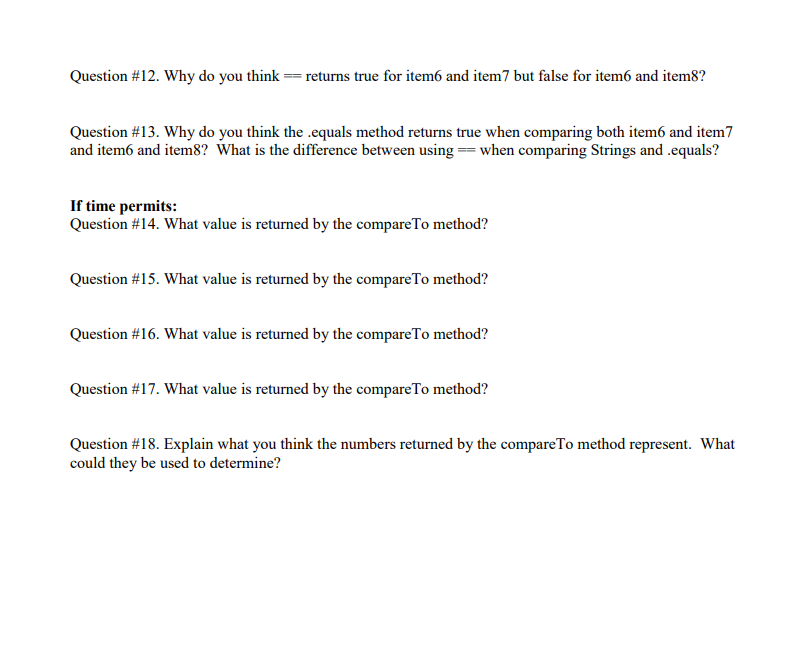
Objectives: To practice project creation using Eclipse To use method headers to determine how to call various methods To explain what a value returned by a method means To learn about simple if and if/else statements Add comments to a program to explain how the code works Starting Eclipse Start Eclipse. You may see a dialog box for Selecting a workspace. Be sure to select the workspace you created previously. If this is your first time using Eclipse, specify a workspace location (this is where Eclipse will store your projects and associated files, be sure to make a note about where it is located). Click OK. ** If at any point during project creation you are asked to create a module, say no! Creating a New Project 1. Use the Project wizard to create a new project. From the main menu choose File. Click New. Choose Java Project. In the Project name: text box type lab3 (all lower-case letters) Notice the path that appears in the location text box is \lab3 this specifies that the files you create as the source files will be stored in your workspace directory and the lab3 subdirectory. Recall that Eclipse creates several other folders in the lab3 subdirectory where your files will be stored. Your java source files will be in the lab3 folder in the src subdirectory. Click Finish You will see the lab3 project on the left-hand pane of the window. The Application/Client Class 2. Create a new class where you will write the java statements you want the computer to execute. From the main menu choose File. Click New. Choose Class. You should see lab3/src" in the Source folder: text box. In the Package: text box type lab3 (this name should be the same as the project name). In the Name: text box type Lab3App (use upper and lower-case letters) Click Finish Copy the code from the file, Lab3App.java, on Blackboard and paste it into the Lab3App tab. Be sure to delete the package statement and the class header that have already been provided by the IDE. Understanding Compiler Messages The Lab3App class contains a main method and declaration statements for a number of reference variables. During this part of the lab you will type in the statements below, each of which has at least 1 error. You will read the error message specified by the compiler, answer questions #1 - #13 which are listed at the end of the lab, and fix each error. 3. Type the following statement on the next line after the comment place #3 statement here: int item 1 T = item 1.trim(); Answer Questions #1 & 2 now. 4. Use your answers to fix the statement. Run the program and look at the output. Answer Question #3 now. 5. Type the following statement on the next line after the comment place #5 statement here: int position = item 5.indexOf0; Answer Questions #4 & 5 now. 6. Use your answers to fix the statement to determine where the String milk appears in item5. Use the reference to the String object containing milk as the argument. Uncomment the System.out.println statement, run the program and look at the output. 7. Write a statement to see if the String pasta appears in item5. Use the reference to the String object containing pasta as the argument and store the result in position (overwriting the previous value of position). This statement should be placed on the next line after the comment place #7 statement here. Uncomment the System.out.println statement, run the program and look at the output. Answer Question #6 now. 8. Type the following statement on the next line after the comment place #8 statement here: String result = item5.contains (item 4); Answer Questions #7 & 8 now. 9. Fix the statement now. Uncomment the System.out.println statement, run the program and look at the output 10. Write a statement to see if the String pasta is contained in item5. Use the reference to the String object containing pasta as the argument and store the value returned in result (overwriting the previous value of result). This statement should be placed on the next line after the comment place #10 statement here. Uncomment the System.out.println statement, run the program and look at the output. Answer Question #9 now. Writing Java Statements 11. The startsWith method in the String class has the following method header: public boolean startsWith(String str) Call the starts With method on item5 to see if it starts with choco" and store the value returned in result. Uncomment the System.out.println statement, run the program and look at the output. 12. Write a second call to the starts With method on item 5 to see if it starts with Choco" and store the value returned in result. Uncomment the System.out.println statement, run the program and look at the output. Answer Question #10 now. 13. An if/else statement allows the program to evaluate a condition and execute one of two possible outcomes. If the condition is true, the first outcome is executed, if the condition is false, the second outcome is executed. The format for an if/else statement is: if (condition) statement to execute if condition is true else statement to execute if condition is false The condition must evaluate to true or false. This can be a comparison of two values using a relational operator (,,=, !=), a boolean variable or a method call that returns a boolean value. The == operator is a logical equivalence. When used with primitive variables it determines if the values stored in the variables are exactly the same. When used with reference variables it determines if the addresses stored in the reference variables are the same. The != operator checks if the two values are not the same. 14. Uncomment the two if/else statements under the #14 comment. Run the program and look at the output Answer Questions #11 & 12 now. 15. The equals method in the String class has the following method header: public boolean equals(String str) Uncomment the two if/else statements under the #15 comment. Each is missing a condition in the () after the keyword if. The condition of an if statement must evaluate to a boolean value. Since the equals method returns a boolean value the method call can be used as the condition in the if statement. Write a condition for the first if/else statement so it calls the equals method on item to compare it to item7. As the condition in the second if/else statement call the equals method on item6 to compare it to item8. Run the program and look at the output. Answer Question #13 now. Complete the comment at the beginning of your program by filling in the title of the program, a description of what the program does and your name as the author. Sample output: Before trim: water After trim: water* The result of checking the indexOf milk in chocolate chip cookies and milk is 27 The result of checking the indexof pasta in chocolate chip cookies and milk is -1 The result of checking if chocolate chip cookies and milk contains milk is true The result of checking if chocolate chip cookies and milk contains pasta is false The result of checking if chocolate chip cookies and milk starts with choco is true The result of checking if chocolate chip cookies and milk starts with Choco is false Apple and Apple are the same Apple and Apple are NOT the same Apple and Apple are the same Apple and Apple are the same If time permits: 16. The compare To method in the String class has the following method header: public int compare To (String str) Declare a new variable, num, that can store an integer value. Write a call to the compare To method on item2 comparing it to item4 and storing the result in num. This statement should be placed after the comment place #16 statement here. Uncomment the System.out.println statement, run the program and look at the output. Answer Question #14 now. 17. Under the comment place #17 statement here write a call to the compare To method on item2 comparing it to item3 and storing the result in num. Uncomment the System.out.println statement, run the program and look at the output. Answer Question #15 now. 18. Under the comment place #18 statement here write a call to the compareTo method on item3 comparing it to item4 and storing the result in num. Uncomment the System.out.println statement, run the program and look at the output. Answer Question #16 now. 19. Under the comment place #19 statement here write a call to the compareTo method on item8 comparing it to item and storing the result in num. Uncomment the System.out.println statement, run the program and look at the output. Answer Questions #17 & 18 now. Prior to leaving class today: Email yourself and your partner the following (so you each have copies): Lab3App.java (make sure you have selected the .java file) The Word document containing your answers to questions #1 13 (or 18 if you completed the if time permits part) Upload to Gradescope as a group: The Word document MUST be saved as a .txt file prior to submitting to Gradescope! In Word: o Choose File Save As o Change the file type to Plain Text (*.txt) o Click Save You will be presented with a File Conversion dialog box: Under Text encoding: choose Other encoding: From the list choose Unicode (UTF-8) . Click OK Lab #3 Questions Answer each of the questions below when directed to in the lab handout. The answers must be typed using MS Word (you will save to a .txt file at the end of this lab). Question #1. Place your cursor over the red x on the left side of the editor (by the line numbers). What is the error? Question #2. Given the method header for the trim method, public String trim() What do you think the error means? How do you think you can fix it? Question #3. Based upon the output, what do you think the trim method does? Why do you think it was important to include the asterisk in the output? Question #4. Place your cursor over the red x on the left side of the editor (by the line numbers). What is the error? Question #5. Given the method header for the indexOf method, public int indexOf(String str) What do you think the error means? How do you think you can fix it? Question #6. What value is returned for the indexOf pasta? What do you think this value indicates? Question #7. Place your cursor over the red x on the left side of the editor (by the line numbers). What is the error? Question #8. Given the method header for the contains method, public boolean contains(String str) What do you think the error means? How do you think you can fix it? Question #9. Write a description of what you think the contains method does. Question #10. Explain why the output from the first call to startsWith is true but the second is false. Question #11. What is the difference between how item is assigned a value versus item and item7? Question #12. Why do you think == returns true for item and item 7 but false for item6 and item8? Question #13. Why do you think the .equals method returns true when comparing both item6 and item7 and item6 and item8? What is the difference between using = when comparing Strings and .equals? If time permits: Question #14. What value is returned by the compare To method? Question #15. What value is returned by the compareTo method? Question #16. What value is returned by the compare To method? Question #17. What value is returned by the compare To method? Question #18. Explain what you think the numbers returned by the compare To method represent. What could they be used to determine? Objectives: To practice project creation using Eclipse To use method headers to determine how to call various methods To explain what a value returned by a method means To learn about simple if and if/else statements Add comments to a program to explain how the code works Starting Eclipse Start Eclipse. You may see a dialog box for Selecting a workspace. Be sure to select the workspace you created previously. If this is your first time using Eclipse, specify a workspace location (this is where Eclipse will store your projects and associated files, be sure to make a note about where it is located). Click OK. ** If at any point during project creation you are asked to create a module, say no! Creating a New Project 1. Use the Project wizard to create a new project. From the main menu choose File. Click New. Choose Java Project. In the Project name: text box type lab3 (all lower-case letters) Notice the path that appears in the location text box is \lab3 this specifies that the files you create as the source files will be stored in your workspace directory and the lab3 subdirectory. Recall that Eclipse creates several other folders in the lab3 subdirectory where your files will be stored. Your java source files will be in the lab3 folder in the src subdirectory. Click Finish You will see the lab3 project on the left-hand pane of the window. The Application/Client Class 2. Create a new class where you will write the java statements you want the computer to execute. From the main menu choose File. Click New. Choose Class. You should see lab3/src" in the Source folder: text box. In the Package: text box type lab3 (this name should be the same as the project name). In the Name: text box type Lab3App (use upper and lower-case letters) Click Finish Copy the code from the file, Lab3App.java, on Blackboard and paste it into the Lab3App tab. Be sure to delete the package statement and the class header that have already been provided by the IDE. Understanding Compiler Messages The Lab3App class contains a main method and declaration statements for a number of reference variables. During this part of the lab you will type in the statements below, each of which has at least 1 error. You will read the error message specified by the compiler, answer questions #1 - #13 which are listed at the end of the lab, and fix each error. 3. Type the following statement on the next line after the comment place #3 statement here: int item 1 T = item 1.trim(); Answer Questions #1 & 2 now. 4. Use your answers to fix the statement. Run the program and look at the output. Answer Question #3 now. 5. Type the following statement on the next line after the comment place #5 statement here: int position = item 5.indexOf0; Answer Questions #4 & 5 now. 6. Use your answers to fix the statement to determine where the String milk appears in item5. Use the reference to the String object containing milk as the argument. Uncomment the System.out.println statement, run the program and look at the output. 7. Write a statement to see if the String pasta appears in item5. Use the reference to the String object containing pasta as the argument and store the result in position (overwriting the previous value of position). This statement should be placed on the next line after the comment place #7 statement here. Uncomment the System.out.println statement, run the program and look at the output. Answer Question #6 now. 8. Type the following statement on the next line after the comment place #8 statement here: String result = item5.contains (item 4); Answer Questions #7 & 8 now. 9. Fix the statement now. Uncomment the System.out.println statement, run the program and look at the output 10. Write a statement to see if the String pasta is contained in item5. Use the reference to the String object containing pasta as the argument and store the value returned in result (overwriting the previous value of result). This statement should be placed on the next line after the comment place #10 statement here. Uncomment the System.out.println statement, run the program and look at the output. Answer Question #9 now. Writing Java Statements 11. The startsWith method in the String class has the following method header: public boolean startsWith(String str) Call the starts With method on item5 to see if it starts with choco" and store the value returned in result. Uncomment the System.out.println statement, run the program and look at the output. 12. Write a second call to the starts With method on item 5 to see if it starts with Choco" and store the value returned in result. Uncomment the System.out.println statement, run the program and look at the output. Answer Question #10 now. 13. An if/else statement allows the program to evaluate a condition and execute one of two possible outcomes. If the condition is true, the first outcome is executed, if the condition is false, the second outcome is executed. The format for an if/else statement is: if (condition) statement to execute if condition is true else statement to execute if condition is false The condition must evaluate to true or false. This can be a comparison of two values using a relational operator (,,=, !=), a boolean variable or a method call that returns a boolean value. The == operator is a logical equivalence. When used with primitive variables it determines if the values stored in the variables are exactly the same. When used with reference variables it determines if the addresses stored in the reference variables are the same. The != operator checks if the two values are not the same. 14. Uncomment the two if/else statements under the #14 comment. Run the program and look at the output Answer Questions #11 & 12 now. 15. The equals method in the String class has the following method header: public boolean equals(String str) Uncomment the two if/else statements under the #15 comment. Each is missing a condition in the () after the keyword if. The condition of an if statement must evaluate to a boolean value. Since the equals method returns a boolean value the method call can be used as the condition in the if statement. Write a condition for the first if/else statement so it calls the equals method on item to compare it to item7. As the condition in the second if/else statement call the equals method on item6 to compare it to item8. Run the program and look at the output. Answer Question #13 now. Complete the comment at the beginning of your program by filling in the title of the program, a description of what the program does and your name as the author. Sample output: Before trim: water After trim: water* The result of checking the indexOf milk in chocolate chip cookies and milk is 27 The result of checking the indexof pasta in chocolate chip cookies and milk is -1 The result of checking if chocolate chip cookies and milk contains milk is true The result of checking if chocolate chip cookies and milk contains pasta is false The result of checking if chocolate chip cookies and milk starts with choco is true The result of checking if chocolate chip cookies and milk starts with Choco is false Apple and Apple are the same Apple and Apple are NOT the same Apple and Apple are the same Apple and Apple are the same If time permits: 16. The compare To method in the String class has the following method header: public int compare To (String str) Declare a new variable, num, that can store an integer value. Write a call to the compare To method on item2 comparing it to item4 and storing the result in num. This statement should be placed after the comment place #16 statement here. Uncomment the System.out.println statement, run the program and look at the output. Answer Question #14 now. 17. Under the comment place #17 statement here write a call to the compare To method on item2 comparing it to item3 and storing the result in num. Uncomment the System.out.println statement, run the program and look at the output. Answer Question #15 now. 18. Under the comment place #18 statement here write a call to the compareTo method on item3 comparing it to item4 and storing the result in num. Uncomment the System.out.println statement, run the program and look at the output. Answer Question #16 now. 19. Under the comment place #19 statement here write a call to the compareTo method on item8 comparing it to item and storing the result in num. Uncomment the System.out.println statement, run the program and look at the output. Answer Questions #17 & 18 now. Prior to leaving class today: Email yourself and your partner the following (so you each have copies): Lab3App.java (make sure you have selected the .java file) The Word document containing your answers to questions #1 13 (or 18 if you completed the if time permits part) Upload to Gradescope as a group: The Word document MUST be saved as a .txt file prior to submitting to Gradescope! In Word: o Choose File Save As o Change the file type to Plain Text (*.txt) o Click Save You will be presented with a File Conversion dialog box: Under Text encoding: choose Other encoding: From the list choose Unicode (UTF-8) . Click OK Lab #3 Questions Answer each of the questions below when directed to in the lab handout. The answers must be typed using MS Word (you will save to a .txt file at the end of this lab). Question #1. Place your cursor over the red x on the left side of the editor (by the line numbers). What is the error? Question #2. Given the method header for the trim method, public String trim() What do you think the error means? How do you think you can fix it? Question #3. Based upon the output, what do you think the trim method does? Why do you think it was important to include the asterisk in the output? Question #4. Place your cursor over the red x on the left side of the editor (by the line numbers). What is the error? Question #5. Given the method header for the indexOf method, public int indexOf(String str) What do you think the error means? How do you think you can fix it? Question #6. What value is returned for the indexOf pasta? What do you think this value indicates? Question #7. Place your cursor over the red x on the left side of the editor (by the line numbers). What is the error? Question #8. Given the method header for the contains method, public boolean contains(String str) What do you think the error means? How do you think you can fix it? Question #9. Write a description of what you think the contains method does. Question #10. Explain why the output from the first call to startsWith is true but the second is false. Question #11. What is the difference between how item is assigned a value versus item and item7? Question #12. Why do you think == returns true for item and item 7 but false for item6 and item8? Question #13. Why do you think the .equals method returns true when comparing both item6 and item7 and item6 and item8? What is the difference between using = when comparing Strings and .equals? If time permits: Question #14. What value is returned by the compare To method? Question #15. What value is returned by the compareTo method? Question #16. What value is returned by the compare To method? Question #17. What value is returned by the compare To method? Question #18. Explain what you think the numbers returned by the compare To method represent. What could they be used to determine









 Study Help