







Question: LAB 5 .2 Working with do-while loop Bring the program dowhile.cpp from the Lab 5 folder. The code is shown below: ______________________________________________________________________________ // This program
LAB 5.2 Working with do-while loop
Bring the program dowhile.cpp from the Lab 5 folder.
The code is shown below:
______________________________________________________________________________
// This program displays a hot beverage menu and prompts the user to
// make a selection. A switch statement determines which item the user
// has chosen. A do-while loop repeats until the user selects item E
// from the menu.
// PLACE YOUR NAME HERE
#include
#include
using namespace std;
int main()
{
// Fill in the code to define an integer variable called number,
// a floating point variable called cost,
// and a character variable called beverage
bool validBeverage;
cout
do
{
cout
cout
cout
cout
cout
cout
cout
cout
// Fill in the code to read in beverage
switch(beverage)
{
case 'a':
case 'A':
case 'b':
case 'B':
case 'c':
case 'C':
case 'd':
case 'D': validBeverage = true;
break;
default: validBeverage = false;
}
if (validBeverage == true)
{
cout
// Fill in the code to read in number
}
// Fill in the code to begin a switch statement
// that is controlled by beverage
{
case 'a':
case 'A': cost = number * 1.0;
cout
break;
// Fill in the code to give the case for tea ( $0.75 a cup)
//Fill in the code to give the case for hot chocolate($1.25 a cup)
// Fill in the code to give the case for cappuccino ($2.50 a cup)
case 'e':
case 'E': cout
break;
default:cout
// indicating an invalid selection.
cout
}
} // Fill in the code to finish the do-while statement with the
// condition that beverage does not equal (E or e).
// Fill in the appropriate return statement
}
______________________________________________________________________________
Exercise 1: Fill in the indicated code to complete the above program. Then compile and run the run the program several times with various inputs. Try all the possible relevant cases and record your results.
Sample Run: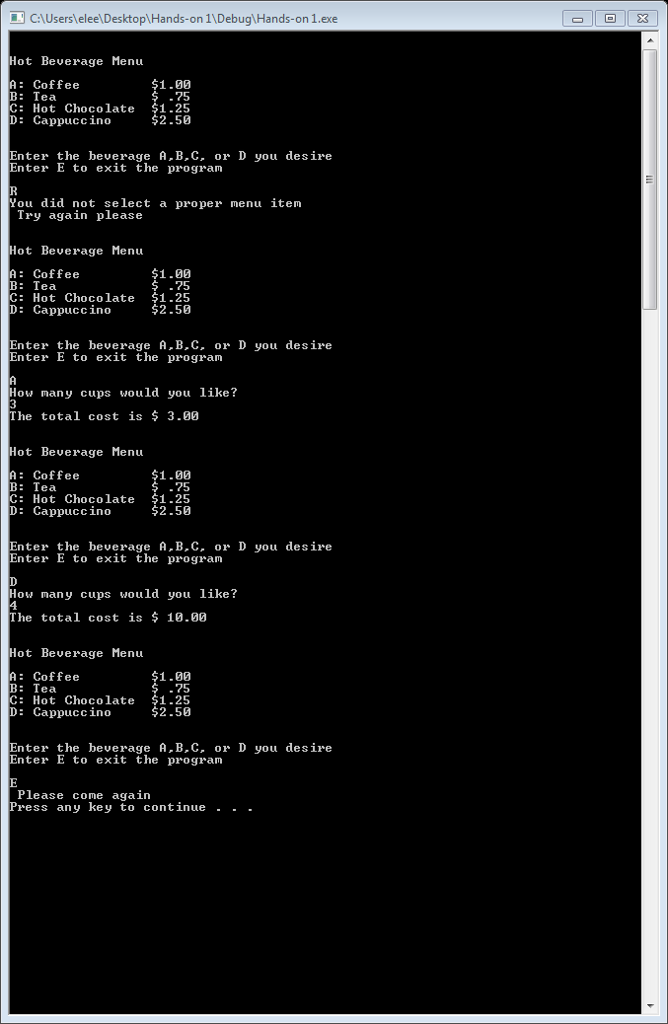
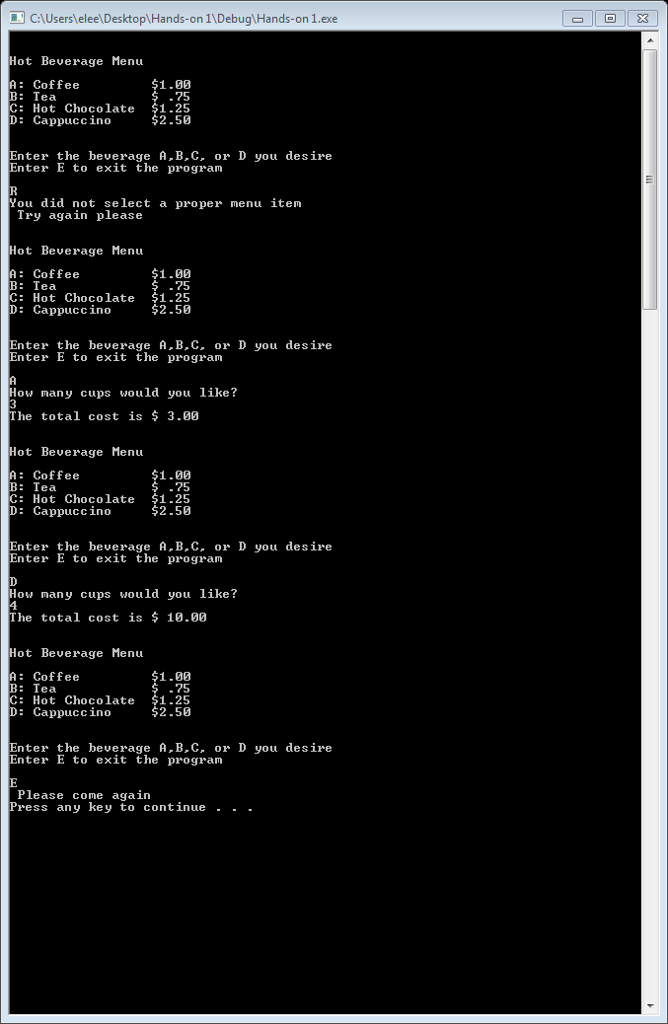
Exercise 2: What do you think will happen if you do not enter A, B, C, D, or E? try running the program and inputting another letter.
Sample Run:
Exercise 3: Replace the line
if (validBeverage == true)
with the line
if(validBeverage)
and run the program again. Are there any differences in the execution of the program? Why or why not?
CAUsers eleelDesktop\Hands-on 1\Debug Hands-on 1.exe Hot Beuerage Menu A: Coffee B: Tea C: Hot Chocolate $1.25 D: Cappuccino 1.00 75 2.50 Enter the beverage A B.C. or D you desire Enter E to exit the program You did not select a proper menu item Try again please Hot Beverage Menu A: Coffee B: Tea C: Hot Chocolate 1.25 D: Cappuccino 1.00 75 $2.50 Enter the beverage A.B.C. or D you desire Enter E to exit the program How many cups would you like? The total cost is $ 3.00 Hot Beverage Menu 1.00 .75 A: Coffee B: Tea C: Hot Chocolate $1.25 D: Cappuccino $2.50 Enter the beverage A.B.C. or D you desire Enter E to exit the program How many cups would you like? 4 The total cost is S 10.00 Hot Beuerage Menu A: Coffee B: Tea C: Hot D: Cappuccino 1.00 75 Chocolate $1.25 2.50 Enter the beverage A.B.C. or D you desire Enter E to exit the prograrm Please come again Press any key to continue
Step by Step Solution
There are 3 Steps involved in it

Get step-by-step solutions from verified subject matter experts
 Study Help