







Question: Lab 5 - 4 Identify Audit Requirements - Slainte Attached are the directions for highlighting the items. I do not understand how to break them
Lab Identify Audit Requirements Slainte
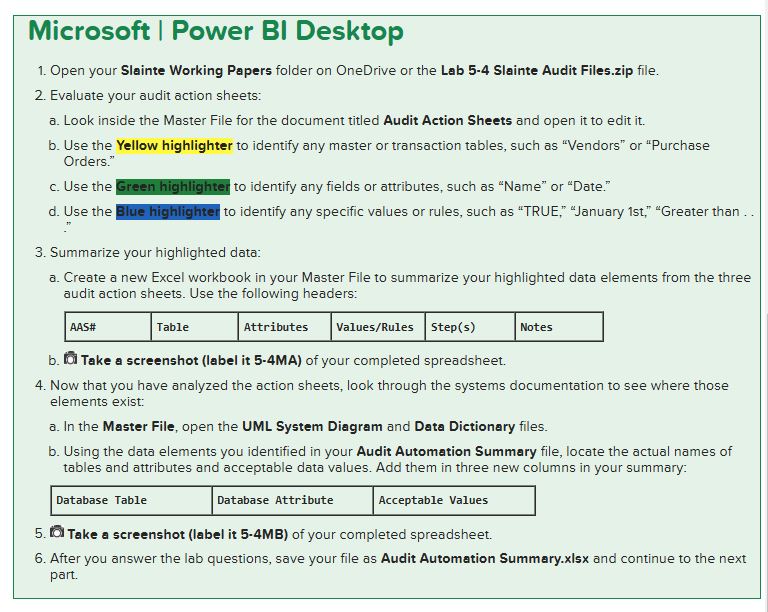
Attached are the directions for highlighting the items. I do not understand how to break them up in an excel sheet. How many tables and what attributes go to where. Microsoft Power BI Desktop
Open your Slainte Working Papers folder on OneDrive or the Lab Slainte Audit Files.zip file.
Evaluate your audit action sheets:
a Look inside the Master File for the document titled Audit Action Sheets and open it to edit it
b Use the Yellow highlighter to identify any master or transaction tables, such as "Vendors" or "Purchase Orders."
c Use the Green highlighter to identify any fields or attributes, such as "Name" or "Date."
d Use the Blue highlighter to identify any specific values or rules, such as "TRUE," "January st "Greater than
Summarize your highlighted data:
a Create a new Excel workbook in your Master File to summarize your highlighted data elements from the three audit action sheets. Use the following headers:
b Take a screenshot label it MA of your completed spreadsheet.
Now that you have analyzed the action sheets, look through the systems documentation to see where those elements exist:
a In the Master File, open the UML System Diagram and Data Dictionary files.
b Using the data elements you identified in your Audit Automation Summary file, locate the actual names of tables and attributes and acceptable data values. Add them in three new columns in your summary:
Take a screenshot label it MB of your completed spreadsheet.
After you answer the lab questions, save your file as Audit Automation Summary.xlsx and continue to the next part. Durit operatornameArtinn Shopt Sucnirinac Sunnlipre
Policy:
Employees should not also be related to suppliers, except where approved by the controller.
Suppliers should have valid data eg valid zip codes, phone numbers
Payments should only be made to approved suppliers with supporting documentation.
Task:
Load complete suppliers and customer master data in IDEA or Excel.
Join suppliers and customers with a fuzzy match on address and zip code. Set fuzzy similarity to
Produce a list of suppliers with fuzzy address and validate with controller.
Additional steps
Identify any suppliers with incomplete or invalid data eg zip code, phone number
Identify any transactions that involve suspicious suppliers.
Review suspicious suppliers with management.
Notes:
Assign a rating for this task:
no exceptionsissues
few exceptionsissues transactions are valid
many exceptionsissues transactions are valid
few exceptionsissues transactions are invalid
many exceptionsissues transactions are invalid
Exceptions should be supported by documentation provided by the controller.
Collect evidence in working papers along with response from management. Attributes
ValuesRules
Steps
no missing fields
Only match approved suppliers
name, address, zip code, phone numbers
Only match to
Step by Step Solution
There are 3 Steps involved in it
1 Expert Approved Answer
Step: 1 Unlock

Question Has Been Solved by an Expert!
Get step-by-step solutions from verified subject matter experts
Step: 2 Unlock
Step: 3 Unlock
 Study Help