







Question: Lab #6: Programming Basics - Vending Machine Using Excel, write the HIPO chart, pseudocode and Flowchart for the following problem. Also, desk check your solution
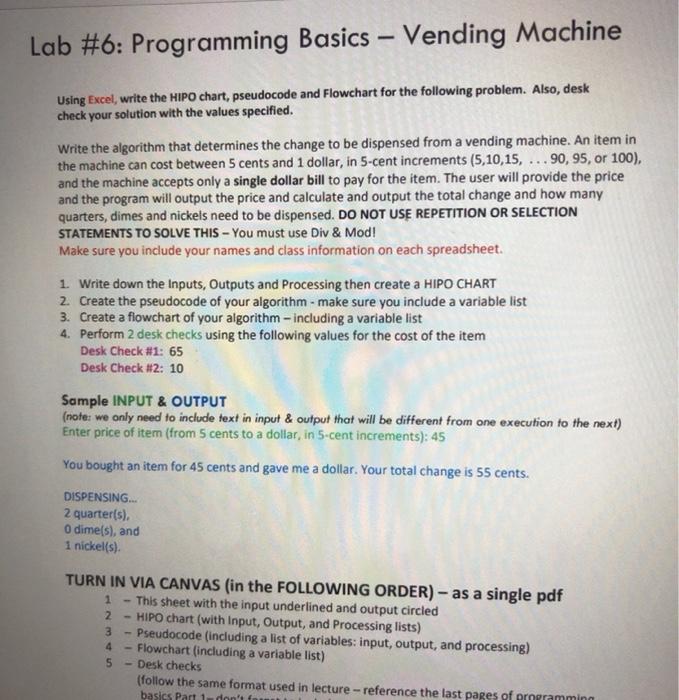
Lab #6: Programming Basics - Vending Machine Using Excel, write the HIPO chart, pseudocode and Flowchart for the following problem. Also, desk check your solution with the values specified. Write the algorithm that determines the change to be dispensed from a vending machine. An item in the machine can cost between 5 cents and 1 dollar, in 5-cent increments (5,10,15, ... 90, 95, or 100), and the machine accepts only a single dollar bill to pay for the item. The user will provide the price and the program will output the price and calculate and output the total change and how many quarters, dimes and nickels need to be dispensed. DO NOT USE REPETITION OR SELECTION STATEMENTS TO SOLVE THIS - You must use Div & Mod! Make sure you include your names and class information on each spreadsheet. 1. Write down the Inputs, Outputs and Processing then create a HIPO CHART 2. Create the pseudocode of your algorithm - make sure you include a variable list 3. Create a flowchart of your algorithm - including a variable list 4. Perform 2 desk checks using the following values for the cost of the item Desk Check #1: 65 Desk Check #2: 10 Sample INPUT & OUTPUT (note: we only need to include text in input & output that will be different from one execution to the next) Enter price of item (from 5 cents to a dollar in 5-cent increments): 45 You bought an item for 45 cents and gave me a dollar. Your total change is 55 cents. DISPENSING... 2 quarter(s) O dime(s), and 1 nickel(s) TURN IN VIA CANVAS (in the FOLLOWING ORDER) as a single pdf 1 This sheet with the input underlined and output circled 2 - HIPO chart (with Input, Output, and Processing lists) 3 - Pseudocode (including a list of variables: input, output, and processing) 4 Flowchart (including a variable list) 5 - Desk checks (follow the same format used in lecture - reference the last pages of armeramming basics Part 1 don't fi Lab #6: Programming Basics - Vending Machine Using Excel, write the HIPO chart, pseudocode and Flowchart for the following problem. Also, desk check your solution with the values specified. Write the algorithm that determines the change to be dispensed from a vending machine. An item in the machine can cost between 5 cents and 1 dollar, in 5-cent increments (5,10,15, ... 90, 95, or 100), and the machine accepts only a single dollar bill to pay for the item. The user will provide the price and the program will output the price and calculate and output the total change and how many quarters, dimes and nickels need to be dispensed. DO NOT USE REPETITION OR SELECTION STATEMENTS TO SOLVE THIS - You must use Div & Mod! Make sure you include your names and class information on each spreadsheet. 1. Write down the Inputs, Outputs and Processing then create a HIPO CHART 2. Create the pseudocode of your algorithm - make sure you include a variable list 3. Create a flowchart of your algorithm - including a variable list 4. Perform 2 desk checks using the following values for the cost of the item Desk Check #1: 65 Desk Check #2: 10 Sample INPUT & OUTPUT (note: we only need to include text in input & output that will be different from one execution to the next) Enter price of item (from 5 cents to a dollar in 5-cent increments): 45 You bought an item for 45 cents and gave me a dollar. Your total change is 55 cents. DISPENSING... 2 quarter(s) O dime(s), and 1 nickel(s) TURN IN VIA CANVAS (in the FOLLOWING ORDER) as a single pdf 1 This sheet with the input underlined and output circled 2 - HIPO chart (with Input, Output, and Processing lists) 3 - Pseudocode (including a list of variables: input, output, and processing) 4 Flowchart (including a variable list) 5 - Desk checks (follow the same format used in lecture - reference the last pages of armeramming basics Part 1 don't fi
Step by Step Solution
There are 3 Steps involved in it

Get step-by-step solutions from verified subject matter experts
 Study Help