







Question: LAB 6.2 - Using a void Function Step 1: Remove tryIt6A.cpp from the project and add the fortunes cpp program in your Lab6 folder to
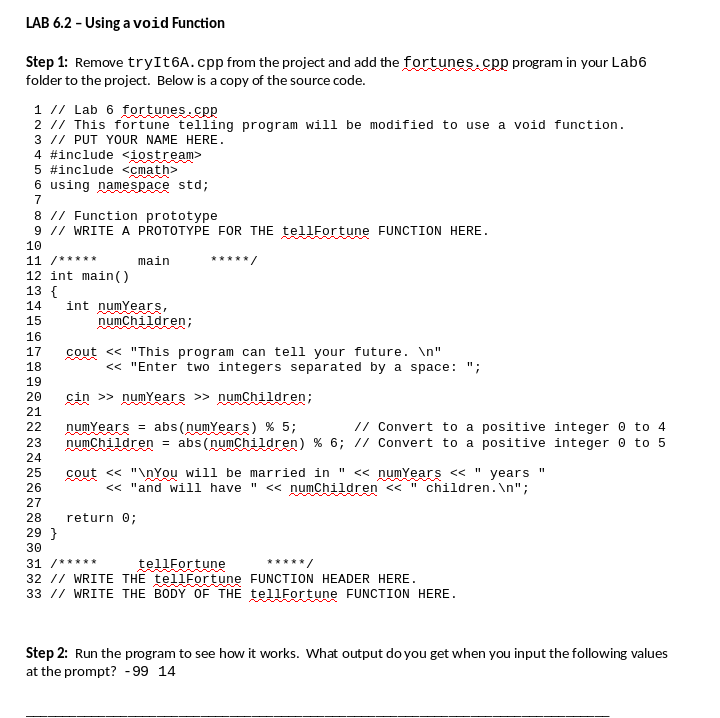
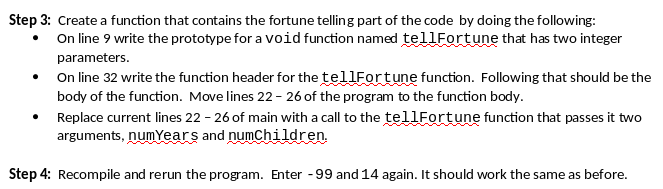
LAB 6.2 - Using a void Function Step 1: Remove tryIt6A.cpp from the project and add the fortunes cpp program in your Lab6 folder to the project. Below is a copy of the source code in you Below i a copy of the 1 // Lab 6 fortunes sp 2 // This fortune telling program will be modified to use a void function. 3 I/ PUT YOUR NAME HERE 4 #include
Step by Step Solution
There are 3 Steps involved in it
1 Expert Approved Answer
Step: 1 Unlock

Question Has Been Solved by an Expert!
Get step-by-step solutions from verified subject matter experts
Step: 2 Unlock
Step: 3 Unlock
 Study Help