







Question: LAB ASSIGNMENT 1 Due: January 2 5 , 1 1 : 5 9 pm . Topics: Create a table with formatted fields. Set up filters
LAB ASSIGNMENT
Due: January : pm
Topics:
Create a table with formatted fields.
Set up filters for a table.
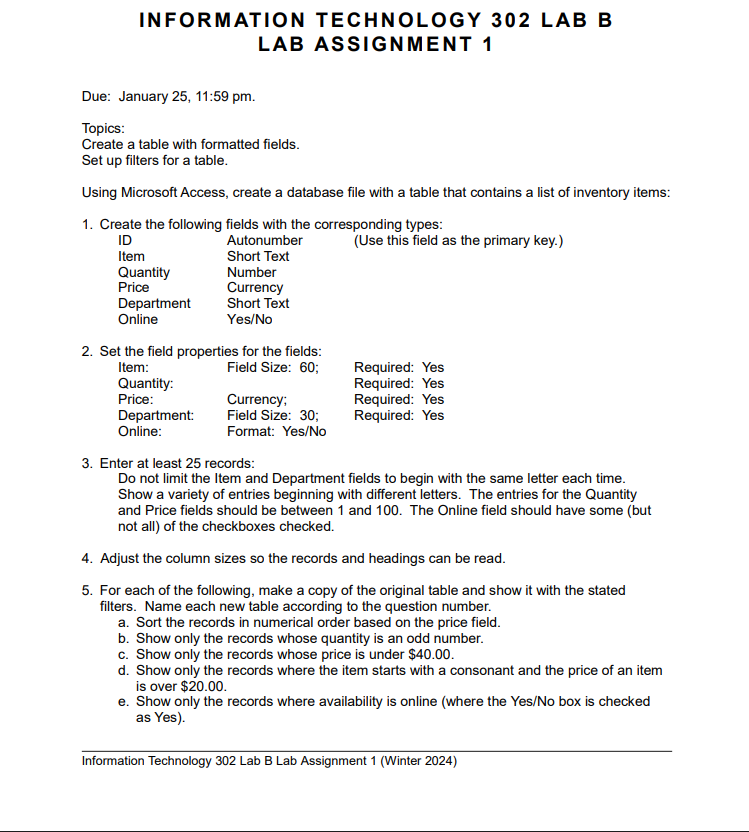
Using Microsoft Access, create a database file with a table that contains a list of inventory items:
Create the following fields with the corresponding types:
Set the field properties for the fields:
Item: Field Size: ;
Quantity:
Price:
Department:
Online:
Currency;
Field Size: ;
Format: YesNo
Required: Yes
Required: Yes
Required: Yes
Required: Yes
Enter at least records:
Do not limit the Item and Department fields to begin with the same letter each time.
Show a variety of entries beginning with different letters. The entries for the Quantity
and Price fields should be between and The Online field should have some but
not all of the checkboxes checked.
Adjust the column sizes so the records and headings can be read.
For each of the following, make a copy of the original table and show it with the stated
filters. Name each new table according to the question number.
a Sort the records in numerical order based on the price field.
b Show only the records whose quantity is an odd number.
c Show only the records whose price is under $
d Show only the records where the item starts with a consonant and the price of an item
is over $
e Show only the records where availability is online where the YesNo box is checked
as Yes
Step by Step Solution
There are 3 Steps involved in it
1 Expert Approved Answer
Step: 1 Unlock

Question Has Been Solved by an Expert!
Get step-by-step solutions from verified subject matter experts
Step: 2 Unlock
Step: 3 Unlock
 Study Help