







Question: Lab - Configuration and OSPF Topology Addressing Table table [ [ Device , Interface,IP Address,Subnet Mask,Default Gateway,Switch Port ] , [ R 1 ,
Lab Configuration and OSPF
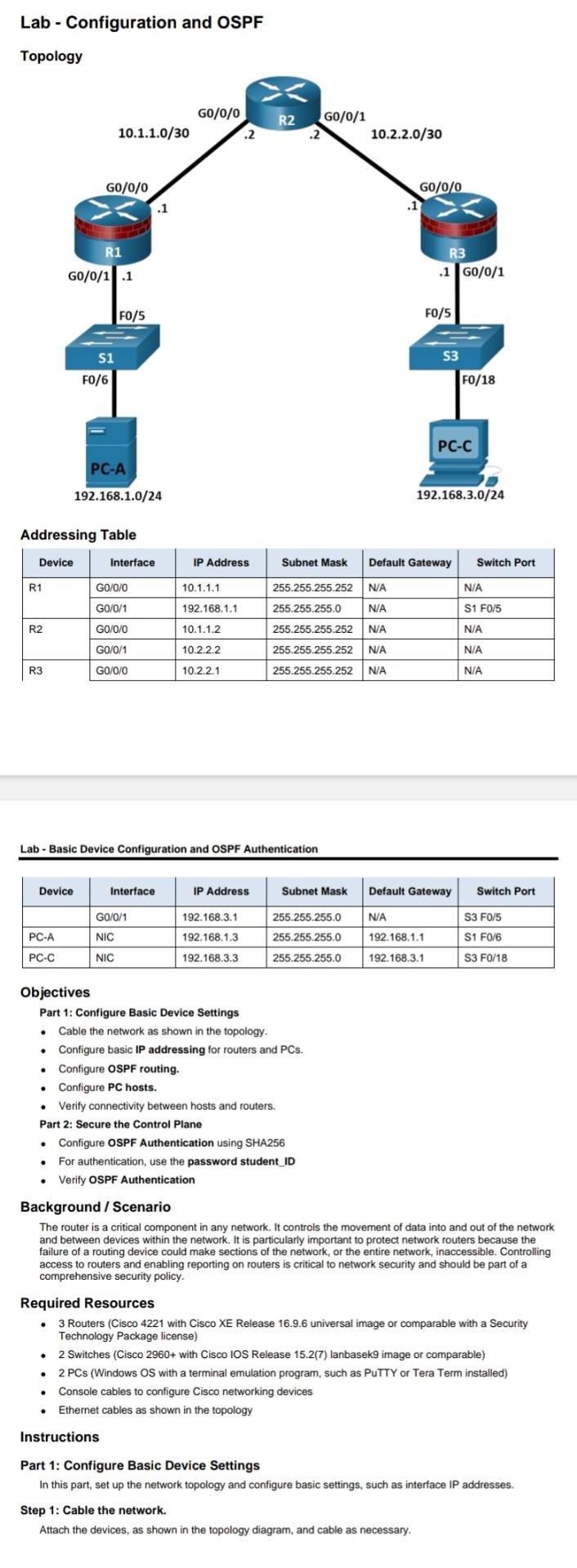
Topology
Addressing Table
tableDeviceInterface,IP Address,Subnet Mask,Default Gateway,Switch PortRGONANAGoNAS FRGONANAGoNANARGoNANA
Lab Basic Device Configuration and OSPF Authentication
tableDeviceInterface,IP Address,Subnet Mask,Default Gateway,Switch PortGONAS FPCANIC,S FPCCNIC,S F
Objectives
Part : Configure Basic Device Settings
Cable the network as shown in the topology,
Configure basic IP addressing for routers and PCs
Configure OSPF routing.
Configure PC hosts.
Verify connectivity between hosts and routers.
Part : Secure the Control Plane
Configure OSPF Authentication using SHA
For authentication, use the password studentID
Verify OSPF Authentication
Background Scenario
The router is a critical component in any network. It controls the movement of data into and out of the network and between devices within the network. It is particularly important to protect network routers because the failure of a routing device could make sections of the network, or the entire network, inaccessible. Controlling access to routers and enabling reporting on routers is critical to network security and should be part of a comprehensive security policy.
Required Resources
Routers Cisco with Cisco XE Release universal image or comparable with a Security Technology Package license
Switches Cisco with Cisco IOS Release lanbasek image or comparable
PCs Windows OS with a terminal emulation program, such as PuTTY or Tera Term installed
Console cables to configure Cisco networking devices
Ethernet cables as shown in the topology
Instructions
Part : Configure Basic Device Settings
In this part, set up the network topology and configure basic settings, such as interface IP addresses.
Step : Cable the network.
Attach the devices, as shown in the topology diagram, and cable as necessary.
Step by Step Solution
There are 3 Steps involved in it
1 Expert Approved Answer
Step: 1 Unlock

Question Has Been Solved by an Expert!
Get step-by-step solutions from verified subject matter experts
Step: 2 Unlock
Step: 3 Unlock
 Study Help