Question: Lab D - AWK 100 lab points possible - 7 graded tasks (Rev. FA 2023) Introduction This lab assignment will assess what you have learned
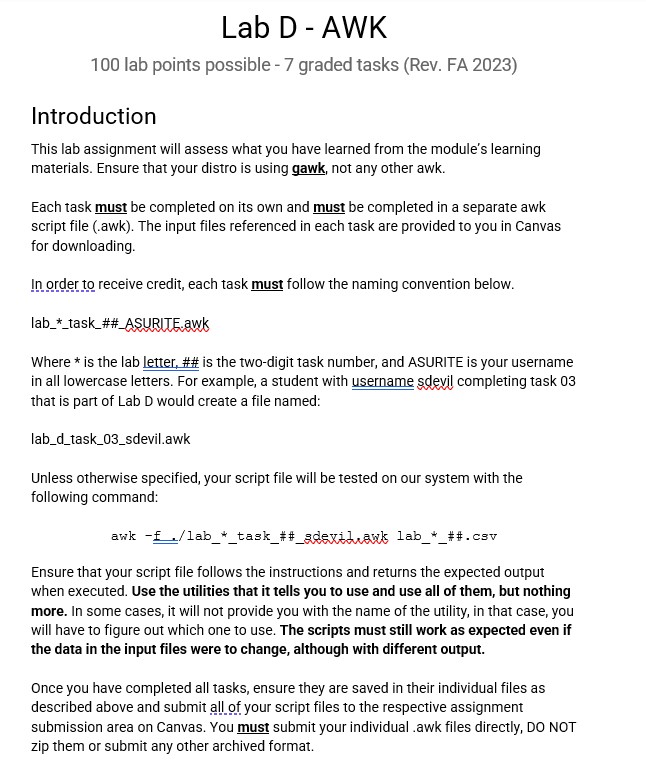
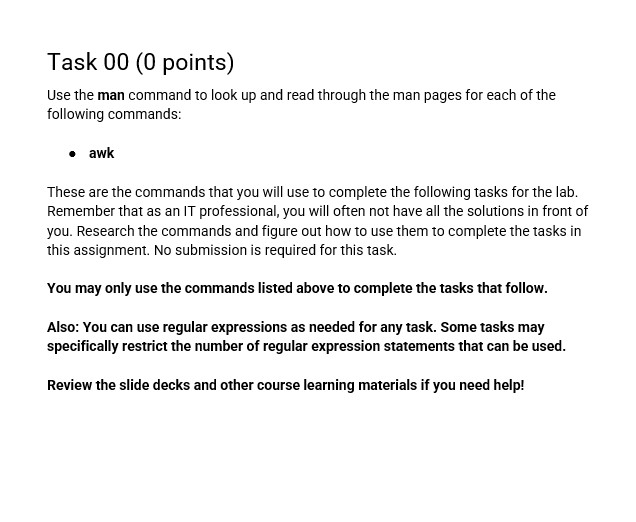
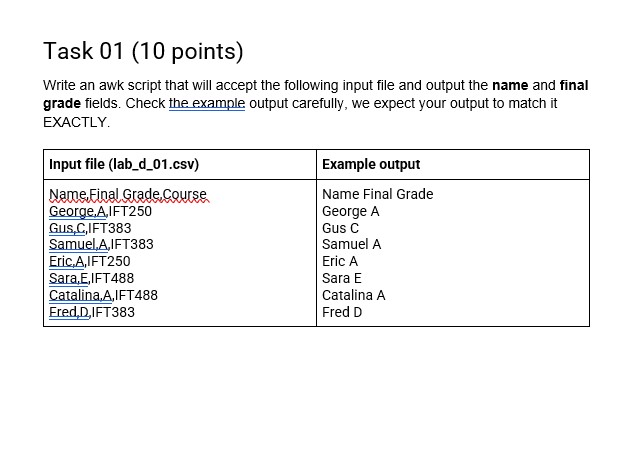
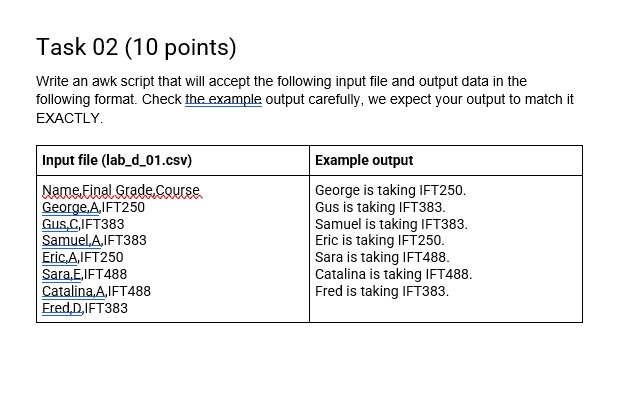
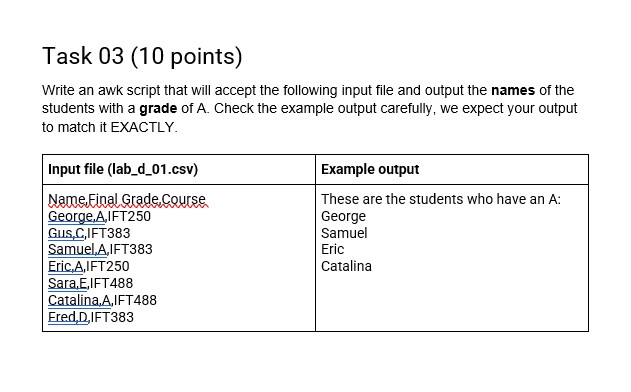
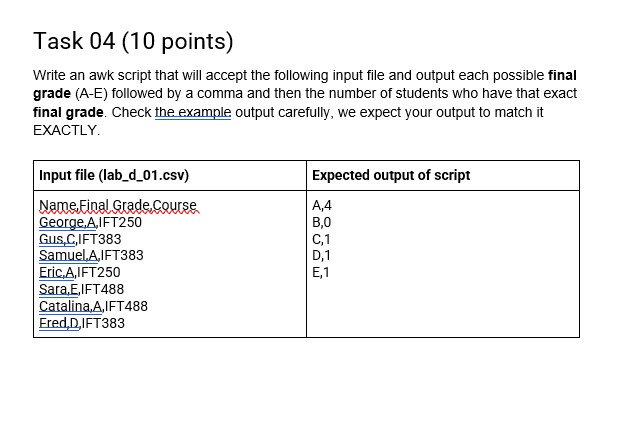
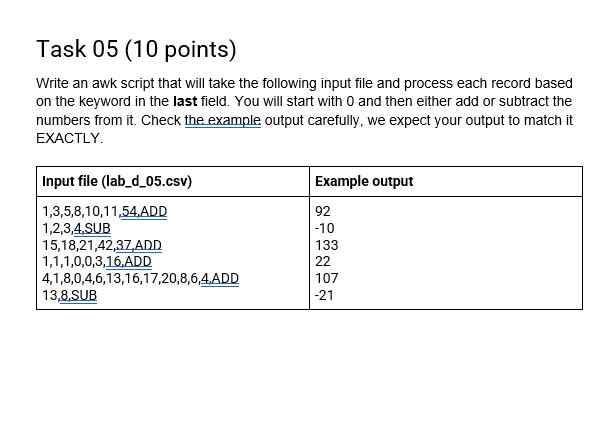
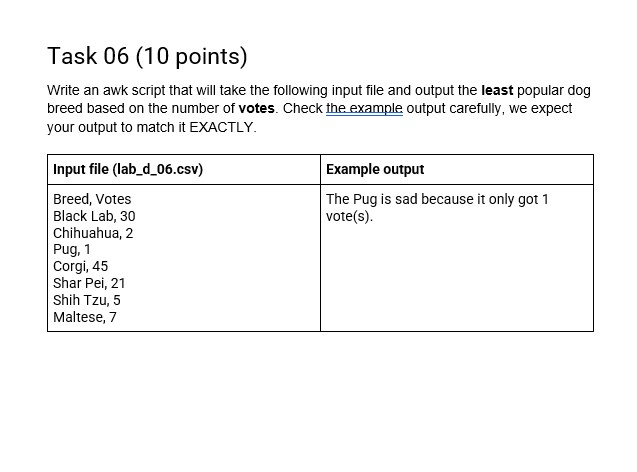
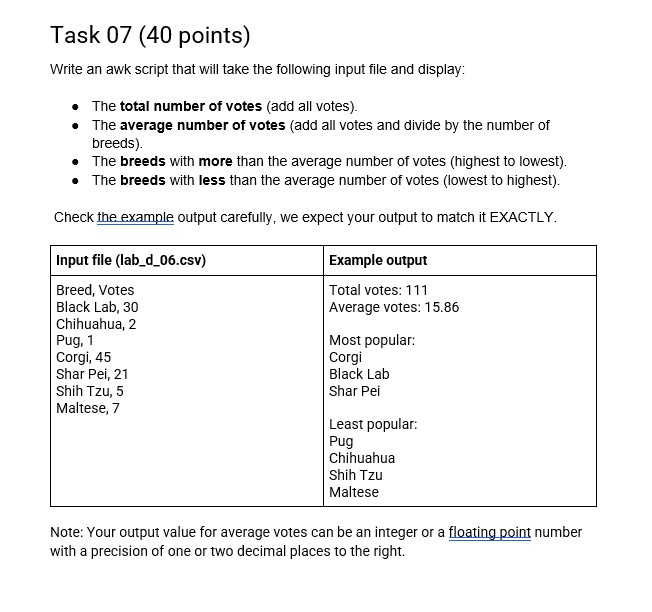
Lab D - AWK 100 lab points possible - 7 graded tasks (Rev. FA 2023) Introduction This lab assignment will assess what you have learned from the module's learning materials. Ensure that your distro is using gawk, not any other awk. Each task must be completed on its own and must be completed in a separate awk script file (awk). The input files referenced in each task are provided to you in Canvas for downloading. lab_*_task_##_ASURITE.awk Where * is the lab letter, ## is the two-digit task number, and ASURITE is your username in all lowercase letters. For example, a student with username sdeyil completing task 03 that is part of Lab D would create a file named: lab_d_task_03_sdevil.awk Unless otherwise specified, your script file will be tested on our system with the following command: awk -_./lab * task_## sdevil,awk lab_*_##.csv Ensure that your script file follows the instructions and returns the expected output when executed. Use the utilities that it tells you to use and use all of them, but nothing more. In some cases, it will not provide you with the name of the utility, in that case, you will have to figure out which one to use. The scripts must still work as expected even if the data in the input files were to change, although with different output. Once you have completed all tasks, ensure they are saved in their individual files as submission area on Canvas. You must submit your individual .awk files directly, DO NOT zip them or submit any other archived format. Task 00 (0 points) Use the man command to look up and read through the man pages for each of the following commands: * awk These are the commands that you will use to complete the following tasks for the lab. Remember that as an IT professional, you will often not have all the solutions in front of you. Research the commands and figure out how to use them to complete the tasks in this assignment. No submission is required for this task. You may only use the commands listed above to complete the tasks that follow. Also: You can use regular expressions as needed for any task. Some tasks may specifically restrict the number of regular expression statements that can be used. Review the slide decks and other course learning materials if you need help! Task 01 (10 points) Write an awk script that will accept the following input file and output the name and final grade fields. Check the example output carefully, we expect your output to match it EXACTLY. Input file (lab_d_01.csv) Example output Name Final Grade Course Name Final Grade George,A, IFT250 George A GUS, C,IFT383 Gus C Samuel,A, IFT383 Samuel A Eric, A,IFT250 Eric A Sara,E,IFT488 Sara E Catalina.A, IFT 488 Catalina A Fred, D,IFT383 Fred DTask 02 (10 points) Write an awk script that will accept the following input file and output data in the following format. Check the example output carefully, we expect your output to match it EXACTLY. Input file (lab_d_01.csv) Example output Name Final Grade Course. George is taking IFT250. George.A,IFT250 Gus is taking IFT383. GUS,C,IFT383 Samuel is taking IFT383. Samuel,A, IFT383 Eric is taking IFT250. Eric A, IFT250 Sara is taking IFT488. Sara,E,IFT 488 Catalina is taking IFT488. Catalina,A, IFT 488 Fred is taking IFT383. Fred, D,IFT383Task 03 (10 points) Write an awk script that will accept the following input file and output the names of the students with a grade of A. Check the example output carefully, we expect your output to match it EXACTLY. Input file (lab_d_01.csv) Example output Name Final Grade Course These are the students who have an A: George,A, IFT250 George GUS, C,IFT383 Samuel Samuel,A, IFT383 Eric Eric,A, IFT250 Catalina Sara,E, IFT 488 Catalina.A, IFT488 Fred, D,IFT383Task 04 (10 points) Write an awk script that will accept the following input file and output each possible final grade (A-E) followed by a comma and then the number of students who have that exact final grade. Check the example output carefully, we expect your output to match it EXACTLY. Input file (lab_d_01.csv) Expected output of script Name Final Grade Course A,4 George.A,IFT250 B,0 GUS, C,IFT383 C,1 Samuel,A, IFT383 D, 1 Eric, A,IFT250 E,1 Sara.E,IFT 488 Catalina,A, IFT488 Fred, D,IFT383Task 05 (10 points) Write an awk script that will take the following input file and process each record based on the keyword in the last field. You will start with 0 and then either add or subtract the numbers from it. Check the example output carefully, we expect your output to match it EXACTLY. Input file (lab_d_05.csv) Example output 1,3,5,8,10,11 54.ADD 92 1,2,3,4 SUB -10 15,18,21,42,37.ADD 133 1,1,1,0,0,3,16,ADD 22 4,1,8,0,4,6,13,16,17,20,8,6,4.ADD 107 13 8,SUB -21Task 06 (10 points) Write an awk script that will take the following input file and output the least popular dog breed based on the number of votes. Check the example output carefully, we expect your output to match it EXACTLY. Input file (lab_d_06.csv) Example output Breed, Votes The Pug is sad because it only got 1 Black Lab, 30 vote(s). Chihuahua, 2 Pug, 1 Corgi, 45 Shar Pei, 21 Shih Tzu, 5 Maltese, 7 Task 07 (40 points) Write an awk script that will take the following input file and display: breeds). The total number of votes (add all votes). The average number of votes (add all votes and divide by the number of The breeds with more than the average number of votes (highest to lowest). The breeds with less than the average number of votes (lowest to highest). Check the example output carefully, we expect your output fo match it EXACTLY. Input file (lab_d_06.csv) Breed, Votes Black Lab, 30 Chihuahua, 2 Pug, 1 Corgi, 45 Shar Pei, 21 Shih Tzu, 5 Maltese, 7 Example output Total votes: 111 Average votes: 15.86 Most popular: Corgi Black Lab Shar Pei Least popular: Pug Chihuahua Shih Tzu Maltese Note: Your output value for average votes can be an integer or a floating point number with a precision of one or two decimal places to the right
Step by Step Solution
There are 3 Steps involved in it
1 Expert Approved Answer
Step: 1 Unlock
Question Has Been Solved by an Expert!
Get step-by-step solutions from verified subject matter experts
Step: 2 Unlock
Step: 3 Unlock
Students Have Also Explored These Related Accounting Questions!









 Study Help