







Question: Lab Description: In this lab, you will learn how to create Swing application. Write the code for a GUI application that has Seven buttons labeled
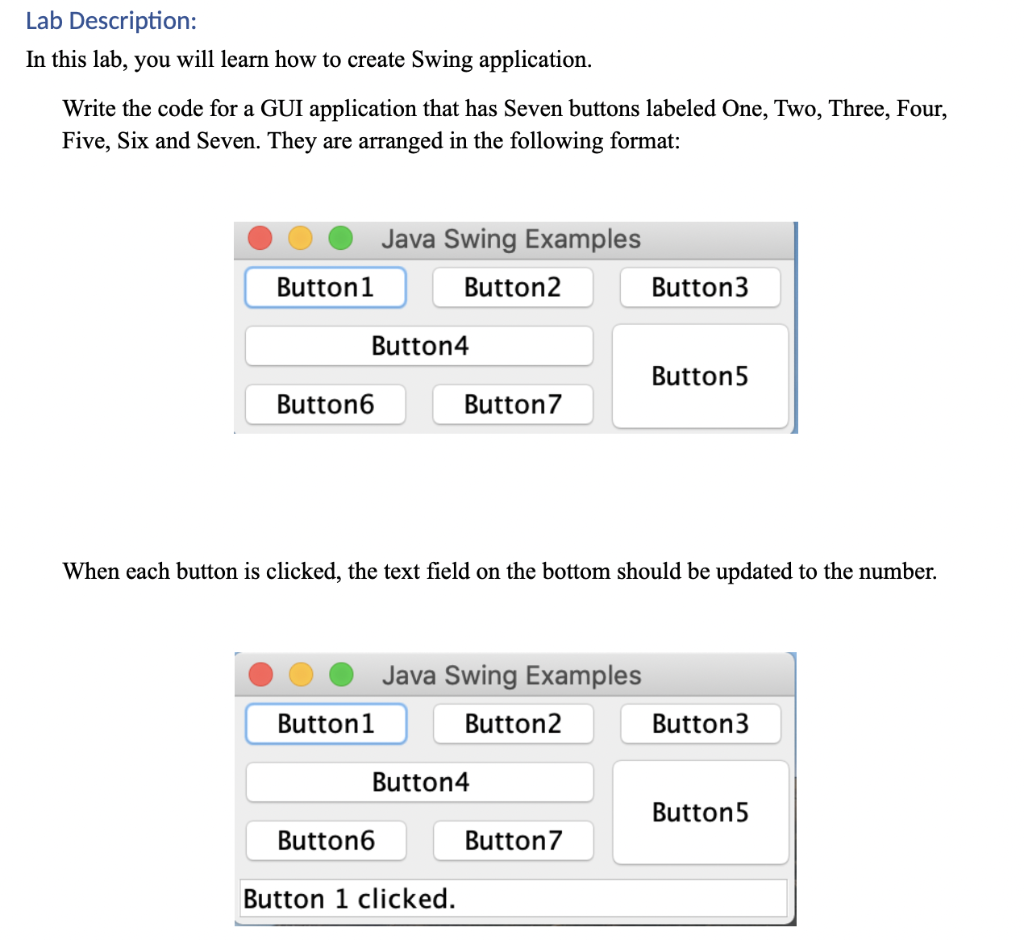

Lab Description: In this lab, you will learn how to create Swing application. Write the code for a GUI application that has Seven buttons labeled One, Two, Three, Four, Five, Six and Seven. They are arranged in the following format: Java Swing Examples Button1 Button2 Button3 Button4 Button5 Buttono Button7 When each button is clicked, the text field on the bottom should be updated to the number. Java Swing Examples Button1 Button2 Button3 Button4 Button5 Button6 Button7 Button 1 clicked. Perform Following: 1. (2 points) Create a Swing project that runs the Swing Frame. 2. (4 points) Create 7 buttons and display them in Swing Frame. 3. (2 points) Change the TextField value according to the button selection
Step by Step Solution
There are 3 Steps involved in it

Get step-by-step solutions from verified subject matter experts
 Study Help