







Question: Lab Description: Using graphics, polygons, and arrays, draw the tree shown below. You can change the tree anyway you like to make it your own.
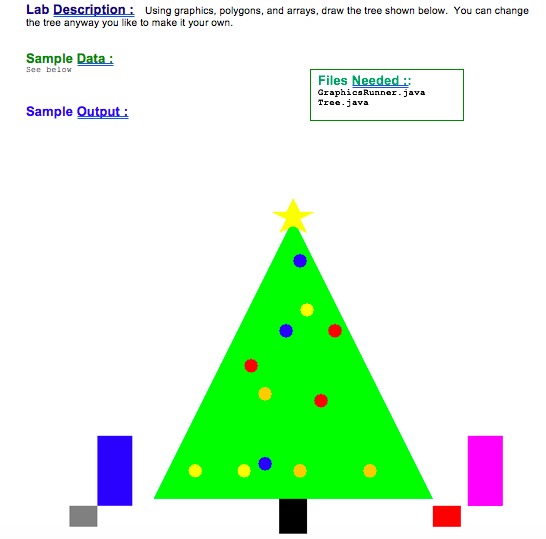
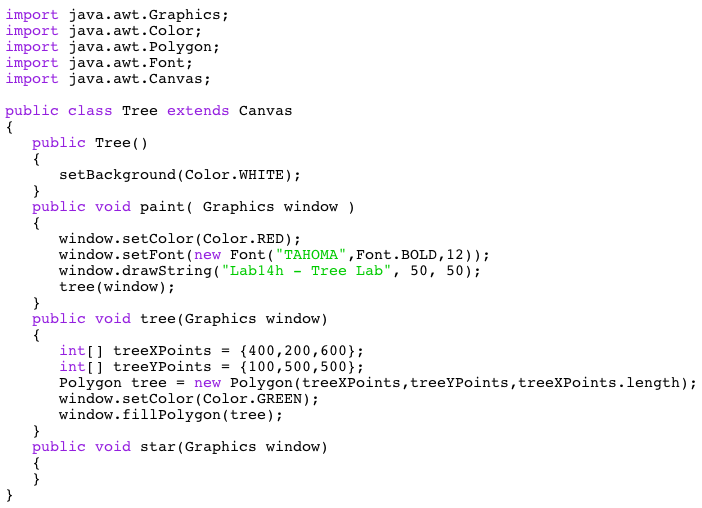
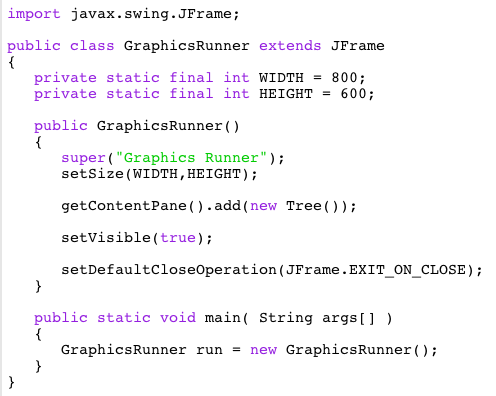
Lab Description: Using graphics, polygons, and arrays, draw the tree shown below. You can change the tree anyway you like to make it your own. Sample Data Sec below Files Needed:: GraphicaRunner.java Tree.java Sample Output: import java.awt.Graphics; import java.awt.color; import java.awt.Polygon; import java.awt.Font; import java.awt.Canvas; public class Tree extends Canvas public Tree() setBackground (Color.WHITE) public void paint ( Graphics window) window. setColor (Color.RED); window.setFont (new Font("TAHOMA" ,Font.BOLD,12) window.drawstring("Lab14h Tree Lab", 50, 50) tree(window); IONaA , Font.BOL.D,12) public void tree(Graphics window) int[] treeXPoints400,200,600 int] treeYPoints-100,500,500; Polygon tree -new Polygon (treeXPoints,treeYPoints,treeXPoints.length) window.setColor (Color. GREEN) window.fillPolygon (tree) nev Polygos(treeointa, trePointa,treexPointa.length), public void star (Graphics window) import javax.swing. JFrame; public class GraphicsRunner extends JFrame private static final int WIDTH = 800; private static fina int HEIGHT = 600; public GraphicsRunner() super ("Graphics Runner" setSize (WIDTH, HEIGHT) ; getcontentPane().add(new Tree)) setVisible(true); setDefaultcloseoperation (JFrame.EXIT_ON CLOSE); public static void main( String args) GraphicsRunner run - new GraphicsRunner
Step by Step Solution
There are 3 Steps involved in it

Get step-by-step solutions from verified subject matter experts
 Study Help