







Question: Lab Exercise 1: Modify the following C code to display the letters HELP on the 7-segment displays on the Dragon 12-Plus microcontroller board. Explain your
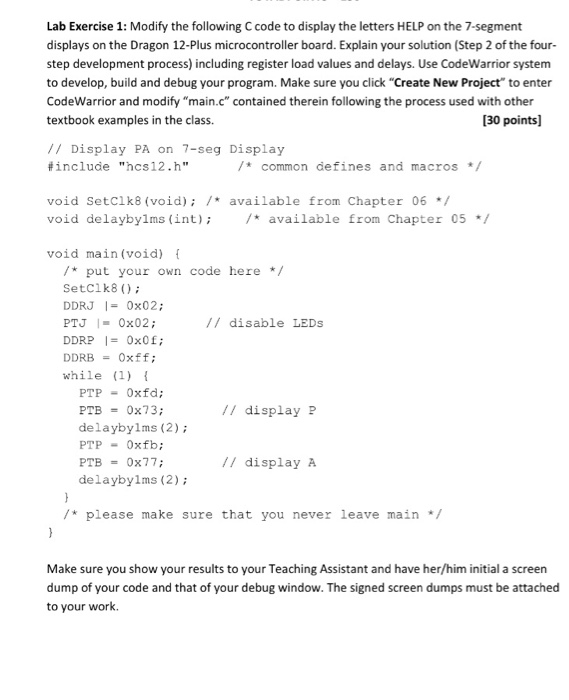
Lab Exercise 1: Modify the following C code to display the letters HELP on the 7-segment displays on the Dragon 12-Plus microcontroller board. Explain your solution (Step 2 of the four- step development process) including register load values and delays. Use CodeWarrior system to develop, build and debug your program. Make sure you click "Create New Project" to enter CodeWarrior and modify "main.c" contained therein following the process used with other textbook examples in the class. [30 points] // Display PA on 7-seg Display #include "hcs12.h" /*common defines and macros / void SetClk8 (void); /available from Chapter 06 / void delaybylms (int) /t available from Chapter 05 void main(void) /* put your own code here / SetClk8); DDRJ | = 0x02; PTJ I- 0x02; DDRP0x0f DDRBOxff; while (1) // disable LEDs PTP-0xfd; PTB 0x73; delaybylms (2); ???- 0xfb; /I display P // display A delayby1ms (2) /* please make sure that you never leave main */ Make sure you show your results to your Teaching Assistant and have her/him initial a screen dump of your code and that of your debug window. The signed screen dumps must be attached to your work
Step by Step Solution
There are 3 Steps involved in it

Get step-by-step solutions from verified subject matter experts
 Study Help