







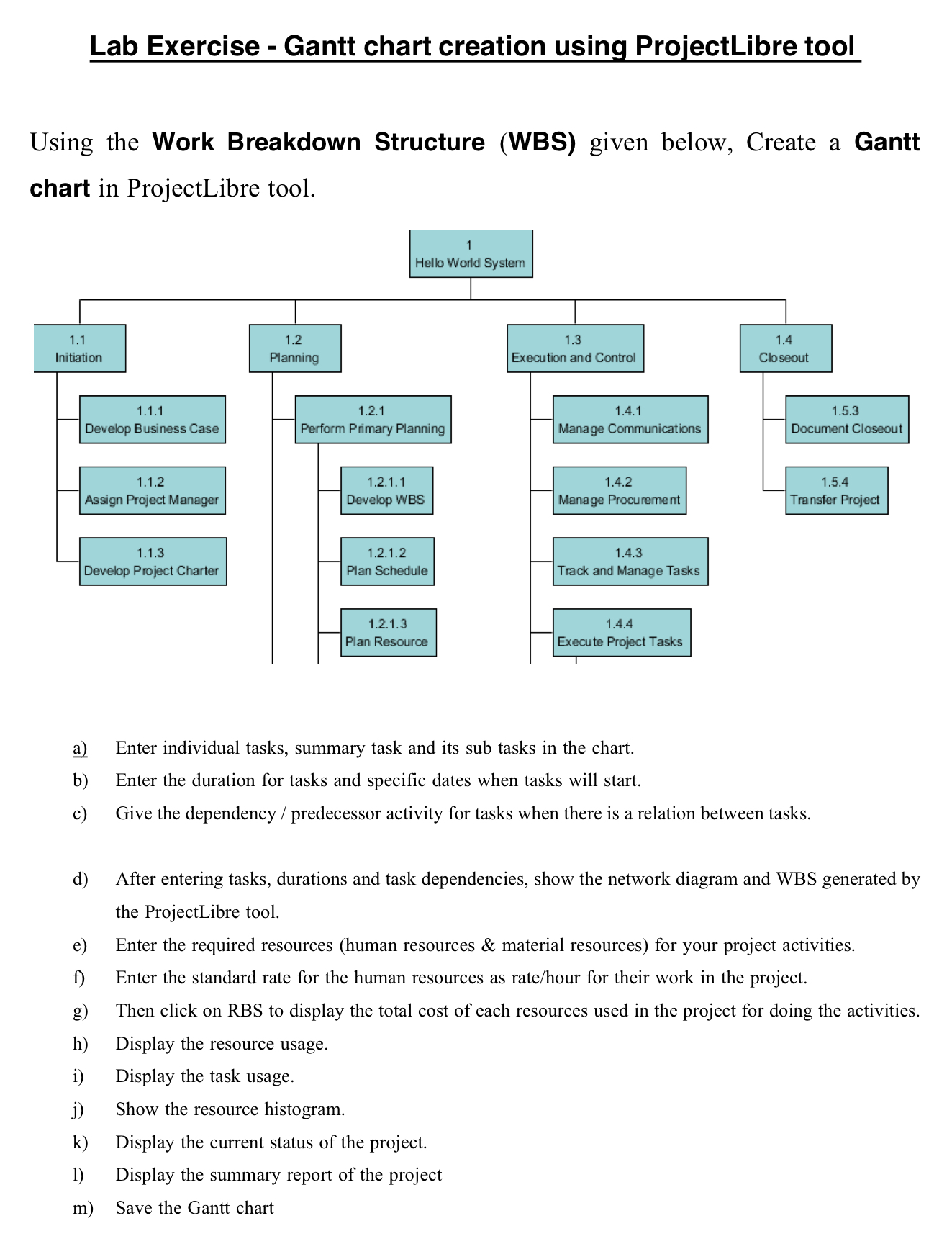
Question: Lab Exercise - Gantt chart creation using ProjectLibre tool Using the Work Breakdown Structure ( WBS ) given below, Create a Gantt chart in ProjectLibre
Lab Exercise Gantt chart creation using ProjectLibre tool
Using the Work Breakdown Structure WBS given below, Create a Gantt
chart in ProjectLibre tool.
a Enter individual tasks, summary task and its sub tasks in the chart.
b Enter the duration for tasks and specific dates when tasks will start.
c Give the dependency predecessor activity for tasks when there is a relation between tasks.
d After entering tasks, durations and task dependencies, show the network diagram and WBS generated by
the ProjectLibre tool.
e Enter the required resources human resources & material resources for your project activities.
f Enter the standard rate for the human resources as ratehour for their work in the project.
g Then click on RBS to display the total cost of each resources used in the project for doing the activities.
h Display the resource usage.
i Display the task usage.
j Show the resource histogram.
k Display the current status of the project.
Display the summary report of the project
m Save the Gantt chart
Step by Step Solution
There are 3 Steps involved in it
1 Expert Approved Answer
Step: 1 Unlock

Question Has Been Solved by an Expert!
Get step-by-step solutions from verified subject matter experts
Step: 2 Unlock
Step: 3 Unlock
 Study Help