







Question: LAB In this lab you will modify your polymorphism lab so that it uses composition in the employee class to include a Project class as
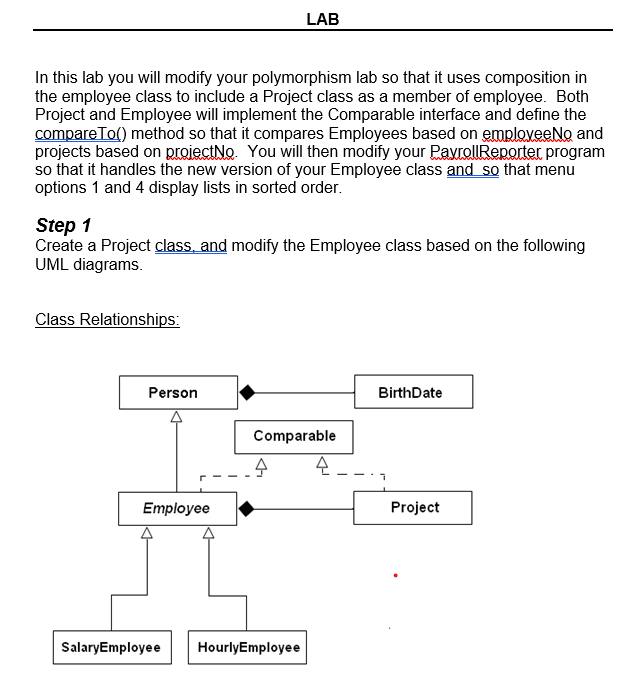
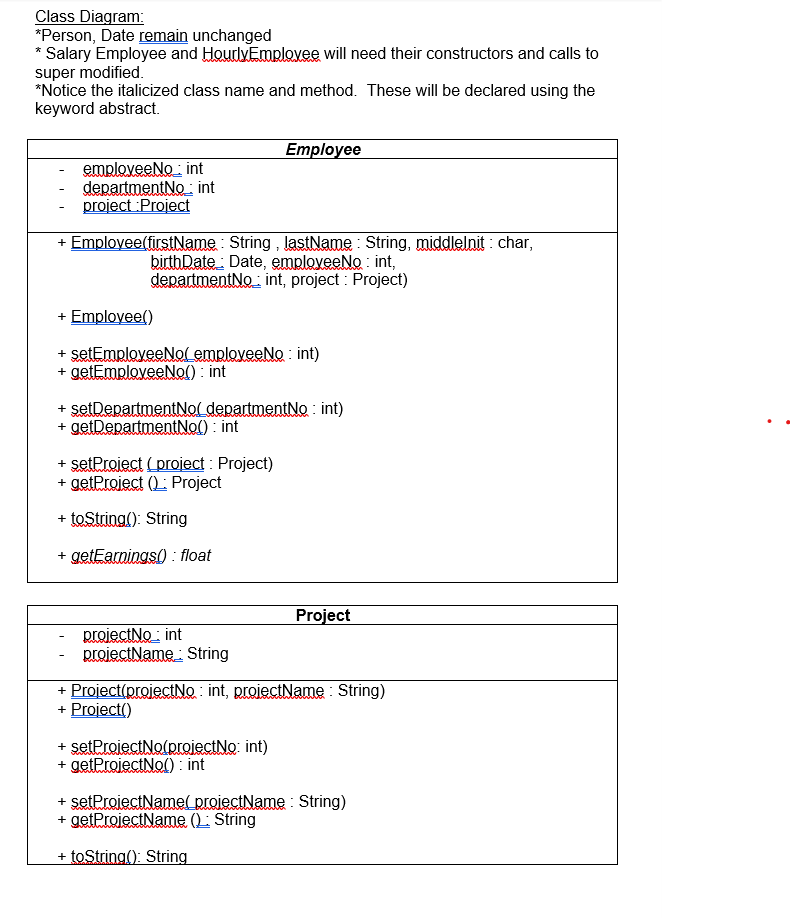
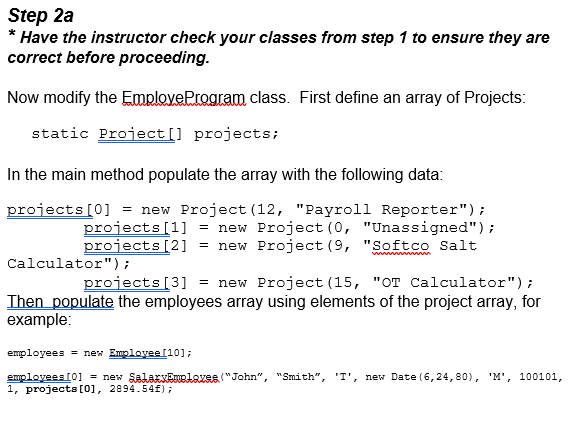
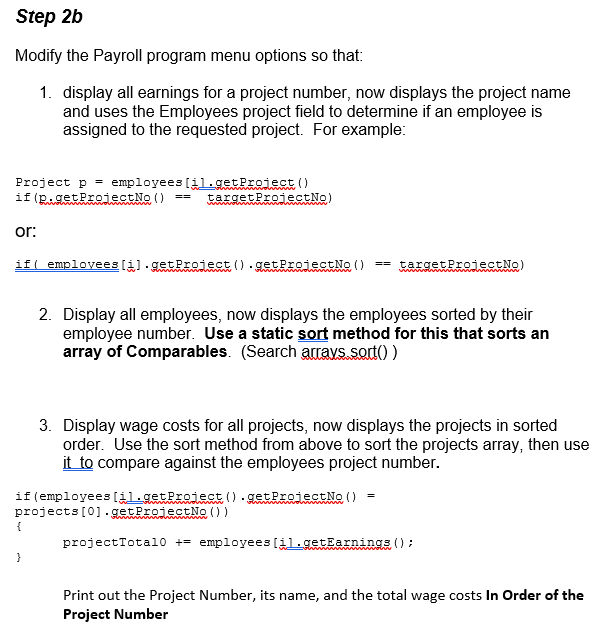
LAB In this lab you will modify your polymorphism lab so that it uses composition in the employee class to include a Project class as a member of employee. Both Project and Employee will implement the Comparable interface and define the compareTo() method so that it compares Employees based on employeeNo and projects based on projectNo. You will then modify your PayrollReporter program so that it handles the new version of your Employee class and so that menu options 1 and 4 display lists in sorted order. Step 1 Create a Project class, and modify the Employee class based on the following UML diagrams. Class Relationships: Person BirthDate Comparable 4 Employee Project SalaryEmployee HourlyEmployee Class Diagram: *Person, Date remain unchanged * Salary Employee and HourlyEmployee will need their constructors and calls to super modified *Notice the italicized class name and method. These will be declared using the keyword abstract Employee employeeNo: int departmentNo: int project Project + Employee(firstName : String , lastName : String, middlelnit : char, birthDate : Date, employeeNo: int, departmentNo: int, project : Project) + Employee) + setEmployee Nol employeeNo : int) + getEmployeeNol): int + setDepartment Nol departmentNo: int) + getDepartmentNod) : int + setProject (project : Project) + getProject Project + toString(): String +getEarnings) : float Project projectNo: int proiectName_ String + Project(projectNo: int, proiectName : String) + Project) + setProjectNo(proiectNo: int) + getProiectNel): int + setProjectNamel_projectName : String) + getProiectName (L: String + toString(): String Step 2a * Have the instructor check your classes from step 1 to ensure they are correct before proceeding. Now modify the Emplove Program class. First define an array of Projects: static Project[] projects; In the main method populate the array with the following data: projects[0] = new Project (12, "Payroll Reporter"); projects[1] new Project(0, "Unassigned"); projects [2] = new Project (9, "Softco Salt Calculator"); projects [3] = new Project (15, "OT Calculator"); Then populate the employees array using elements of the project array, for example: employees = new Employee [10]; employees [0] = new Sada sentaxes ("John", "Smith", 1, projects[0], 2894.54f); 'T', new Date(6,24,80), 'M', 100101, Step 2b Modify the Payroll program menu options so that: 1. display all earnings for a project number, now displays the project name and uses the Employees project field to determine if an employee is assigned to the requested project. For example: Project p = employees [il.getProiect() if(RigetProjectN() == targetProjectNo) or: if( employees 11).getProject().getProject No () == targetProjectNo) 2. Display all employees, now displays the employees sorted by their employee number. Use a static sort method for this that sorts an array of Comparables. (Search accays.sorto) 3. Display wage costs for all projects, now displays the projects in sorted order. Use the sort method from above to sort the projects array, then use it to compare against the employees project number. if (employees [il.getProiect().getProjectNo() projects[0].getProjectNo()) { projectTotalo += employees [il.getEarnings (); } Print out the Project Number, its name, and the total wage costs In Order of the Project Number LAB In this lab you will modify your polymorphism lab so that it uses composition in the employee class to include a Project class as a member of employee. Both Project and Employee will implement the Comparable interface and define the compareTo() method so that it compares Employees based on employeeNo and projects based on projectNo. You will then modify your PayrollReporter program so that it handles the new version of your Employee class and so that menu options 1 and 4 display lists in sorted order. Step 1 Create a Project class, and modify the Employee class based on the following UML diagrams. Class Relationships: Person BirthDate Comparable 4 Employee Project SalaryEmployee HourlyEmployee Class Diagram: *Person, Date remain unchanged * Salary Employee and HourlyEmployee will need their constructors and calls to super modified *Notice the italicized class name and method. These will be declared using the keyword abstract Employee employeeNo: int departmentNo: int project Project + Employee(firstName : String , lastName : String, middlelnit : char, birthDate : Date, employeeNo: int, departmentNo: int, project : Project) + Employee) + setEmployee Nol employeeNo : int) + getEmployeeNol): int + setDepartment Nol departmentNo: int) + getDepartmentNod) : int + setProject (project : Project) + getProject Project + toString(): String +getEarnings) : float Project projectNo: int proiectName_ String + Project(projectNo: int, proiectName : String) + Project) + setProjectNo(proiectNo: int) + getProiectNel): int + setProjectNamel_projectName : String) + getProiectName (L: String + toString(): String Step 2a * Have the instructor check your classes from step 1 to ensure they are correct before proceeding. Now modify the Emplove Program class. First define an array of Projects: static Project[] projects; In the main method populate the array with the following data: projects[0] = new Project (12, "Payroll Reporter"); projects[1] new Project(0, "Unassigned"); projects [2] = new Project (9, "Softco Salt Calculator"); projects [3] = new Project (15, "OT Calculator"); Then populate the employees array using elements of the project array, for example: employees = new Employee [10]; employees [0] = new Sada sentaxes ("John", "Smith", 1, projects[0], 2894.54f); 'T', new Date(6,24,80), 'M', 100101, Step 2b Modify the Payroll program menu options so that: 1. display all earnings for a project number, now displays the project name and uses the Employees project field to determine if an employee is assigned to the requested project. For example: Project p = employees [il.getProiect() if(RigetProjectN() == targetProjectNo) or: if( employees 11).getProject().getProject No () == targetProjectNo) 2. Display all employees, now displays the employees sorted by their employee number. Use a static sort method for this that sorts an array of Comparables. (Search accays.sorto) 3. Display wage costs for all projects, now displays the projects in sorted order. Use the sort method from above to sort the projects array, then use it to compare against the employees project number. if (employees [il.getProiect().getProjectNo() projects[0].getProjectNo()) { projectTotalo += employees [il.getEarnings (); } Print out the Project Number, its name, and the total wage costs In Order of the Project Number
Step by Step Solution
There are 3 Steps involved in it

Get step-by-step solutions from verified subject matter experts
 Study Help